Scrumbuiss vs Jira for software teams and IT operations
A dated buyer guide for software teams and IT operations comparing Scrumbuiss with Jira across sprint planning, workload, ITSM, reporting, and tool sprawl reduction.
Szukasz alternatywy dla Jira ? Ta strona to praktyczny przewodnik oceny. Dokładne szczegóły planów sprawdź na stronach dostawców. Wszystkie nazwy produktów są znakami towarowymi ich właścicieli.
How this comparison was reviewed
Reviewed on March 12, 2026. This guide compares one operating workflow: sprint planning, capacity review, dependency tracking, GitHub-connected delivery, incident/change coordination, and stakeholder reporting.
- Scrumbuiss references come from the live pricing page plus the Project Delivery, ITSM, Sprints, Workload & Capacity, ITSM solution, and GitHub integration pages in this site.
- Jira references come from Atlassian's official Jira pricing and Jira features pages reviewed on March 12, 2026.
- The goal is not to score every checkbox. It is to help software teams and IT operations leaders test whether their weekly operating workflow fits better in Scrumbuiss or in a Jira-centered stack.
Szybkie dopasowanie
Szybki sposób, aby zdecydować, które narzędzie lepiej pasuje do Twojego workflow.
Wybierz Scrumbuiss, jeśli
- ✓ Software teams that want sprint planning, workload review, timelines, and reporting in one operating layer.
- ✓ Teams that need delivery work and IT operations to stay connected without sending incidents, changes, and status updates across separate systems.
- ✓ Leads who want simpler setup, clearer stakeholder reporting, and less admin overhead than a heavily customized Jira stack.
Wybierz Jira , jeśli
- ✓ Engineering organizations already standardized on Jira with mature admins, workflows, and marketplace extensions.
- ✓ Teams whose primary need is deep issue tracking inside an established Atlassian environment.
- ✓ Large programs willing to invest in configuration and governance to tailor Jira across many squads.

Decision matrix
Pick the buyer profile that matches the workflow pressure your team feels every week.
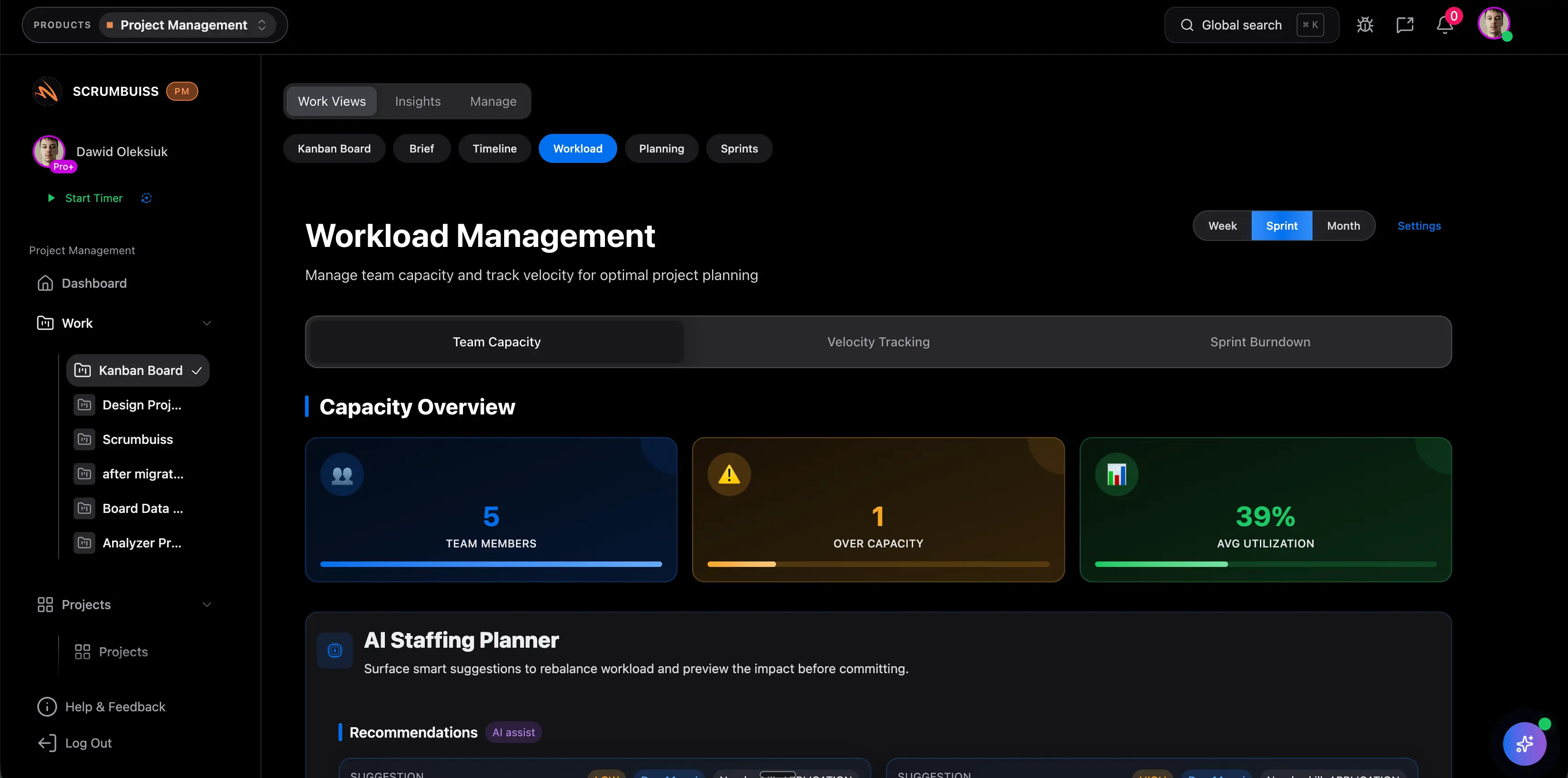
Replacing Jira plus separate planning tools
Use this lens when Jira already tracks engineering work, but capacity planning, timeline review, or stakeholder reporting still happen somewhere else.
Strong fit if
- Sprint commitments are made in Jira, but workload or dependency review happens in spreadsheets or side dashboards.
- Engineering leads rebuild planning context before every sprint or release checkpoint.
- Stakeholders need delivery visibility that is easier to follow than issue-level reporting alone.

Combining software delivery and IT operations
This is the strongest fit when releases, incidents, changes, and follow-up work keep crossing between product delivery and operational teams.
Strong fit if
- Delivery teams and operations teams lose context when incidents or changes need product follow-up.
- The organization wants one place to coordinate sprint work, change schedules, and release risk.
- Operational reporting matters just as much as engineering issue tracking.

Reducing admin overhead around a Jira-centered stack
Choose this profile when Jira is one important layer in the workflow, but the real friction is the amount of governance and maintenance needed to keep everything consistent.
Strong fit if
- Boards, custom fields, permissions, and conventions require steady admin attention.
- New teams take too long to inherit the same workflow and reporting standard.
- The business wants a usable operating model faster instead of another configuration project.
W skrócie
Szybkie podsumowanie najczęstszych kryteriów oceny.
| Kategoria | Scrumbuiss | Jira |
|---|---|---|
| Sprint planning | Sprints, backlog structure, planning poker, and capacity review sit inside a guided delivery workflow. | Jira supports sprint and backlog management; teams should verify how much board, field, and workflow administration is needed to keep planning consistent across squads. |
| Workload & capacity | Workload and capacity views help leads rebalance commitments before a sprint or milestone slips. | Jira is strong for issue tracking and sprint execution, but teams should validate whether workload planning lives natively, through Atlassian add-ons, or in adjacent tools. |
| Dependencies and timelines | Gantt timelines, dependencies, and milestone visibility are part of the same delivery workflow used day to day. | Jira roadmaps and planning views are powerful, but teams should test how dependency management, reporting, and cross-team timeline visibility behave in their exact setup. |
| IT operations and change coordination | Incidents, changes, schedules, and delivery work can stay in one environment through the ITSM product and related workflows. | Jira often expands into a broader Atlassian stack for service management and operations. Verify how much context stays shared between software delivery and operational work. |
| Reporting for non-engineering stakeholders | Dashboards, briefs, and activity views are easier for PMs, ops leads, and managers who do not live inside issue trackers all day. | Jira reports and dashboards are strong for engineering teams, but stakeholder-friendly reporting often depends on conventions, dashboard design, and admin upkeep. |
| Tool sprawl and adjacent workflows | Project delivery, IT operations, time tracking, files, CRM, and risk workflows live in one product suite. | Jira often becomes one layer in a broader stack alongside docs, service management, time tracking, and other extensions. |
| Pricing model | 14-day full-product trial, then Team ($9 monthly / $7 annual) or Business ($17 monthly / $14 annual) per full member. Guests and viewers are free. | Atlassian publishes Jira Free for up to 10 users, plus Standard, Premium, and Enterprise tiers with seat-count pricing and annual billing options. Recheck the calculator for your exact team size and billing cycle. |
Kluczowe różnice
Gdzie zespoły zwykle odczuwają największą różnicę na co dzień.
Delivery planning stays closer to execution
Scrumbuiss connects sprint planning, workload review, timelines, and reporting inside the same delivery workflow. That matters when teams want planning decisions to stay visible after the sprint starts, not spread across separate boards and planning layers.
IT operations is treated as part of the operating system
If the same organization coordinates releases, incidents, changes, and follow-up work, Scrumbuiss can keep that in one environment through its ITSM product. Jira is often part of a broader Atlassian setup, so teams should test how much cross-context handoff they still manage manually.
Lower governance overhead is part of the value proposition
Jira can be exceptionally powerful, but that power usually comes with workflow design, field hygiene, permissions, and ongoing administration. Scrumbuiss is stronger when the team wants a usable operating model faster and prefers less long-term configuration ownership.
Stakeholder reporting is designed for mixed audiences
Scrumbuiss emphasizes dashboards, brief-style context, and product-level visibility that engineering and non-engineering stakeholders can follow together. That reduces the need to translate issue-tracker detail into separate weekly status artifacts.
GitHub-connected delivery does not have to stop at issue tracking
Teams using GitHub still need sprint, timeline, and status coordination around the code. Scrumbuiss positions the GitHub integration as one input into a wider delivery workflow rather than the center of the operating model.
Pricing should be measured as stack cost, not only seat cost
For software teams and IT operations, the real decision is whether Jira remains a strong core plus surrounding tools, or whether one product suite reduces enough reporting, admin, and tool-switching overhead to justify a simpler stack.
Lista kontrolna oceny
Użyj tej listy, aby porównać narzędzia wewnętrznie z zespołem.
- ✓ Are we mostly optimizing for issue tracking, or for the full delivery operating model around it?
- ✓ Do sprint planning, capacity review, and timeline visibility need to stay connected in one workflow?
- ✓ Do software delivery and IT operations need to share context for incidents, changes, and follow-up work?
- ✓ How much Jira admin and workflow governance do we want to own long-term?
- ✓ Which GitHub, stakeholder reporting, and cross-team visibility requirements are non-negotiable?
Przykłady workflow
Konkretne scenariusze, które możesz odtworzyć w trialu, aby zweryfikować dopasowanie.
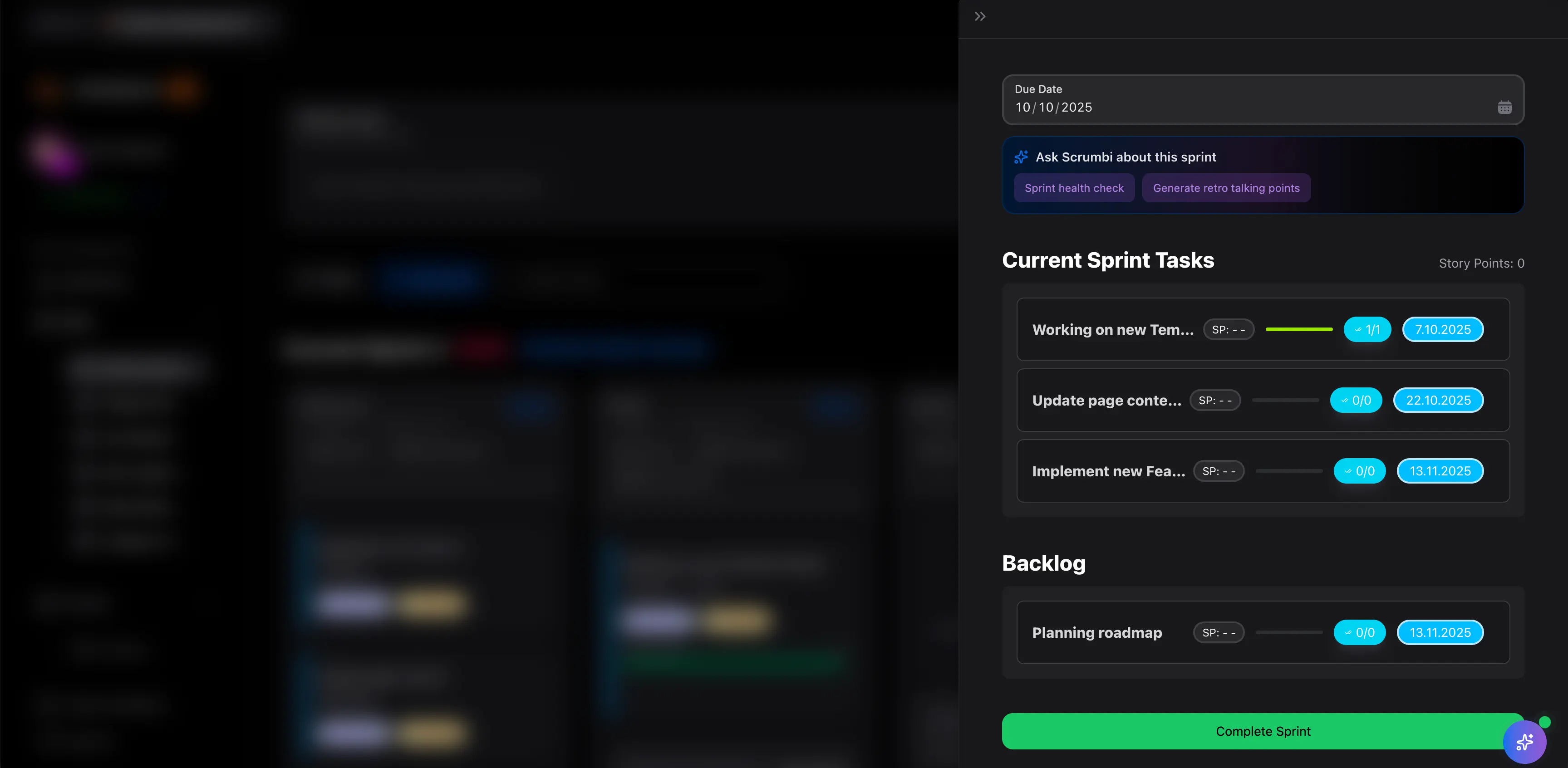
Sprint planning with capacity and dependency review
Run a sprint planning cycle that turns backlog decisions into realistic commitments before engineering work starts.
- Pull the next sprint candidate work into one planning view with owners, estimates, and blockers.
- Review workload and capacity before commitments, not after the sprint slips.
- Check dependencies and timeline risk while scope is still negotiable.
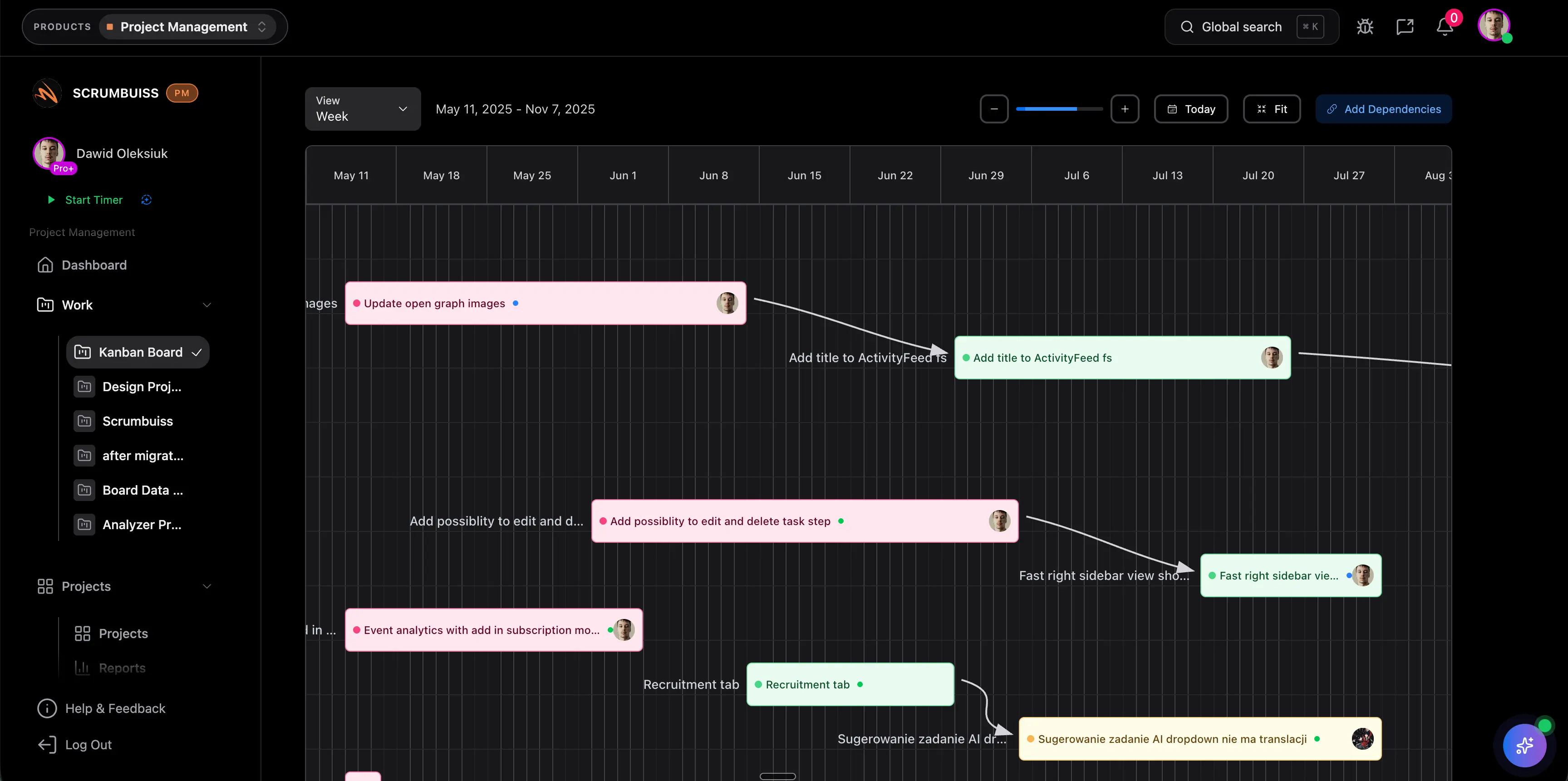
Delivery timeline management across squads
Keep milestones, dependencies, and engineering updates connected when several teams share a delivery plan.
- Build a shared timeline for milestones, release gates, and dependency checkpoints.
- Connect delivery visibility to GitHub-linked engineering work without making code activity the only reporting layer.
- Use dashboards for weekly cross-team review instead of rebuilding release status by hand.
Incident and change coordination tied to delivery work
Coordinate operational work without losing the connection to releases, owners, and follow-up tasks.
- Capture incidents or planned changes with owners, timing, and impact in the same operating environment.
- Link the operational issue back to the delivery work, release date, or sprint that it affects.
- Use automations and dashboards to keep engineering and IT operations aligned on follow-up work.
Potencjalny wpływ (przykłady)
Poniższe przykłady są poglądowe i zależą od Twojego zespołu, procesu i obciążenia.
Faster sprint re-planning
Capacity and dependency review move closer to the sprint workflow, so teams catch overload earlier.
Less manual status translation
Engineering detail can roll up into stakeholder-friendly reporting without rebuilding updates from issue-level views.
Cleaner release and operational follow-up
Delivery and IT operations teams can coordinate incidents, changes, and follow-up tasks with less context loss.
Published pricing comparison
This section uses the public Scrumbuiss pricing page and the official Atlassian Jira pricing page reviewed on March 12, 2026. Re-check both vendor sites before purchasing.
| Kategoria | Scrumbuiss | Jira |
|---|---|---|
| Free or trial entry | 14-day full-product trial with no card required. | Jira Free supports up to 10 users with 2 GB of storage and Community Support on Atlassian's published pricing page. |
| Lowest published paid plan | Team at $7 annual or $9 monthly per full member. | Jira Standard uses seat-count pricing. Atlassian's published annual pricing starts at $900 per year for 10 users; exact cost changes by team size and billing cycle. |
| Next published paid plan | Business at $14 annual or $17 monthly per full member. | Jira Premium uses seat-count pricing. Atlassian's published annual pricing starts at $1,850 per year for 10 users and adds advanced planning and global automation. |
| Enterprise path | Contact the team if you need a broader rollout model beyond the public plans. | Jira Enterprise is part of Atlassian's published tier lineup; validate annual pricing, governance, and admin requirements directly with Atlassian for your instance design. |
| What software teams should really price | Model one workflow covering sprint planning, workload, GitHub-connected delivery, and incident/change follow-up in one product trial. | Model the full Jira-centered stack cost, including any adjacent planning, reporting, service management, or marketplace tooling needed for your workflow. |
Notes
- Atlassian pricing changes by team size, billing cycle, and tier.
- Enterprise planning should include governance, instance design, and administration effort, not only seat cost.
- Published pricing and packaging can change, so verify the official calculator before purchase.
Uwagi dotyczące cen
Kilka kwestii kosztowych, które zespoły często pomijają podczas oceny.
- Do not compare seat price alone. Include admin ownership, reporting upkeep, and any extra tools needed for workload planning, service management, or stakeholder visibility.
- Price one real software-team workflow and one real operational workflow before deciding.
- Check how much of your current Jira setup depends on conventions, custom fields, boards, or marketplace add-ons that must be recreated and maintained.
- Validate how many people truly need full paid access versus guest, viewer, or operational visibility only.
Plan migracji
Pragmatyczny sposób na zmianę narzędzia bez zakłócania pracy.
- ✓ Select one representative Jira workflow: sprint planning, release coordination, or incident/change follow-up.
- ✓ Inventory the fields, statuses, boards, dashboards, GitHub touchpoints, and reporting outputs that workflow currently depends on.
- ✓ Rebuild that workflow in Scrumbuiss using Project Delivery, workload review, timelines, and ITSM where needed.
- ✓ Define the smallest set of rules your team will maintain: status model, owners, sprint cadence, and escalation path.
- ✓ Pilot for 2 weeks with one software team or one mixed delivery-plus-ops team and compare planning time, reporting effort, and handoff clarity.
- ✓ Expand only after the pilot proves that sprint planning, stakeholder reporting, and operational follow-up all work without recreating old Jira complexity.
Co mówią klienci
Prawdziwe opinie od zespołów korzystających z Scrumbuiss.

Scrumbuiss dziala bardzo plynnie i zmienil sposob, w jaki organizuje oraz realizuje swoje projekty.

Interfejs ulatwia przypisywanie zadan, ustalanie priorytetow i monitorowanie postepu calej pracy.
Więcej na naszej stronie Klientów .
FAQ
Is Scrumbuiss an issue tracker like Jira? +
Scrumbuiss supports delivery workflows, planning, and coordination across software teams and IT operations. If your primary need is deep issue tracking in a very large engineering environment, Jira may still be the better fit. The best approach is to map your real workflow and validate it in a trial.
When is Jira still the better fit? +
Jira is still a strong option when your organization is already standardized on Atlassian tooling, depends on mature admin ownership, or needs the depth of Jira's issue-tracking model and marketplace ecosystem more than a simpler operating workflow.
Is Scrumbuiss a good Jira alternative for software teams? +
Yes, especially when software teams care about sprint planning, capacity review, timelines, stakeholder reporting, and lower workflow overhead in the same environment. It is strongest for teams that want a broader delivery operating system, not only issue tracking.
Can Scrumbuiss also work for IT operations teams? +
Yes. Scrumbuiss includes an ITSM product and related workflows for incidents, changes, scheduling, and follow-up work. That makes it relevant when software delivery and IT operations need to stay connected instead of operating as separate systems.
What should we test in a pilot before migrating? +
Recreate one real operating workflow end to end: sprint planning, capacity review, GitHub-connected delivery, stakeholder reporting, and incident or change follow-up where relevant. Then compare setup effort, reporting friction, and handoff clarity with your current Jira-centered workflow.
Do we need to migrate everything at once? +
No. Many teams start with one software team or one mixed delivery-plus-ops workflow, then expand once the structure, reporting cadence, and operational follow-up all work without recreating the same complexity they wanted to leave behind.