Kunden - Geschichten
Sieh, wie Teams Scrumbuiss für Projektumsetzung, CRM, ITSM, Portfolio-Planung und mehr nutzen.
Kundenfeedback
Echte Zitate von Menschen, die Scrumbuiss nutzen.

Scrumbuiss laeuft sehr reibungslos und hat veraendert, wie ich meine Projekte organisiere und umsetze.

Die Oberflaeche macht es einfach, Aufgaben zuzuweisen, Prioritaeten zu setzen und Fortschritt im Blick zu behalten.
Beispiel-Workflows
Diese Beispiele zeigen, wie Teams Scrumbuiss einsetzen. Es sind keine Kundenzitate.
Software-Teams
Beispiel-WorkflowPlane, setze um und liefere mit Sprints, Kanban, Abhängigkeiten und KI-Unterstützung.
- Sprints + Backlog-Planung
- Kanban-Umsetzung mit klarer Ownership
- Gantt-Abhängigkeiten und Terminplanung

IT-Operations
Beispiel-WorkflowKoordiniere Incidents und Changes mit klarer Ownership, Zeitplänen und Automatisierungen.
- Incident-Triage und Nachverfolgung der Lösung
- Change-Kalender und Terminplanung
- Automations-Trigger und Alerts

Sales-Pipelines
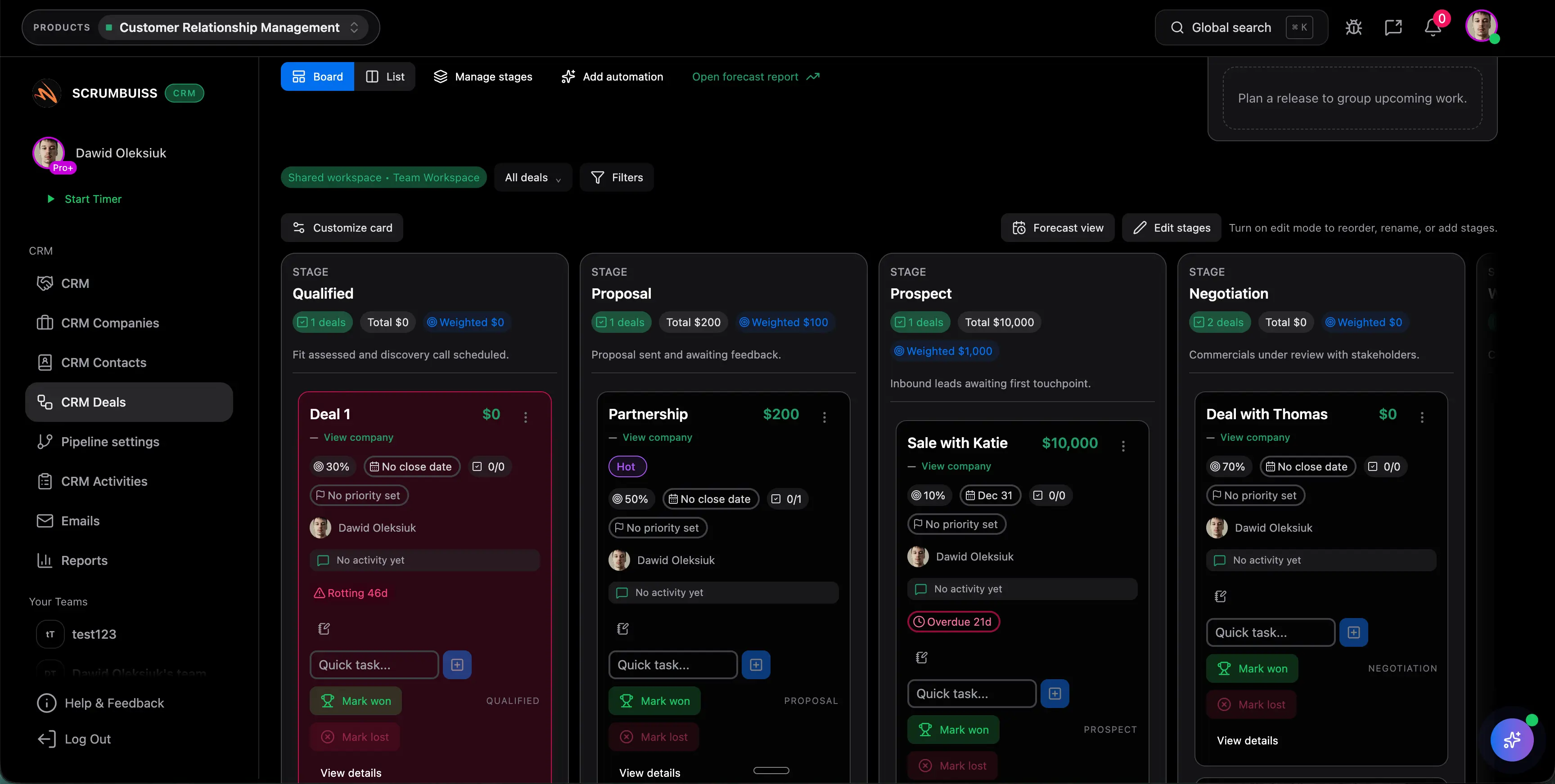
Beispiel-WorkflowVerwalte Deals und Aktivitäten und übergib Arbeit an Delivery, ohne Kontext zu verlieren.
- Kontakte, Unternehmen und Deals an einem Ort
- Pipeline-Phasen und Aktivitäts-Tracking
- E-Mail- + Follow-up-Workflows
Anwendungsfälle
Praktische Workflows, illustriert mit echten Scrumbuiss-Screenshots. Diese Guides helfen dir zu sehen, wie Teams Scrumbuiss nutzen.
Software-Teams
AnwendungsfallPlane, setze um und liefere mit Sprints, Kanban, Abhängigkeiten und KI-Unterstützung.
- Sprints + Backlog-Planung
- Kanban-Umsetzung mit klarer Ownership
- Gantt-Abhängigkeiten und Terminplanung
IT-Operations
AnwendungsfallKoordiniere Incidents und Changes mit klarer Ownership, Zeitplänen und Automatisierungen.
- Incident-Triage und Nachverfolgung der Lösung
- Change-Kalender und Terminplanung
- Automations-Trigger und Alerts
Sales-Pipelines
AnwendungsfallVerwalte Deals und Aktivitäten und übergib Arbeit an Delivery, ohne Kontext zu verlieren.
- Kontakte, Unternehmen und Deals an einem Ort
- Pipeline-Phasen und Aktivitäts-Tracking
- E-Mail- + Follow-up-Workflows
Agenturen
AnwendungsfallOrganisiere Client-Delivery mit Zeiterfassung, Dateien, Roadmaps und klarem Reporting.
- Zeiterfassung mit Dashboards und Reports
- Dateien, Assets und geteilte Collections
- Portfolio-Sichtbarkeit über Kunden hinweg

Möchtest du vorgestellt werden?
Wenn du Scrumbuiss nutzt und deinen Workflow sowie Ergebnisse teilen möchtest, veröffentlichen wir gern eine kurze Fallstudie.
Kontaktiere unsAls Nächstes entdecken
Entdecke weitere Seiten, um die Produkt-Suite, typische Workflows und Vergleichsseiten kennenzulernen.