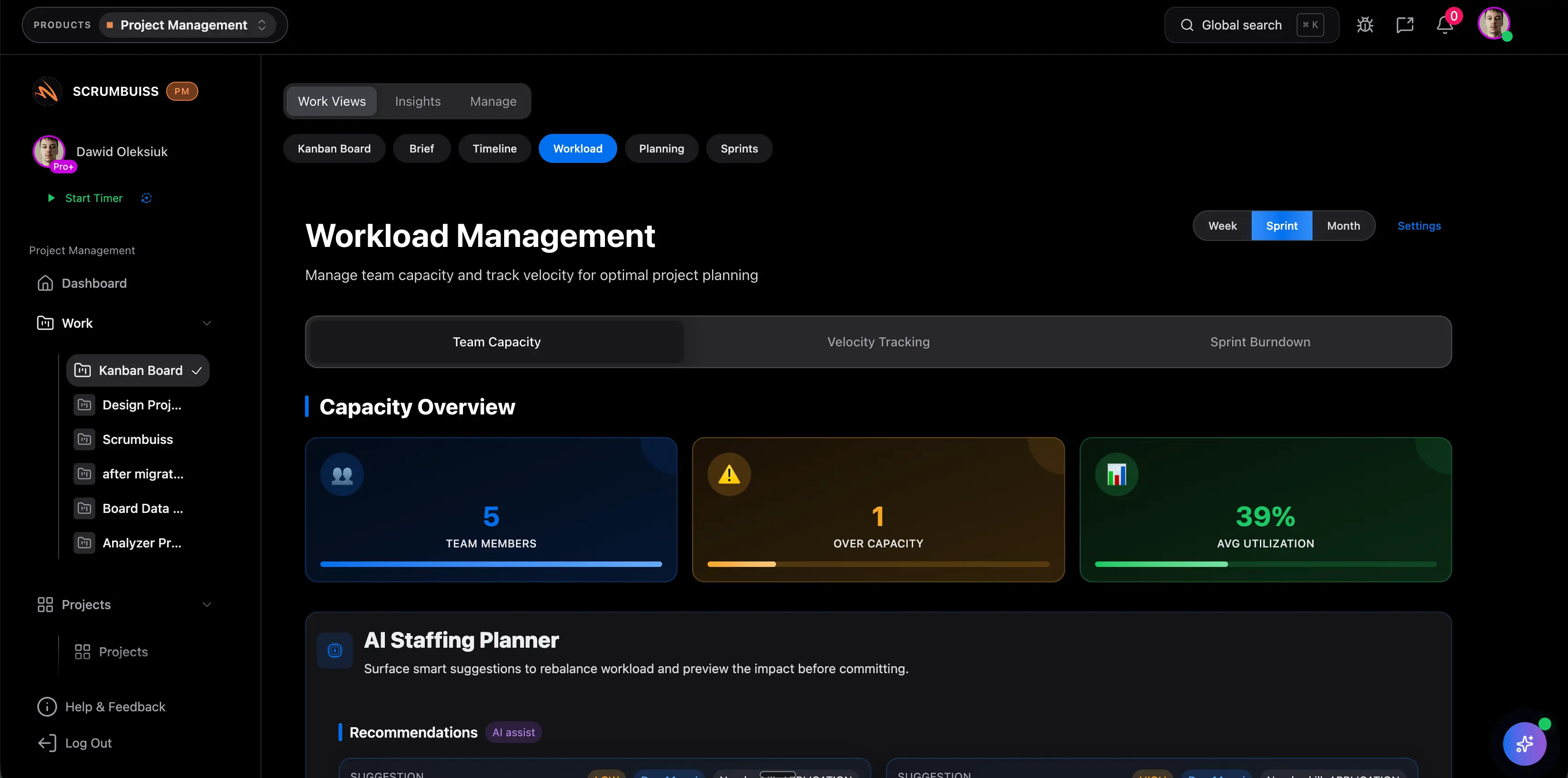
Resource Capacity Planning: Balance Work Before Deadlines Slip
Resource capacity planning helps project teams compare committed work against the time, skills, and availability of the people who will deliver it. It is the part of project management that prevents a plan from looking realistic on a timeline while being impossible for the team assigned to it.
This article targets the practical "resource capacity planning" intent. It is different from the Scrumbuiss Workload & Capacity solution page, which explains the product workflow, and narrower than the project resource management guide, which covers the full resource operating model.
Key Takeaways
- Resource capacity planning compares demand, availability, skill fit, and timing before the team commits to work.
- Capacity should be reviewed before approval, during planning, and during weekly replanning.
- The simplest capacity calculation is available hours minus committed work, adjusted for focus time, meetings, PTO, support load, and review work.
- A good capacity process shows overload early enough to change scope, timing, staffing, or priorities.
What Is Resource Capacity Planning?
Resource capacity planning is the process of checking whether the team has enough available capacity to complete planned work within the required timeframe. It looks at people, roles, skills, calendars, workload, and priority.
At a project level, it answers:
- Who is needed?
- How much time or effort is required?
- When is that effort needed?
- Who is already committed elsewhere?
- Which specialist could become the bottleneck?
- What should change if capacity is not enough?
At a portfolio level, it helps leaders decide which projects can move forward together and which ones should wait.
Capacity Planning vs. Resource Planning
The terms are often used together, but they emphasize different questions.
| Practice | Main question | Example |
|---|---|---|
| Resource planning | Who or what do we need? | Assign a designer, two engineers, and a QA owner |
| Capacity planning | Do we have enough available time and skill? | Check whether those people can take on the work next sprint |
| Workload management | How do we balance active assignments? | Move tasks before one person becomes overloaded |
Teams need all three. Resource planning without capacity review creates optimistic plans. Capacity planning without workload visibility creates spreadsheets no one trusts.
If the question is how to document the resource process for a project, use the resource management plan guide. If the question is how to place assignments on the timeline, use the resource scheduling guide.
A Simple Capacity Formula
Use this baseline:
Available capacity = working hours - fixed commitments - planned absence - focus buffer
Then compare:
Capacity gap = available capacity - planned project demand
Example:
| Item | Hours |
|---|---|
| Weekly working hours | 40 |
| Meetings and recurring admin | -8 |
| Support rotation | -6 |
| Focus buffer for reviews and interruptions | -4 |
| Available project capacity | 22 |
| Planned project work | 30 |
| Capacity gap | -8 |
This person is not "at 75 percent utilization." They are overloaded by eight hours for the project work being planned. The team should change scope, timing, staffing, or priority before the commitment is accepted.
Resource Capacity Planning Steps
1. Define the planning window
Choose the period you are planning: sprint, week, month, release, quarter, or client delivery phase. Short windows help execution teams. Longer windows help portfolio and staffing decisions.
2. List committed work
Include project tasks, support work, reviews, meetings, recurring responsibilities, PTO, and known interruptions. Most teams undercount non-task work, which is why capacity plans look better than reality.
3. Estimate demand by role
Do not estimate only total hours. Break demand by role or skill:
- product
- design
- engineering
- QA
- operations
- customer success
- project management
- stakeholder review
Role-level demand reveals bottlenecks earlier than project totals.
4. Compare demand with availability
Look for overloaded people, overloaded roles, and conflicting dates. Capacity problems often appear in one specialist role, not across the whole team.
5. Decide the tradeoff
If demand exceeds capacity, there are only a few real options:
- reduce scope
- move the date
- add capacity
- defer lower-priority work
- accept risk openly
- split the project into phases
Do not hide the gap by asking the same team to "try."
6. Review every week
Capacity changes as work starts. New blockers, support load, defects, and stakeholder delays can all change the plan. Review capacity in the same rhythm as project status.
Resource Capacity Planning Template
Use this lightweight table before approving a project or sprint.
| Role or person | Available capacity | Planned demand | Gap | Action |
|---|---|---|---|---|
| Product owner | 10h | 8h | +2h | OK |
| Designer | 18h | 26h | -8h | Split design review into two phases |
| Backend engineer | 24h | 20h | +4h | OK |
| Frontend engineer | 22h | 30h | -8h | Move noncritical UI polish |
| QA owner | 16h | 18h | -2h | Add support from engineer during test pass |
The template is useful because it forces a decision. A capacity plan that only shows red cells is not enough.
What To Look For in Resource Capacity Planning Tools
Tools should make the capacity conversation easier, not just prettier.
Look for:
- workload views by person and role
- availability and time-off visibility
- task and project demand in the same place
- timeline or sprint context
- filters for project, client, team, and role
- easy reassignment or rescheduling
- reporting that connects capacity to delivery risk
Scrumbuiss Workload & Capacity is useful when teams want workload review connected to project delivery, timelines, and reporting rather than a separate capacity spreadsheet.
Common Capacity Planning Mistakes
Planning everyone at 100 percent
No team has 100 percent project capacity. Meetings, reviews, interruptions, support, and decision work all consume time.
Ignoring shared specialists
One overloaded designer, architect, QA owner, or approver can delay multiple projects.
Treating estimates as commitments
Estimates should guide tradeoffs. They should not become promises before uncertainty and dependencies are reviewed.
Reviewing capacity only at kickoff
Capacity should be reviewed throughout delivery. A plan that was realistic on Monday can be unrealistic by Friday.
FAQ
Frequently
asked
questions
Related features
Explore the Scrumbuiss features mentioned in this article.
- Workload & Capacity
Balance workload, plan capacity, and spot overload early.
Unlock Success &
Power Up Your Projects
Next to explore
Explore more pages to understand the product suite, common workflows, and evaluation guides.