Risk Center product guide • reviewed March 18, 2026

Scrumbuiss Risk Center for Delivery Risk Management

Evaluate the exact Scrumbuiss Risk Center workflow for delivery risk visibility, mitigation ownership, escalation triggers, stakeholder-ready reporting, and automation support before your team standardizes on another spreadsheet, another RAID tool, or another governance layer that still sits beside execution.

Use this page when the category itself is already clear and the real question is whether the Scrumbuiss product workflow is the right fit. If you still need category guidance first, start with the project risk management software buyer guide. If you only need a spreadsheet starting point, start with the risk register template.

Scrumbuiss Risk Center overview for delivery risk management

How we reviewed Scrumbuiss Risk Center

Reviewed on March 18, 2026. This page evaluates one buyer question: when should a team choose the exact Scrumbuiss Risk Center product instead of stopping at a category guide, defaulting to a spreadsheet risk register, or adopting a governance-heavy tool that still keeps mitigation work at arm's length from execution.

  • Scrumbuiss references come from the Risk Center buyer guide, the risk register template, the Project Delivery product page, the Automations page, the Dashboard page, the Software teams workflow, the IT operations workflow, and the live pricing page in this site.
  • Competitor references come from the official ProjectManager risk management page, the RAIDLOG R.A.I.D. page, and the Planforge risk management page reviewed on March 18, 2026.
  • The goal is not to compare every field in a register. It is to help teams decide whether the exact Scrumbuiss workflow keeps risk detection, mitigation ownership, escalation, and stakeholder reviews close enough to the live work that the product changes real decisions during the week.

When Scrumbuiss Risk Center is a fit

The useful decision is not whether a team can log risk somewhere. It is whether the exact product workflow keeps risk review, mitigation ownership, and stakeholder visibility close enough to the live work that the product improves real decisions before the schedule moves.

Strong fit for Scrumbuiss

Best when the same team needs delivery risk visibility, mitigation follow-up, and stakeholder reporting to stay inside the working delivery system rather than sit in a side register.

  • You already know the risk workflow should stay close to execution, deadlines, owners, and the real plan.
  • The recurring pain is not missing spreadsheet columns. It is delayed action, weak follow-up, and constant status translation.
  • You want the product to support project and operational reviews without introducing another separate control layer.

Worth piloting carefully

A live pilot is useful when the team already tracks risks somewhere, but review cadence, mitigation work, and stakeholder updates still happen in separate tools or rely too much on one lead to translate the story.

  • Pilot one active delivery stream where schedule, dependency, scope, or operational risk is already visible enough to test.
  • Measure whether the product makes ownership and escalation clearer during a normal week, not just during a demo.
  • Validate that the workflow stays readable for both delivery leads and the people who only need the review output.

Probably not the best fit

A lighter template or a heavier governance tool may fit better when the team is not yet ready for a live workflow or when the primary requirement is portfolio governance rather than delivery-connected action.

  • A spreadsheet or risk register template is still enough because the team reviews only a small number of stable risks.
  • The main requirement is enterprise portfolio governance, not risk follow-up embedded in day-to-day delivery work.
  • Project execution already happens cleanly elsewhere and the team is not trying to simplify the operating rhythm around risk review.

Category guide versus template versus exact product page

These pages solve different problems. Keeping them separate makes the product page useful for product evaluation instead of turning it into a near-duplicate of the category guide or a software wrapper around the risk-register template.

Use the category guide first

Start with the buyer guide when the team is still validating whether project risk management software should exist as a live workflow at all.

  • You are still comparing the broader market and deciding what the category should do.
  • You want competitor framing and buying criteria before product specifics.
  • The shortlist still includes several vendors, not only Scrumbuiss.

Use the template first

Start with the risk register template when the team needs a spreadsheet-based review ritual before it commits to a dedicated software workflow.

  • You need a reusable table for logging, scoring, owners, and review cadence.
  • The real need is lightweight standardization, not a broader software rollout.
  • You want to prove the process first before adding dashboards, automations, and product-level workflow changes.

Use this page for exact product fit

Use this page when the category decision is already made and now the question is whether the exact Scrumbuiss Risk Center workflow is the right operational fit.

  • You want product-level workflow, pilot criteria, and feature framing specific to Scrumbuiss.
  • You need to judge whether the product reduces manual follow-up and status translation in practice.
  • Your next step is product validation, not category education or template adoption.

Detect risk in the same workspace as the work

Use one product workflow to capture risk with enough context that owners can act quickly

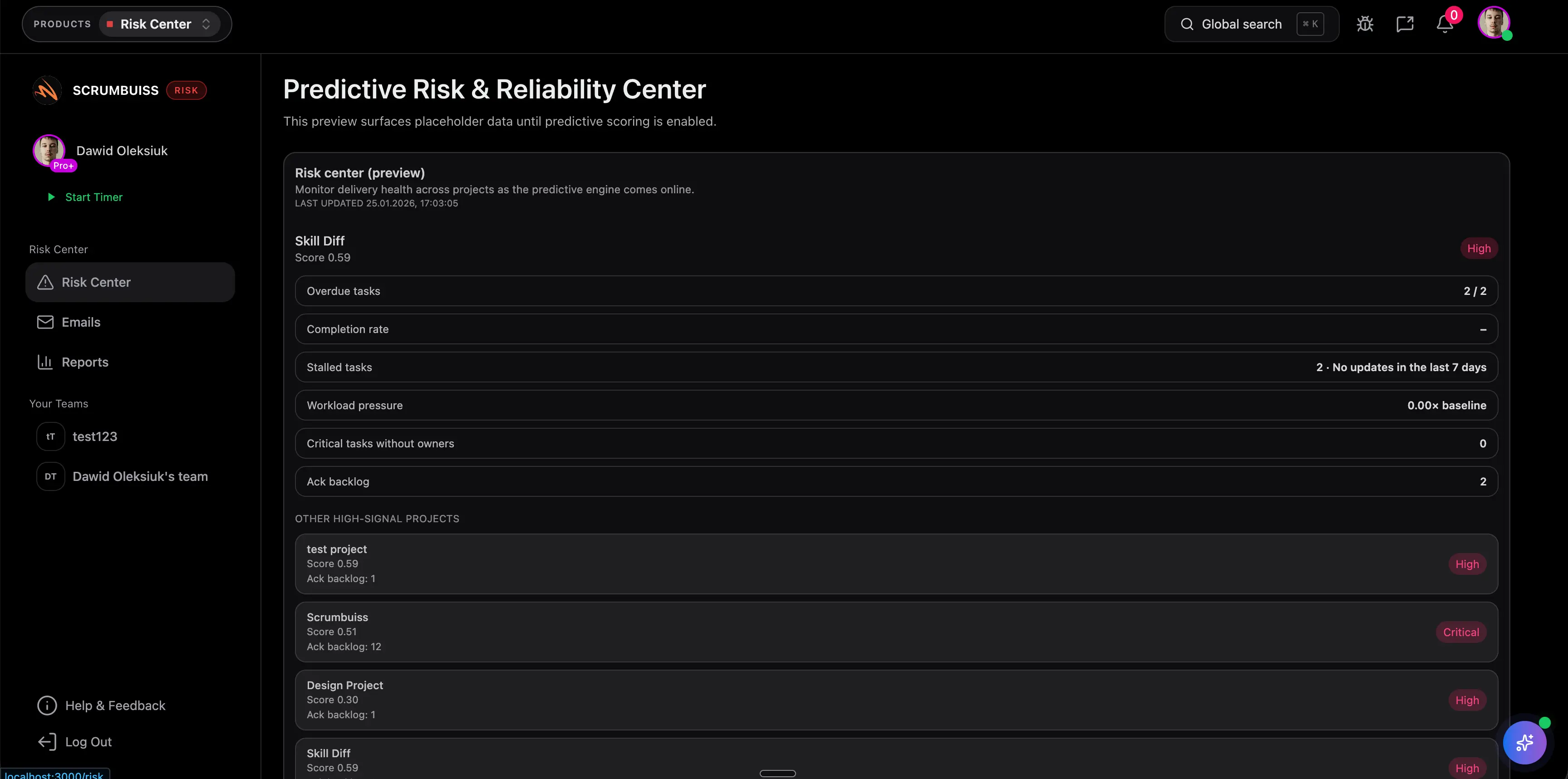
The exact product fit shows up when a risk record is not just a line item. In Scrumbuiss, the useful evaluation is whether the team can capture the risk, attach enough context, assign ownership, and keep it connected to the work that could actually slip.

  • Capture the risk statement, owner, affected workflow area, review date, and mitigation path in one working record.
  • Keep that risk close to the project, milestone, or delivery context that made it visible in the first place.
  • Evaluate whether project leads can open the product and immediately understand what is at risk without re-reading a separate register.
Scrumbuiss Risk Center capture view with delivery risk context and ownership

Convert exposure into mitigation work

Check whether trend signals, prioritization, and follow-up ownership stay actionable inside the product

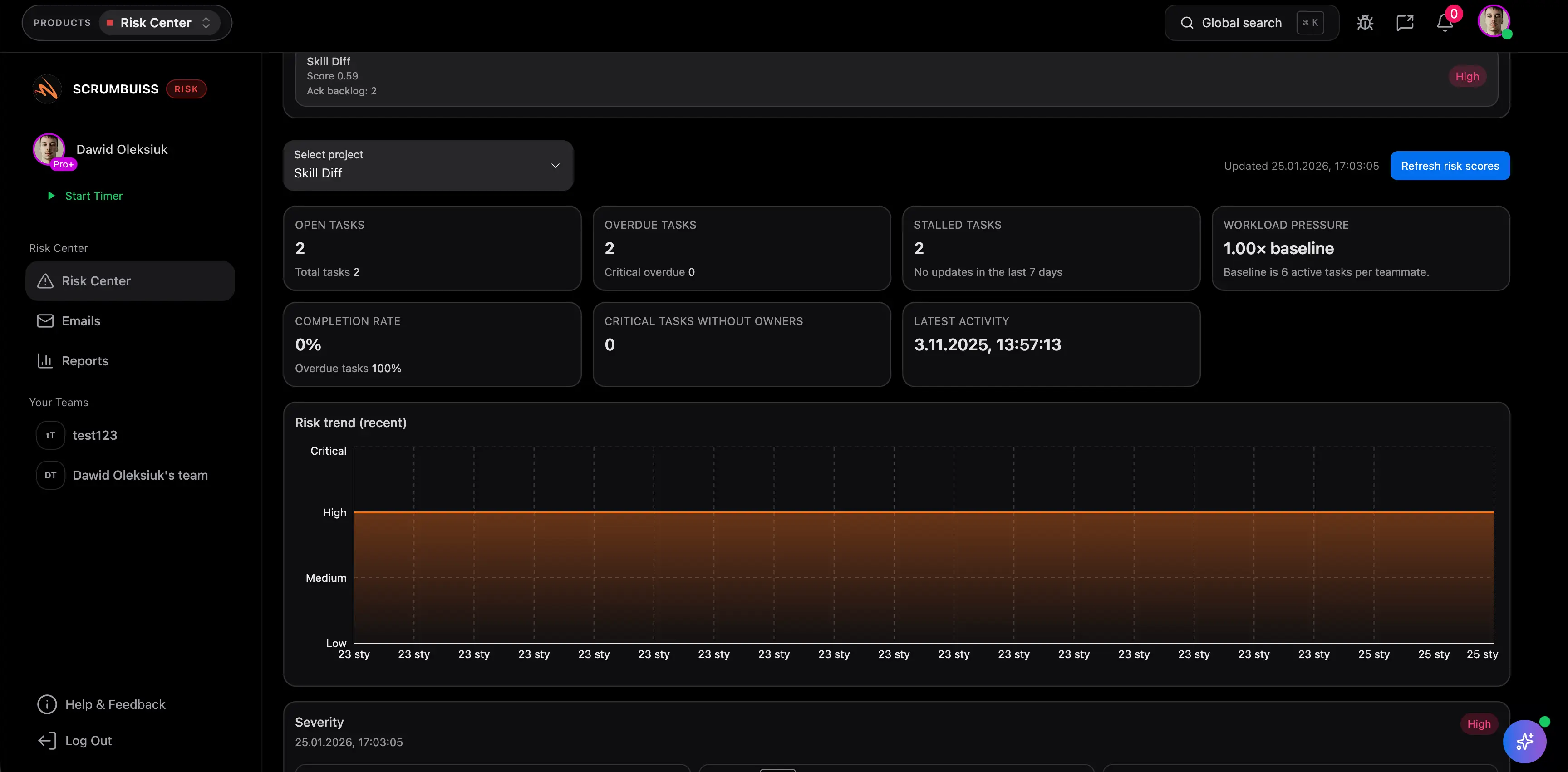
The product should help the team do more than log a concern. The real product-level test is whether rising exposure, missed review dates, or unresolved risks turn into visible follow-up work while there is still time to change a real delivery decision.

  • Use trend and priority signals to tell whether exposure is improving, holding, or getting worse across the active delivery cycle.
  • Judge whether the product makes mitigation work visible enough that owners know the next move without another meeting note.
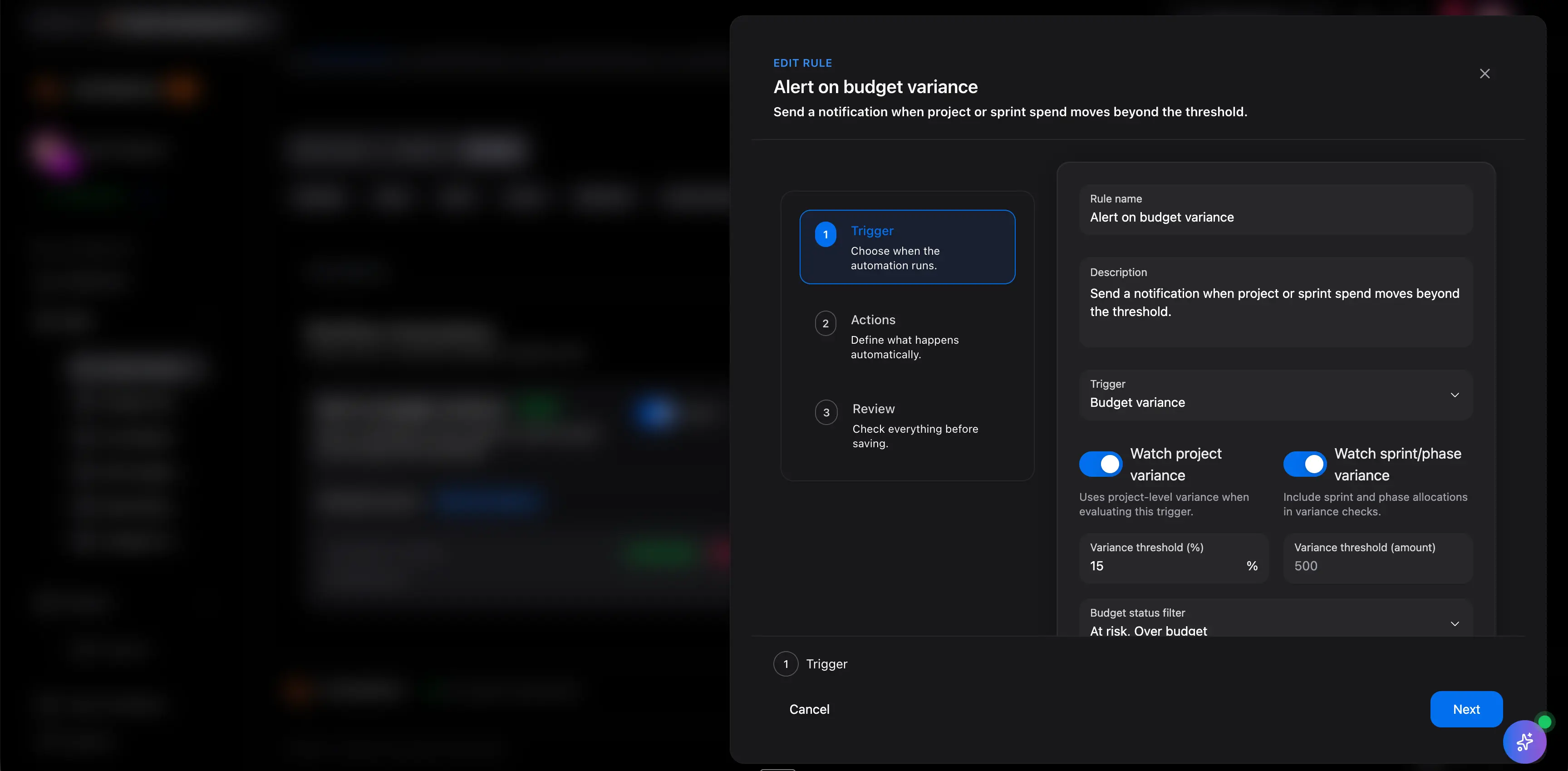
  • Verify that reminders, escalation triggers, and operational follow-up reduce the manual coordination burden around risk review.
Scrumbuiss Risk Center trends view used to monitor and prioritize delivery risk

Keep the review readable for stakeholders

Validate whether Scrumbuiss can explain delivery risk without another slide deck or spreadsheet rewrite

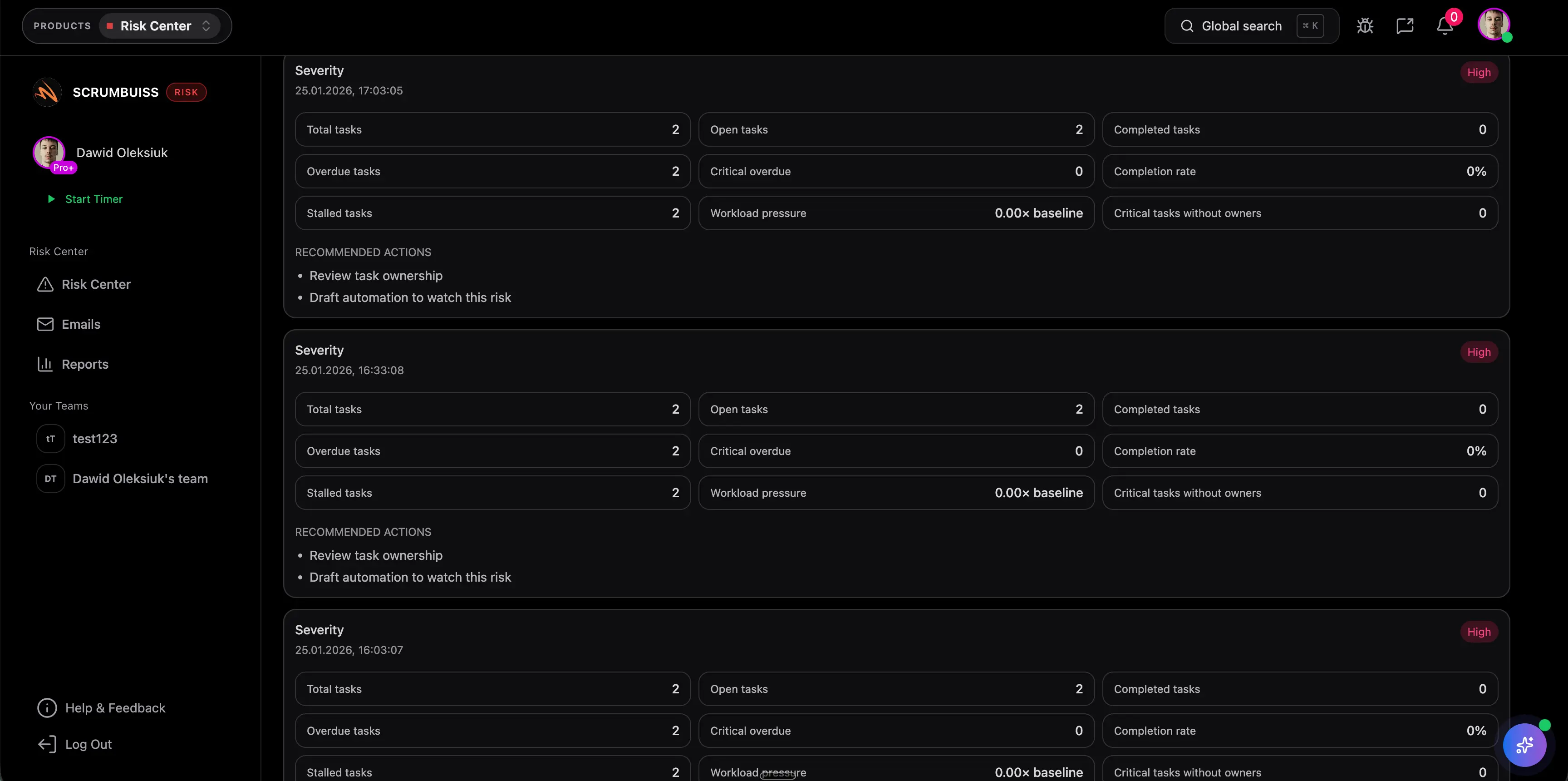
The page should win when the same product view can support project leads doing the work and stakeholders reading the state of risk. That is the product-level difference between a tool people update and a tool that actually gets trusted during a weekly review.

  • Use dashboards and activity history to explain what changed, what is being mitigated, and what needs escalation next.
  • See whether the product can support both delivery reviews and adjacent operational reviews without duplicating the narrative elsewhere.
  • Confirm that the output is readable enough that sponsors and cross-functional stakeholders stop asking for a separate reconstructed status view.
Scrumbuiss Risk Center recommendations and follow-up view for stakeholder-ready reviews

Competitor snapshot from official vendor pages

These tools all address project risk, but they frame the product problem differently. The useful comparison is not whether they can store a risk record. It is how close risk review, mitigation, and reporting stay to the work that needs attention.

Criteria Scrumbuiss ProjectManager RAIDLOG Planforge
Best fit Delivery teams that want risk visibility, mitigation ownership, dashboards, and automation support close to execution. Teams that want a broader project-management suite with RAID logging, risk matrixing, tags, and reporting. Teams that want a dedicated RAID-first system built around risks, actions, issues, and decisions. Organizations that need governance-oriented risk portfolio control across projects and programs.
What the official page emphasizes Delivery-connected risk follow-up, readable reviews, and escalation support inside the product workflow. Managing a RAID log alongside project plans, automatic severity matrixing, tagging tasks as risks, and custom reports. Breaking out of spreadsheet-based RAID logs with portfolio risk analysis, collaborative response planning, and decision traceability. Managing a project risk portfolio with probability, impact, categories, bubble charts, traffic lights, and reporting.
Workflow model Product workflow for active delivery reviews where risk, follow-up, and stakeholder visibility need to stay in one operating layer. Project-management suite where RAID and reporting sit alongside broader planning and tracking tools. Dedicated RAID system centered on structured project-control records. Portfolio-aware governance workflow with more formal project and program structure.
What to validate in a pilot Whether one real delivery review changes ownership, mitigation timing, or escalation quality during the week. Whether the broader suite is worth it if the main requirement is risk follow-up rather than all-around project control. Whether a dedicated RAID tool still leaves delivery execution and stakeholder-ready reporting split across systems. Whether the governance-heavy model is justified when the team mainly needs practical delivery risk visibility.
Where Scrumbuiss is stronger Keeps risk detection, mitigation ownership, automations, dashboards, and delivery context close together in a lighter workflow. Stronger when teams want workflow-connected follow-up and less suite-level overhead around product evaluation. Stronger when risk needs to turn into owned follow-up work inside the same delivery workflow rather than remain a separate RAID layer. Stronger when the real buying need is delivery risk action, not broader portfolio governance infrastructure.

Recheck current packaging, permissions, and reporting depth on the official vendor pages before you buy. Product names are trademarks of their respective owners.

Run a live delivery-risk pilot

The best pilot is one real project, release, or operational change review where risk already matters. Use the checklist below to judge whether the product changes the operating rhythm instead of becoming another register to maintain.

  1. Step 1

    Choose one active project, release, client delivery stream, or change program where hidden risk already creates real cost or coordination drag.

  2. Step 2

    Define the minimum record structure you need up front: owner, trigger signal, mitigation path, review date, and affected milestone or workstream.

  3. Step 3

    Keep the pilot inside the product workflow for at least one normal review cycle instead of backfilling risk updates after the fact.

  4. Step 4

    Use at least one dashboard, summary, or review output that a stakeholder would actually read during the pilot.

  5. Step 5

    Trigger at least one reminder, escalation, or follow-up action so the automation path is tested on a real risk condition.

  6. Step 6

    Set explicit go or no-go criteria around clearer ownership, earlier escalation, fewer manual status rewrites, and better visibility into mitigation progress.

FAQ

These are the product-level questions teams usually need answered before they standardize the Risk Center workflow inside Scrumbuiss.

What makes the Scrumbuiss Risk Center product page different from the category guide?

The category guide helps teams decide what project risk management software should do in general. This product page is narrower. It helps buyers judge whether the exact Scrumbuiss workflow is the right fit once the category itself is already on the shortlist.

How is Risk Center different from a risk register template?

A risk register template is useful when the team needs a spreadsheet-based starting point for logging and scoring risks. Risk Center becomes more valuable when teams need recurring review, mitigation ownership, dashboards, automation support, and stakeholder-readable visibility inside the live delivery workflow.

Can Scrumbuiss Risk Center replace a spreadsheet or RAID log?

Often yes, if the main reason for moving is that risk ownership, follow-up, and reporting no longer stay reliable in a spreadsheet or separate RAID process. Teams that still prefer a simple spreadsheet ritual can start with the template first and move later.

What should a pilot prove before rollout?

A useful pilot should prove that the team can capture a real risk, assign ownership, trigger follow-up, and explain the current state of mitigation from the same product workflow. It should improve one real review decision during a normal week, not only show that a field can be filled in.

Who usually owns Risk Center in practice?

Usually a project lead, delivery manager, program lead, or operational owner runs the cadence, but ownership of individual risks should stay distributed to the people responsible for mitigation. The product works best when review cadence is centralized and next actions are not.

Can Risk Center trigger reminders or escalation?

Yes. The practical value of the product increases when review dates, thresholds, or stalled mitigation work can trigger reminders, escalation, or visible follow-up instead of depending on one person to remember the next step.

Is Risk Center only for software teams?

No. It fits software teams well, but it can also support IT operations, delivery managers, or any cross-functional workflow where schedule, dependency, scope, or operational risks need recurring review and visible ownership.