File-management guide - reviewed March 16, 2026

Project Document Management Software

Keep project briefs, specs, assets, approvals, and client deliverables attached to live work so teams can share files, review status, and hand off projects without hunting through chat threads and side folders.

Use this page to compare project file management software before your team standardizes on another shared drive, another digital-asset layer, or another document workflow that still lives outside delivery execution.

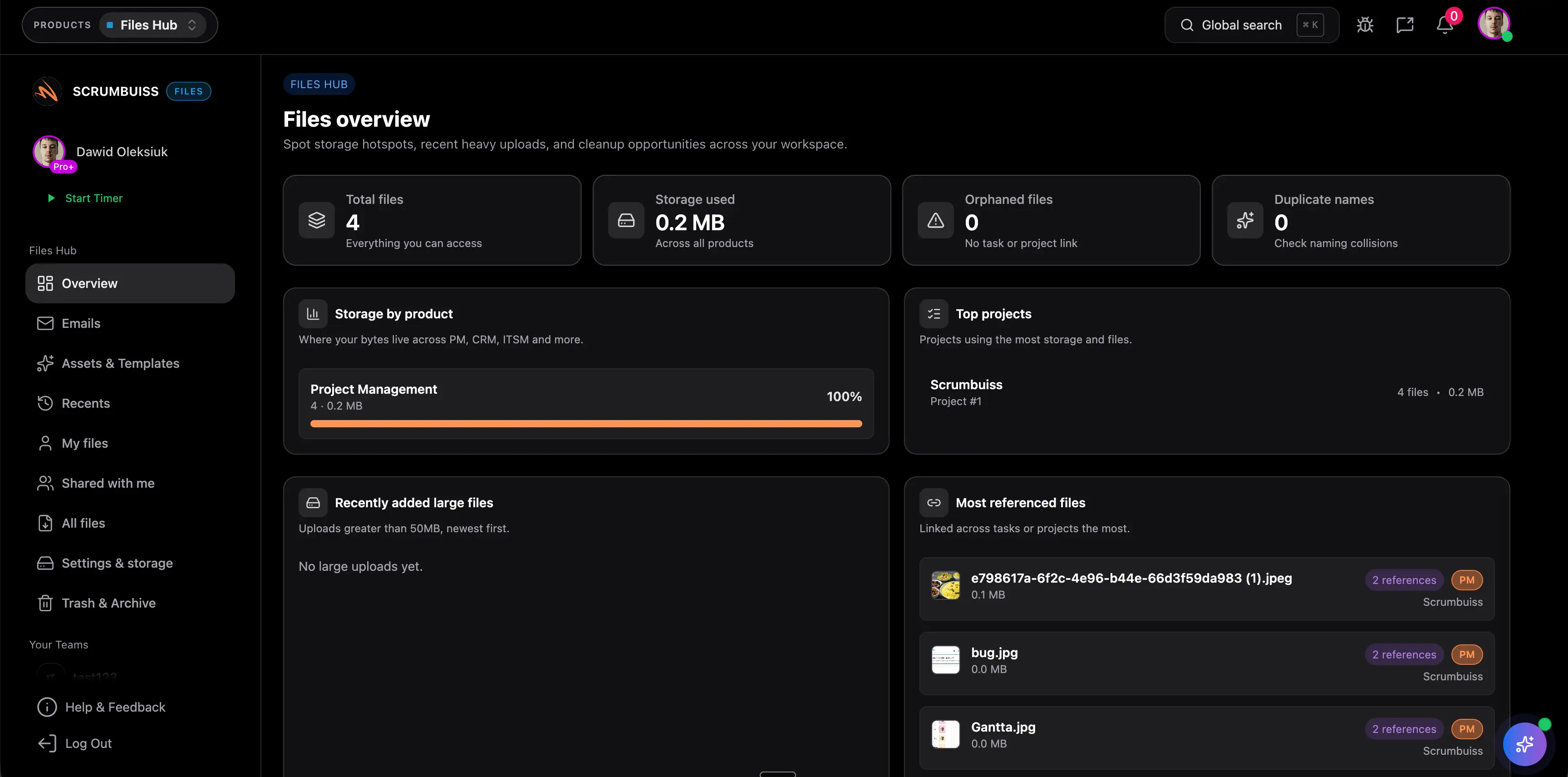
Scrumbuiss project document management overview

How we reviewed project document management tools

Reviewed on March 16, 2026. This page compares one buying question: which project document management tools keep files close enough to active delivery work that teams can find the latest context during execution, status reporting, and client handoff without rebuilding the story from separate folders.

  • Scrumbuiss references come from the live pricing page plus the Files product page, Project Brief page, Project Delivery product page, Agencies workflow page, and Google Drive integration page in this site.
  • Competitor references come from the official monday.com digital asset management page and the current Zoho Projects document-management page reviewed on March 16, 2026.
  • The goal is not to score every storage checkbox. It is to help teams decide whether project file management should stay attached to delivery work or sit in a separate document layer that still requires manual reconciliation.

When Scrumbuiss is a fit

The right decision depends less on raw storage and more on whether project files should stay readable inside the delivery workflow after the team starts planning, reviewing, and handing work off.

Strong fit for Scrumbuiss

Best when teams want project documents, working files, and approved deliverables attached to the delivery workflow instead of buried in a separate storage layer.

  • Project briefs, specs, assets, and client files need to stay visible beside tasks, milestones, and status updates.
  • The recurring pain is not raw storage capacity. It is version confusion, file handoff gaps, and missing context during execution.
  • Stakeholders need one operating record where files, ownership, and the latest delivery status can be reviewed together.

Worth piloting carefully

A live pilot is useful when the team already has shared-drive habits in place, but project managers still spend time chasing the latest file, confirming approvals, or rebuilding context for weekly reviews.

  • Test one real workflow with active briefs, shared assets, working files, and approved deliverables.
  • Measure whether the team can find the latest project context faster without relying on chat links and folder memory.
  • Validate that the new file workflow reduces coordination work rather than simply creating another place to upload documents.

Probably not the best fit

A more storage-centric platform may fit better when the main requirement is enterprise-wide digital asset management or document governance rather than keeping project files connected to delivery work.

  • Your evaluation is mostly about broad asset-library controls, archival policy, or company-wide document administration.
  • Project execution already works well elsewhere and the main requirement is only a shared file repository.
  • The team does not need briefs, tasks, approvals, or client-delivery context to stay connected to the files after upload.

Keep context with the work

Attach briefs, specs, and assets to live delivery work instead of scattering them across folders

Project document management software is most useful when the documents that explain the work stay attached to the work itself. That includes kickoff briefs, requirements, design files, approval notes, and the latest deliverables that people need during execution rather than only at project kickoff.

  • Keep project briefs, specifications, assets, and deliverables in the same operating layer as tasks, owners, and milestones.
  • Reduce the back-and-forth that starts when teams have to ask which folder, link, or version still matters.
  • Make project file management part of the delivery workflow so new contributors can understand the context without a separate handoff ritual.
Scrumbuiss files overview with project documents attached to delivery work

Reduce latest-version drift

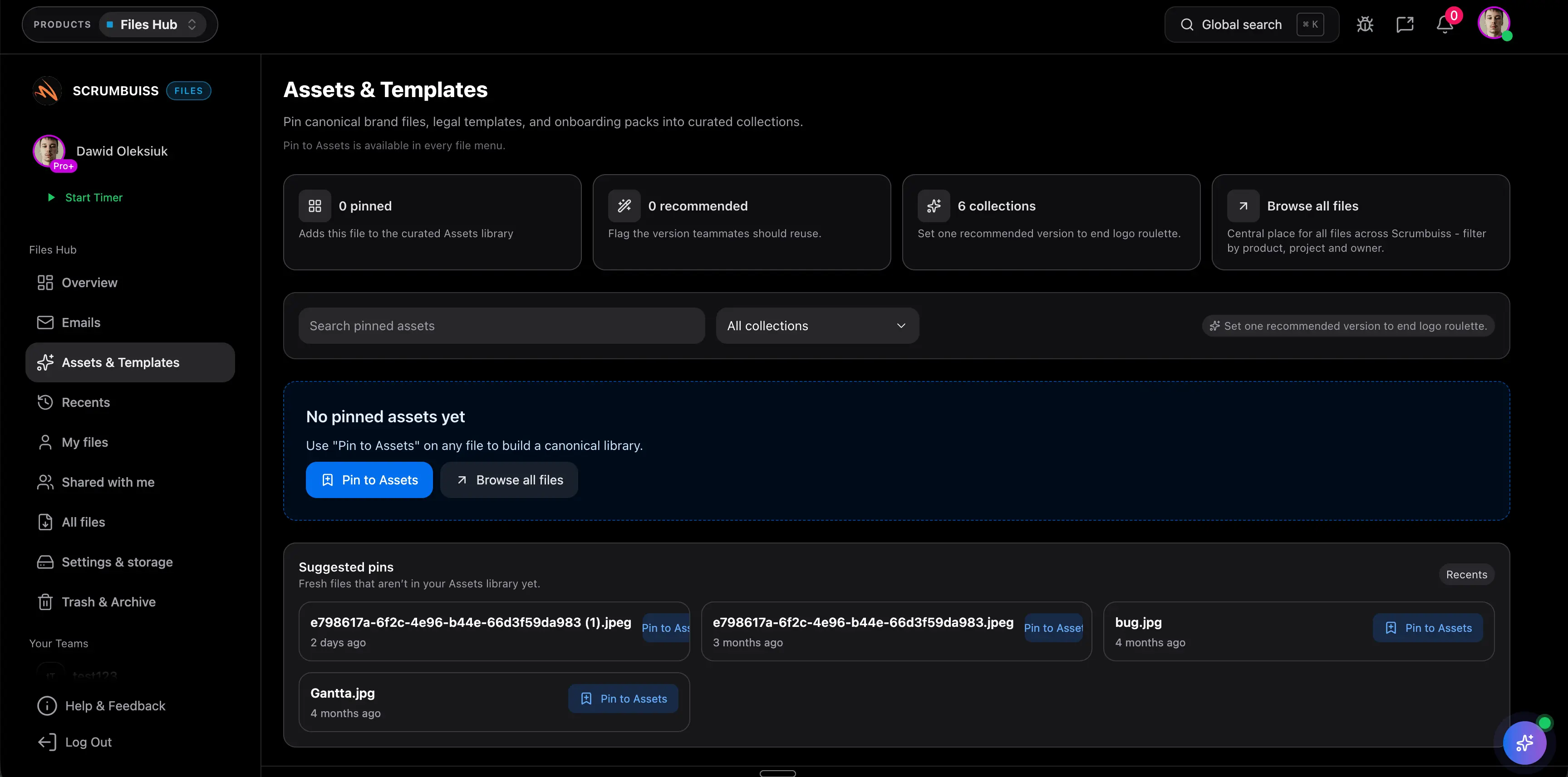
Use shared views, recents, and collections to keep the latest file easier to find

Teams usually do not lose time because files are impossible to store. They lose time because the latest approved asset, current draft, or client-facing version is hard to identify once uploads and edits happen across several tools. The better workflow makes recent activity and shared access visible enough that people stop guessing.

  • Use shared collections and recent activity views so the team can see what changed and where to look next.
  • Keep approved deliverables and working files readable during delivery reviews instead of reconstructing them from disconnected folders.
  • Support project management software with file sharing that stays connected to the work rather than behaving like an isolated file dump.
Scrumbuiss shared file views used to reduce latest-version confusion

Keep reviews and handoffs readable

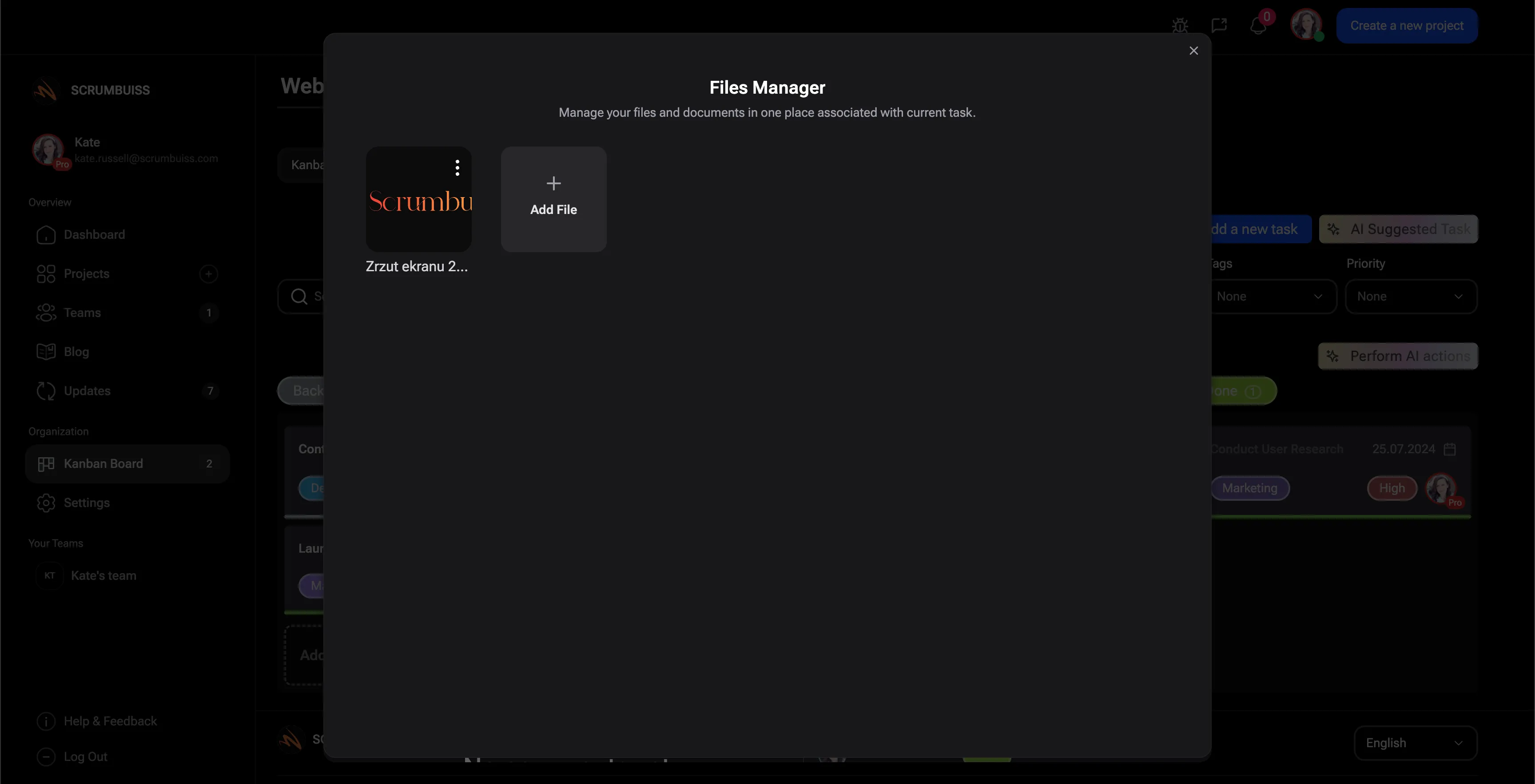
Connect files to client delivery, status reviews, and Google Drive linked workflows

A file workflow becomes operational when project managers, account leads, and contributors can review status and hand off work without reopening separate drives just to explain the latest context. That matters most when client assets, supporting docs, and approved deliverables need to stay tied to milestones, updates, and next actions.

  • Link project files to status reviews so stakeholders can see the latest context without a second search loop.
  • Use Google Drive connections where the source folder should stay shareable while project teams keep delivery context inside Scrumbuiss.
  • Treat files as part of the project handoff and reporting workflow, not just background storage that the team has to remember to check later.
Scrumbuiss file preview connected to client delivery and Google Drive linked workflows

Competitor snapshot

These tools all help teams organize files, but they package document workflows around different operating models. The useful comparison is whether project files stay connected to execution and status visibility or mainly behave like a separate asset layer.

Tool Best for File-management angle Main tradeoff Why teams choose Scrumbuiss instead
monday.com Teams that want digital asset management and file collaboration inside a broader monday.com workspace. monday.com publicly positions the page around digital asset management, team collaboration, and storing files in a cloud-based project environment. Buyers should validate how closely briefs, approvals, deliverables, and weekly project reporting stay attached to the file workflow once the workspace grows more complex. Scrumbuiss is stronger when file context should stay tied to project briefs, delivery work, and client-status reviews instead of acting mainly as a general asset layer.
Zoho Projects Teams that want centralized project documents, sharing, and file collaboration inside the wider Zoho Projects environment. Zoho Projects publicly positions document management around central storage, sharing, collaboration, and keeping the latest project documents easier to access. The shortlist should still test how well working files, approved deliverables, and delivery status stay connected in day-to-day project execution rather than only in the document layer. Scrumbuiss is stronger when the evaluation centers on keeping project files, briefs, milestones, and client handoffs readable inside one delivery workflow.

Review current plan limits, sharing rules, and file-workflow packaging on the vendor pages before you buy. Product names are trademarks of their respective owners.

What to validate in a live pilot

The best trial is one real workflow with active documents, not a blank folder demo. Use the checklist below to judge whether the file workflow reduces coordination work and version confusion in practice.

  1. Step 1

    Pilot one active workflow with a brief, working files, approved deliverables, and at least one stakeholder review cycle.

  2. Step 2

    Define which files must stay visible during delivery: scope docs, specs, assets, approvals, and client-facing deliverables.

  3. Step 3

    Confirm where the team should work from: native files, linked Google Drive folders, or a mix of both for the pilot.

  4. Step 4

    Check whether contributors can identify the latest version quickly from recents, shared views, and project context instead of manual folder hunting.

  5. Step 5

    Run one status review and one handoff from the pilot workflow to verify that files, notes, and next actions stay understandable together.

  6. Step 6

    Set go or no-go criteria: less latest-version confusion, clearer ownership, faster status review, and fewer file-related handoff gaps.

FAQ

These are the buying and rollout questions teams usually need answered before project files become dependable enough to support real delivery work.

What is project document management software?

Project document management software helps teams store, organize, share, and review the documents that support active project work. The useful version does more than hold files in a folder. It keeps briefs, specs, assets, approvals, and deliverables attached to the delivery workflow so people can find the latest context while the project is moving.

How is project document management software different from generic cloud storage?

Generic cloud storage mainly solves file access and synchronization. Project document management software should also keep files connected to project ownership, delivery status, approvals, and next steps. If the files live in one place and the work lives somewhere else, teams usually still spend time reconstructing the project story by hand.

Which teams benefit most from project file management software?

Teams benefit most when project files are part of daily execution rather than passive archives. Agencies, software-delivery teams, IT operations teams, and cross-functional project teams usually feel this first because briefs, design files, handoff assets, and approved deliverables all need to stay easy to find while the work is live.

What should a live pilot validate before a team standardizes on a file workflow?

A live pilot should prove that people can find the latest file faster, understand which documents matter during status reviews, keep approvals and deliverables readable during handoffs, and avoid rebuilding context from separate folders. The best pilot uses one real delivery workflow instead of a blank storage test.

Should file workflows live inside project management software?

They usually should when files are part of planning, approvals, execution, and status reporting. If the team constantly needs to connect tasks, milestones, briefs, and deliverables, keeping files close to project management reduces handoff gaps and version confusion. A separate storage layer can still work, but it often creates more reconciliation work.

Can Scrumbuiss replace every enterprise document management system?

Not always. Scrumbuiss is strongest when the need is project document management inside a delivery workflow rather than a company-wide enterprise document-governance system. Teams looking for heavy archival, enterprise records controls, or broader digital-asset administration may still prefer a more storage-centric platform.