Scrumbuiss vs Trello for teams outgrowing simple boards
A dated buyer guide for teams outgrowing simple boards and comparing Scrumbuiss with Trello across sprint planning, timelines, workload, reporting, and stack sprawl.
Looking for a Trello alternative? This page is a practical evaluation guide. For exact plan-level details, verify on vendor websites. All product names are trademarks of their respective owners.
How this comparison was reviewed
Reviewed on March 12, 2026. This guide compares one common transition point: a team that started with Trello boards and now needs sprint planning, timeline visibility, workload review, stakeholder reporting, and adjacent workflows without rebuilding everything around add-ons and side tools.
- Scrumbuiss references come from the live pricing page plus the Project Delivery, Kanban, Sprints, Gantt Timeline, Workload & Capacity, Time Tracking, and Files pages in this site.
- Trello references come from Trello's official pricing, project-management, task-management, and Power-Ups pages reviewed on March 12, 2026.
- The goal is not to score every checkbox. It is to help a growing team decide whether Trello should remain a lightweight board layer or whether a broader operating workflow now fits better in Scrumbuiss.
Quick fit
A high-level way to decide which tool is more likely to match your workflow.
Choose Scrumbuiss if
- ✓ Teams that started with simple boards but now need sprint planning, timeline visibility, and clearer operating structure.
- ✓ Leads who want reporting, files, time tracking, and delivery context to stay in one system instead of growing around Trello with side tools.
- ✓ Teams that still value Kanban simplicity but now need a more predictable workflow for cross-project coordination and stakeholder visibility.
Choose Trello if
- ✓ Teams that genuinely want a lightweight board-first workspace and do not need deeper planning or reporting yet.
- ✓ Small teams that prioritize fast adoption, simple cards and lists, and minimal process overhead over delivery rigor.
- ✓ Workflows where Trello boards, checklists, labels, views, and Power-Ups are enough without rebuilding planning elsewhere.
Decision matrix
Pick the buyer profile that matches the workflow pressure your team feels every week.
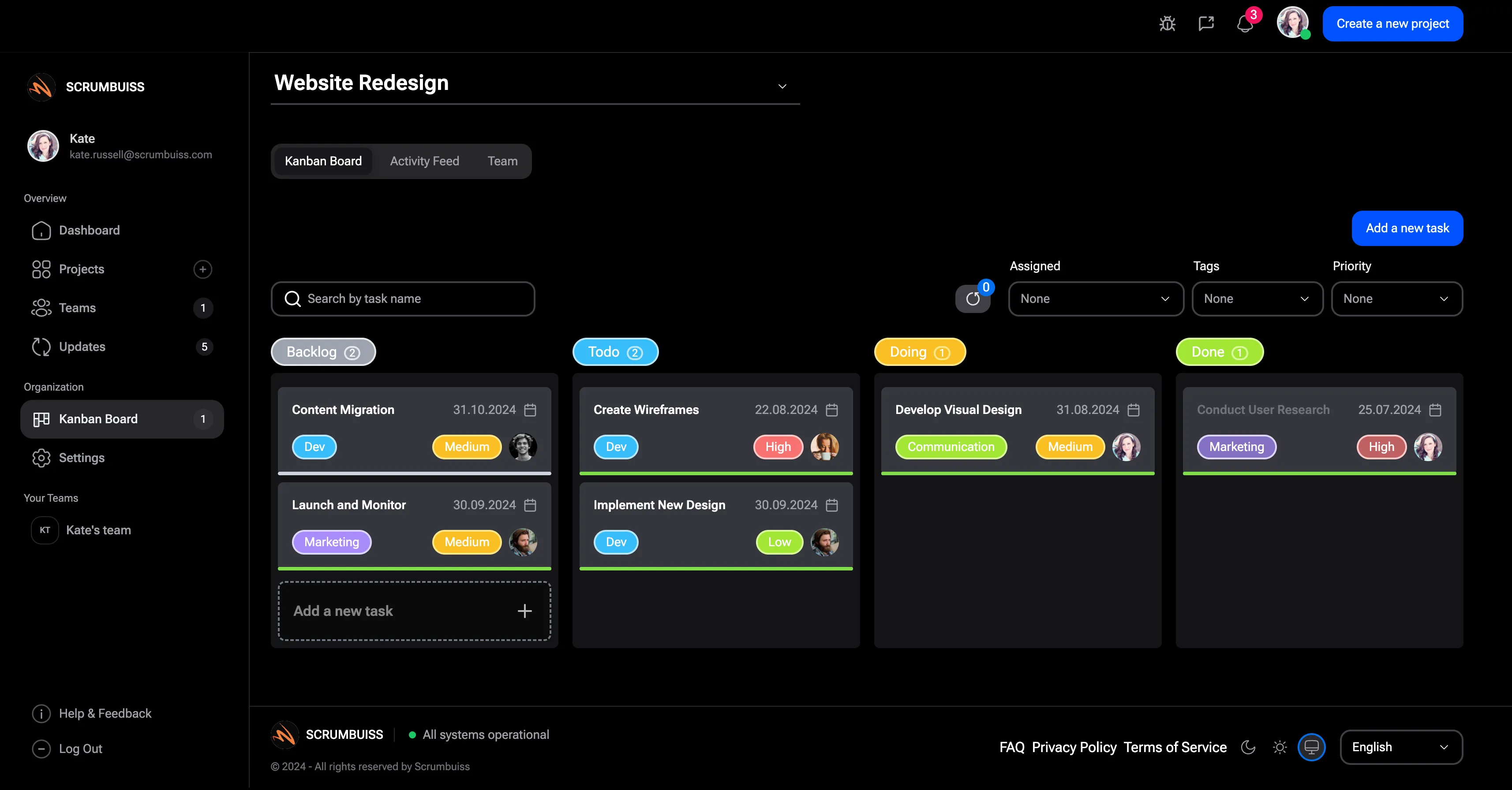
Trello still works, but weekly coordination is getting messy
Use this lens when the team still likes Trello's simplicity, but planning and reporting have already spilled into docs, spreadsheets, or recurring chat threads.
Strong fit if
- Trello boards track tasks, but planning decisions and weekly status updates happen somewhere else.
- The team wants a clearer operating rhythm without losing the speed of visual task tracking.
- People can still use Trello, but nobody wants to keep stitching updates together by hand.
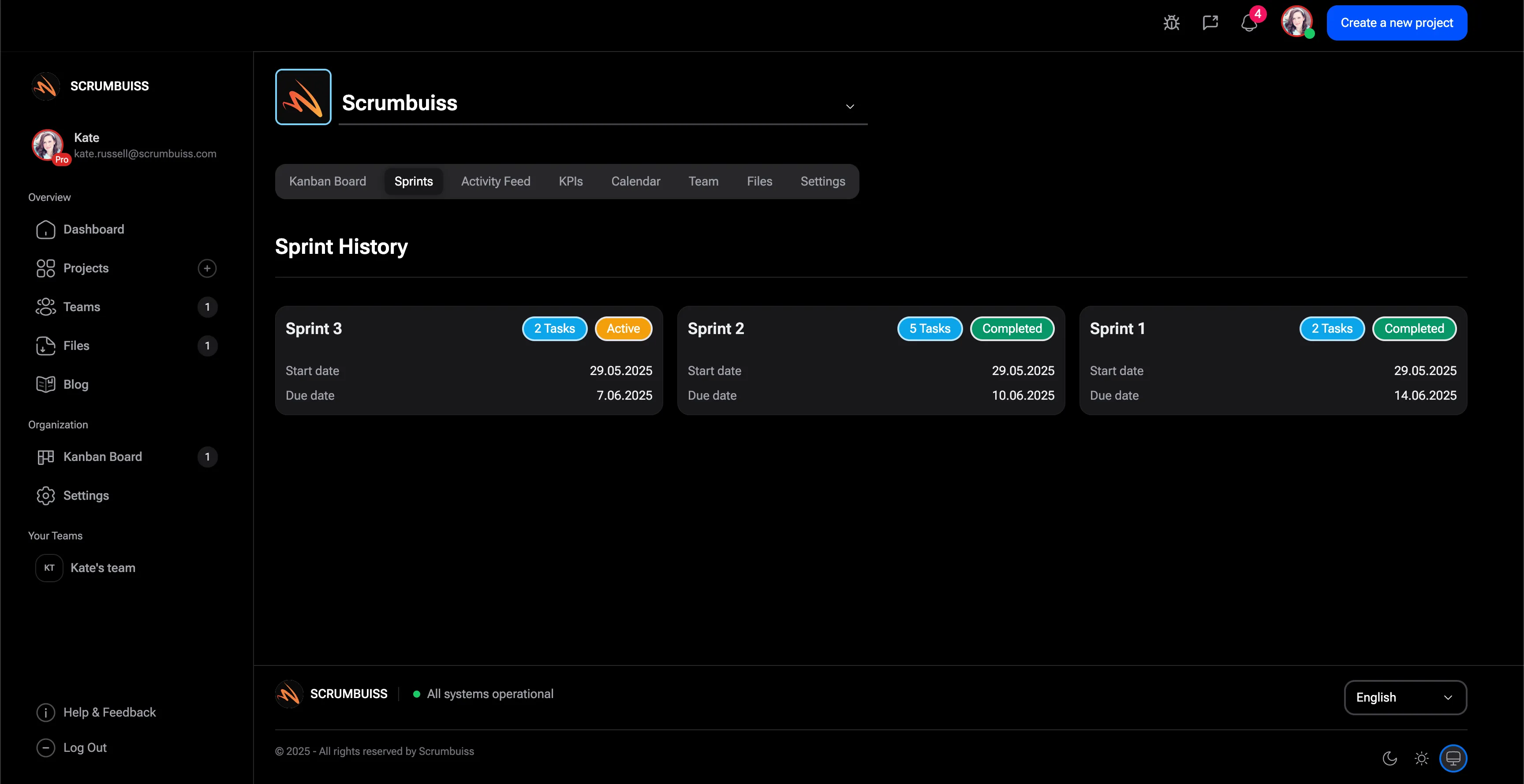
Board tracking is no longer enough for sprint and timeline planning
This is the strongest fit when delivery now depends on cadence, milestones, and dependency visibility that a simple board no longer keeps obvious.
Strong fit if
- The team needs backlog review, sprint commitments, and release checkpoints that stay visible after planning ends.
- Milestones or dependencies now matter across more than one person or project.
- Project leads need earlier warning when scope, workload, or blockers threaten dates.
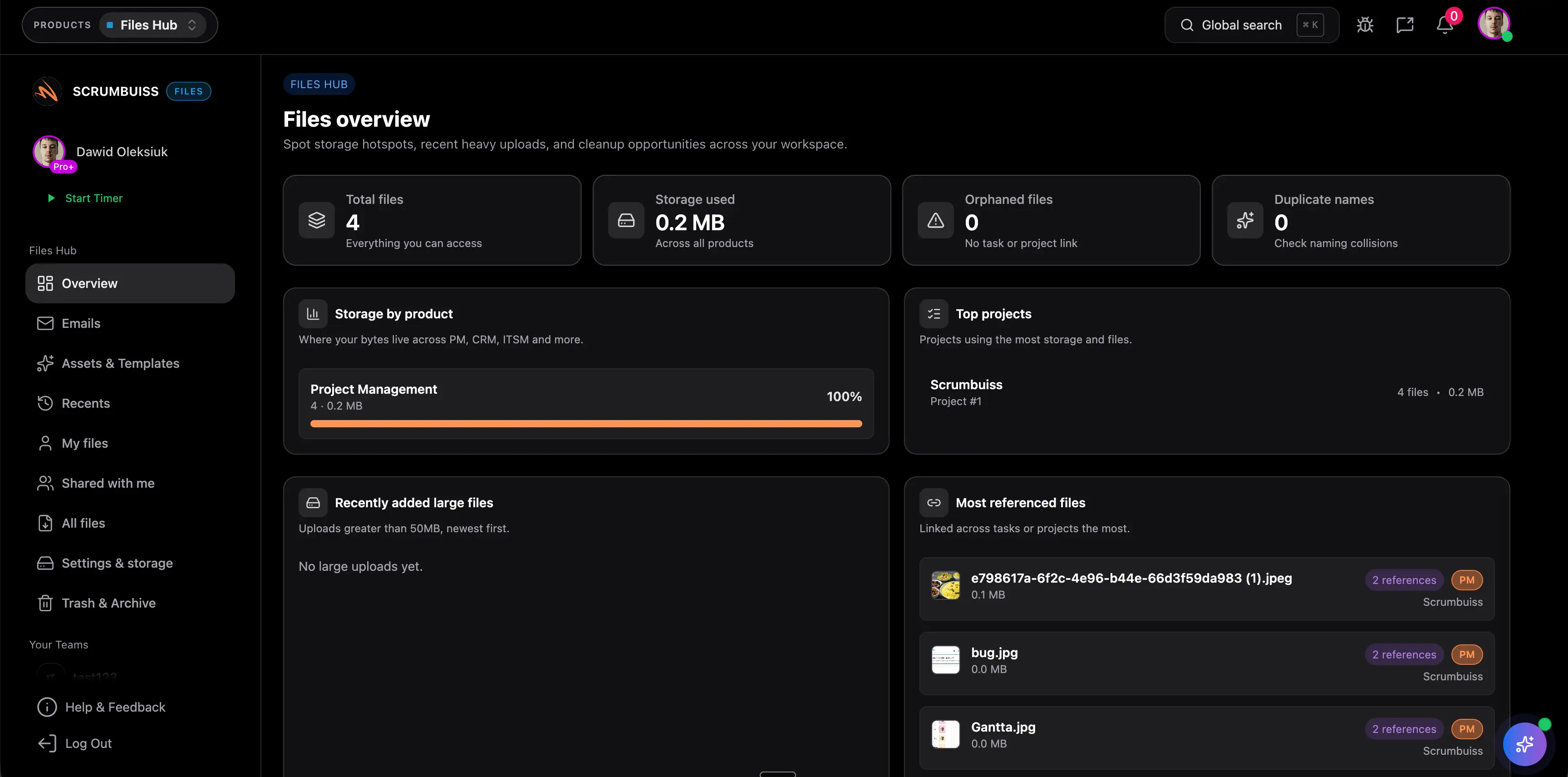
Time, files, and reporting need to live closer to delivery
Choose this profile when Trello still tracks work, but client files, effort review, or cross-project reporting already live in other systems.
Strong fit if
- The team swaps between Trello, file tools, and time tracking just to explain project status.
- Leads need one place to review delivery health, effort, and asset context together.
- The business wants fewer handoffs between task tracking and the rest of the operating workflow.
At a glance
A quick summary of the most common evaluation points.
| Category | Scrumbuiss | Trello |
|---|---|---|
| Board-first simplicity | Kanban is still available, but it sits inside a broader delivery workflow that can expand into sprints, timelines, reporting, and adjacent products. | Trello's official task-management pages emphasize fast boards, cards, checklists, labels, and visual task tracking for teams that want to get moving quickly. |
| Sprint planning | Sprints, backlog structure, planning poker, and delivery status stay inside one workflow built for repeatable team cadence. | Trello can support agile boards, but teams should verify whether sprint planning, backlog structure, and consistent cadence still feel clear enough as the team grows. |
| Timelines and dependencies | Gantt timelines, dependencies, and milestone visibility are part of the same day-to-day delivery system. | Trello's official project-management guidance points teams to boards, roadmap-style planning, and Power-Ups. Validate whether dependency management and multi-project timeline review stay usable without extra setup. |
| Workload and capacity | Workload and capacity views help leads rebalance commitments before delivery slips. | Trello's official pages emphasize boards, views, and integrations. Teams should verify how capacity planning will be handled in their exact Trello setup. |
| Reporting for growing teams | Dashboards, briefs, and linked workflow context make stakeholder updates easier to maintain as projects multiply. | Trello gives quick board visibility early on, but teams should test how reporting behaves once they need cross-project summaries, dates, and owner-level accountability. |
| Adjacent workflows | Project delivery, time tracking, files, IT operations, CRM, and risk workflows can stay connected in one environment. | Trello's official use-case pages highlight 200+ integrations and Power-Ups, which is strong for flexibility but often means Trello stays one layer in a broader stack. |
| Pricing model | 14-day full-product trial, then Team ($9 monthly / $7 annual) or Business ($17 monthly / $14 annual) per full member. Guests and viewers are free. | Trello's official pricing page lists Free for up to 10 collaborators per Workspace, Standard at $5 annual / $6 monthly per user, Premium at $10 annual / $12.50 monthly per user, and Enterprise from $17.50 per user/month billed annually at the base 50-user estimate. |
Key differences
Where teams typically feel the biggest day-to-day impact.
Board-first speed vs operating-system depth
Trello is strongest when the board itself is the workflow. Scrumbuiss is stronger when the board is only one layer inside a broader delivery system that also needs planning, reporting, and coordination depth.
Planning stays closer to execution
Scrumbuiss connects Kanban, sprints, timelines, and workload review in the same operating model. That matters once the team wants planning decisions to remain visible after work starts, not live in separate habits around the board.
The real cost is the workflow around the board
Trello's seat price can look attractive, especially early on. The harder question is how many additional tools, Power-Ups, and manual reporting steps the team keeps adding as delivery gets more complex.
Cross-project visibility becomes a bigger separator over time
Trello keeps single-board work easy to understand. Scrumbuiss is stronger once leads need to see dependencies, workload, and status across several projects without rebuilding that view manually every week.
Adjacent workflows do not have to live somewhere else
If effort tracking, files, or operations already matter to the workflow, Scrumbuiss can keep them closer to delivery work instead of turning Trello into only the task board in a larger tool chain.
Migration does not need to start with a full replacement
Teams rarely switch because Trello failed at basic task tracking. They switch when reporting, planning, and accountability outgrow what a board-first setup can do cleanly. That makes a workflow-by-workflow pilot more useful than a blanket migration debate.
Evaluation checklist
Use this checklist when comparing tools internally with your team.
- ✓ Is Trello still our whole workflow, or has the real operating model already spread into docs, chat, and side tools?
- ✓ Do we now need sprint cadence, dependency visibility, or workload review beyond a simple board?
- ✓ How much stakeholder reporting is still built manually around the board every week?
- ✓ Which adjacent workflows matter now: time tracking, files, approvals, or cross-project visibility?
- ✓ Would we rather keep a board-first tool and add more around it, or move to a broader operating workflow sooner?
Workflow examples
Concrete scenarios you can recreate in a trial to validate fit.
Keep Kanban simple, then add structure only where the team now needs it
Recreate the parts of Trello that the team already likes, then add planning and status structure around them where coordination has become fragile.
- Start from a Kanban workflow with clear owners and statuses so the team does not lose visual flow.
- Add dashboards and shared status views for weekly reporting instead of rebuilding progress in chats or docs.
- Keep the workflow readable while adding more structure only where the current Trello setup is breaking down.
Add sprint cadence, milestones, and dependency visibility
Use this scenario when the team now needs more than cards moving across columns and wants commitments that hold up under delivery pressure.
- Group incoming work into a backlog and sprint rhythm that the team can review consistently.
- Map dependencies and milestones before dates are locked, not after blockers start slipping work.
- Use timeline and workload views to see whether the plan is realistic before the sprint starts.
Consolidate delivery context, files, and effort review
Run this workflow when the problem is not only task tracking, but the number of places a lead must open to explain project health.
- Track time where the work happens so effort review is not disconnected from actual delivery progress.
- Store project files and shared context next to the work instead of chasing the latest version across tools.
- Review delivery status, files, and effort in one place before sending a stakeholder update.
Potential impact (examples)
Illustrative examples. Your results depend on team size, process, and workload.
Less manual status rebuilding
Reporting moves closer to the workflow, so leads spend less time turning board activity into narrative updates.
Earlier planning corrections
Capacity and dependency review happen before dates slip, not only after the board starts showing overdue work.
Cleaner delivery context across tools
The team spends less time hopping between task tracking, files, and effort review just to answer a basic project-health question.
Published pricing comparison
This section uses the public Scrumbuiss pricing page and Trello's official pricing page reviewed on March 12, 2026. Re-check both vendor sites before purchasing.
| Category | Scrumbuiss | Trello |
|---|---|---|
| Free or trial entry | 14-day full-product trial with no card required. | Trello Free is listed for up to 10 collaborators per Workspace on the official pricing page. |
| Lowest published paid plan | Team at $7 annual or $9 monthly per full member. | Trello Standard is listed at $5 per user/month billed annually or $6 billed monthly. |
| Next published paid plan | Business at $14 annual or $17 monthly per full member. | Trello Premium is listed at $10 per user/month billed annually or $12.50 billed monthly. |
| Enterprise path | Contact the team if you need a broader rollout model beyond the public plans. | Trello Enterprise is listed from $17.50 per user/month billed annually at the base 50-user estimate, with enterprise-grade security and controls. |
| What growing teams should really price | Model one workflow covering Kanban, sprint planning, timelines, workload review, reporting, and any adjacent delivery context in one product trial. | Model Trello seat cost plus any Power-Ups, integrations, reporting habits, and companion tools your team needs once work grows beyond a simple board. |
Notes
- Trello's official pricing page also notes that multi-board guests are billed at the same rate as Standard or Premium Workspace members.
- Enterprise pricing on Trello's page starts from the base user estimate and should be rechecked for your actual user count and controls.
- Published pricing and packaging can change, so verify the official pricing pages before purchase.
Pricing notes
A few cost considerations teams often miss during evaluation.
- Do not compare seat cost alone. Model the reporting time, integrations, and add-ons required once the board is no longer your whole workflow.
- Trello's lower entry cost is real, especially for lightweight teams. The decision changes when planning, timeline review, and stakeholder visibility start living outside the board.
- Check how many people need full paid access versus guest-style participation once the workflow spans more than one board.
- Price the next 6-12 months of operating complexity, not only the current board setup you have today.
Migration plan
A pragmatic way to switch without disrupting delivery.
- ✓ Choose one Trello workflow that now feels too light: weekly delivery tracking, sprint planning, or project reporting.
- ✓ List the boards, Power-Ups, automations, files, and side documents that workflow currently depends on.
- ✓ Recreate the workflow in Scrumbuiss with Kanban first, then add sprints, timelines, or workload review only where the Trello setup is failing.
- ✓ Rebuild one weekly reporting view so stakeholders can compare the old Trello-centered process against the new workflow directly.
- ✓ Pilot for 2 weeks with one team, then measure setup effort, reporting time, and planning clarity before expanding.
- ✓ Scale only after the pilot proves that the broader workflow is actually simpler than the Trello stack it replaces.
What customers say
Real feedback from teams using Scrumbuiss.

Scrumbuiss runs very smoothly and has changed how I organize and execute my projects.

The interface made it easy to assign tasks, set priorities, and monitor progress across our work.
Read more on our Customers page .
FAQ
When is Trello still the better fit? +
Trello is still the better fit when your team genuinely wants a lightweight board-first workspace, does not need deeper planning or reporting yet, and prefers simplicity over broader workflow depth.
What is a common sign that a team has outgrown Trello? +
A common trigger is when Trello still tracks tasks, but the real planning and reporting workflow already lives somewhere else. That usually shows up as manual status rebuilding, separate planning sheets, or repeated context chasing around the board.
Is Scrumbuiss harder to adopt than Trello? +
It can be broader, but it does not need to be heavier on day one. A good rollout starts with a Kanban workflow the team already understands, then adds sprints, timelines, or reporting only where the current Trello setup is breaking down.
Can Scrumbuiss replace Trello plus other tools? +
For many growing teams, yes. It is especially relevant when the team wants task tracking, planning, files, time review, and reporting to stay closer together instead of keeping Trello as only one layer in a larger stack.
Do we need to migrate every Trello board at once? +
No. The better approach is to pick one workflow that now feels too light in Trello, recreate that in Scrumbuiss, and compare planning clarity and reporting effort before expanding.
Is Scrumbuiss a good Trello alternative for small teams? +
It can be, especially for small teams that already know they will need more than a simple board. If your workflow is still straightforward and Trello covers it cleanly, Trello may remain the simpler option for now.