CRM product guide • reviewed March 18, 2026

Scrumbuiss CRM for Connected Sales and Delivery

Evaluate the exact Scrumbuiss CRM product for contacts, companies, deals, activities, and sales-to-delivery handoff that should stay readable in one workflow instead of being rebuilt across notes, project briefs, and follow-up tools.

Reviewed by Scrumbuiss editorial team. Use this page when the CRM-with-project-management category already makes sense and the real question is whether the exact Scrumbuiss product is strong enough for your pipeline, follow-up discipline, and handoff into delivery. If you still need category guidance first, start with the CRM buyer guide. If Monday.com is the live benchmark, use the direct comparison page.

Scrumbuiss CRM overview for connected sales and delivery workflows

How we reviewed the Scrumbuiss CRM product

Reviewed on March 18, 2026 by the Scrumbuiss editorial team. This page evaluates one buyer question: when should a team choose the exact Scrumbuiss CRM product instead of stopping at the broader category guide, staying in a standalone CRM, or stitching sales context into delivery through separate tools and manual handoffs.

  • Scrumbuiss references come from the CRM buyer guide, the Monday.com comparison page, the live pricing page, and the Forms, Automations, Activity Feed, and Project Brief pages in this site.
  • Competitor references come from the official Pipedrive CRM project management page, Insightly CRM project management page, and Zoho CRM project management page reviewed on March 18, 2026.
  • The goal is not to compare every enterprise CRM feature. It is to help teams decide whether the exact Scrumbuiss product keeps pipeline context, follow-up discipline, and delivery handoff readable enough to remove weekly coordination overhead.

When the Scrumbuiss CRM product is a fit

The useful product decision is not whether the CRM can store records. It is whether the exact workflow keeps the pipeline, follow-up discipline, and handoff into delivery readable enough that the team does not rebuild the same customer story after every closed-won deal.

Strong fit for Scrumbuiss

Best when sales context still shapes the work after the deal moves forward and the same team needs a lighter CRM tied closely to delivery follow-through.

  • Won deals become onboarding, implementation, agency work, or client delivery that still depends on the original account story.
  • The recurring pain is not only pipeline visibility. It is missed follow-up, duplicate briefing work, and messy handoff into execution.
  • You want one product workflow where activities, reminders, forms, and the first delivery brief stay close to the CRM record.

Worth piloting carefully

A live pilot is useful when the team already has a CRM, but the real operational cost shows up after the deal closes and the next team has to reconstruct context.

  • Test one real pipeline stage sequence and one genuine handoff into delivery or onboarding.
  • Measure whether reps and delivery leads can find the same customer context without copying it into a second operating record.
  • Validate that reminders, ownership, and next actions become easier to run instead of creating one more layer of admin.

Probably not the best fit

A broader standalone CRM may fit better when the main requirement is enterprise CRM administration, deeper revenue operations, or heavy forecasting rather than sales-to-delivery continuity.

  • The main buying need is sales governance, forecasting depth, or complex CRM administration first.
  • Delivery work rarely needs the deal record once the handoff happens.
  • The current handoff into another execution system is already fast, structured, and low effort.

Category guide versus exact product page versus Monday.com comparison

These pages solve different search intents. Keeping them separate helps the product page answer the exact-fit question without duplicating the category guide or the direct Monday.com comparison.

Use the CRM buyer guide first

Start with the buyer guide when you still need category-level framing for CRM with project management software and have not narrowed the decision to Scrumbuiss yet.

  • You want market-level tradeoffs before evaluating one product.
  • The shortlist still includes different CRM and project-management combinations.
  • You are deciding whether the category itself fits your workflow.

Use this page for exact Scrumbuiss CRM fit

Use this page when the category already makes sense and the real question is whether the exact Scrumbuiss CRM product is strong enough for your sales-to-delivery workflow.

  • You want product-level fit, rollout guidance, and product-specific competitor framing.
  • You need to judge whether the product removes handoff friction in practice.
  • Your next step is a live product pilot, not broader category research.

Use the Monday.com comparison when the benchmark is board-first work management

Use the direct comparison page when Monday.com is the live benchmark and the decision depends on whether customer context, delivery planning, and adjacent workflows should stay in a more guided operating model.

  • The team is already comparing Scrumbuiss and Monday.com directly.
  • The pain comes from board sprawl, adjacent workflow drift, or heavier reporting overhead.
  • You need a named-vendor decision page, not a general CRM explanation.

What the exact CRM product covers today

The useful question is not whether the CRM can store a deal. It is whether the surrounding workflows that make the handoff dependable stay close enough to the product that the team can run them without rebuilding context elsewhere.

Core CRM record

The product covers the account and pipeline layer directly: contacts, companies, deals, stages, ownership, and the current next step.

  • Keep customer records, deal stages, and owner visibility in one CRM workflow.
  • Track the next action so the record stays operational, not passive.
  • Use the CRM as the working context for the first handoff, not just the place where the deal was stored.

Forms for structured intake

Forms handle the structured information that should enter the workflow in a consistent shape before the team commits to work or completes the handoff.

  • Capture qualification inputs, onboarding requests, or post-sale requirements in a repeatable format.
  • Reduce the number of handoff details that live only in email or chat.
  • Keep the data cleaner before it reaches the delivery brief.

Automations for routing and reminders

Automations support the operational next steps around the CRM so stage movement, reminders, and ownership changes do not depend on manual follow-up.

  • Trigger reminders, stage updates, and handoff tasks when real milestones happen.
  • Keep recurring follow-up visible when several deals move at once.
  • Use automation to support discipline, not to hide a messy workflow.

Activity feed for shared context

The activity feed keeps the customer story visible across the people who need to act next instead of scattering that context across several status tools.

  • Make follow-up history, decisions, and workflow changes easier to review.
  • Give delivery owners a readable trail before kickoff begins.
  • Support shared visibility without turning chat into the system of record.

Project brief for the handoff into delivery

The project brief is where the most important deal context should become a reusable delivery handoff instead of being rewritten from scratch after the sale.

  • Move scope, stakeholders, files, and commitments into a brief the next team can use immediately.
  • Start delivery from the existing customer story instead of a blank document.
  • Use the template when you need a faster pilot, then move the workflow into the live product setup.

Keep the pipeline operational

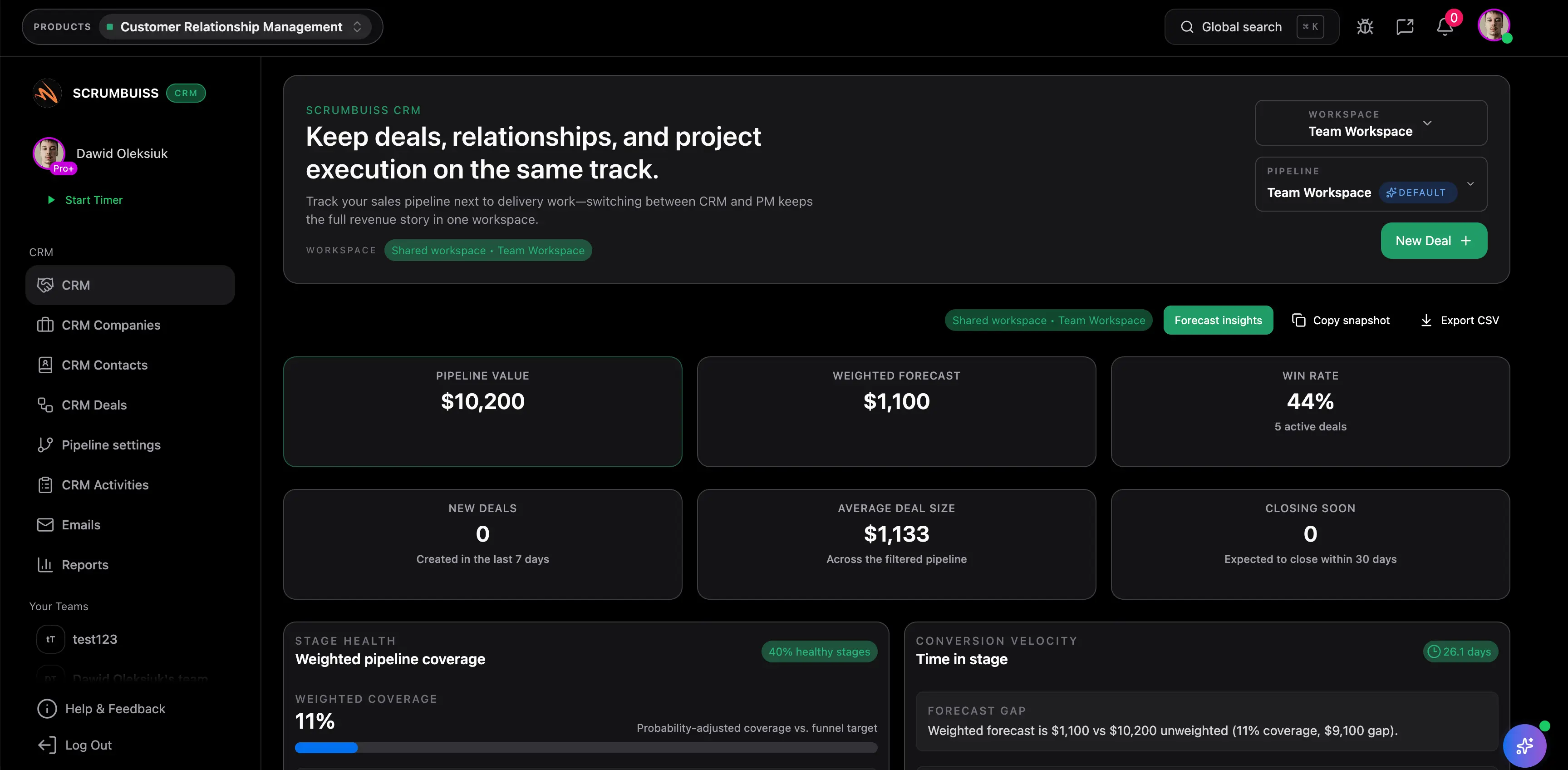
Track contacts, companies, deals, and next steps without separating the customer story from the work that follows

The exact product fit shows up when the pipeline is not only visible, but usable. The Scrumbuiss CRM workflow is strongest when contacts, company context, deal ownership, and the next action stay readable enough that the next team does not have to reconstruct the account story after the deal progresses.

  • Keep the current account context tied to the same record that will drive the handoff forward.
  • Reduce the copy-paste loop that starts when the CRM and the delivery setup live in separate systems.
  • Use one working record for sales context before the next delivery step begins.
Scrumbuiss CRM overview with contacts, companies, and deals connected to follow-through work

Standardize follow-through

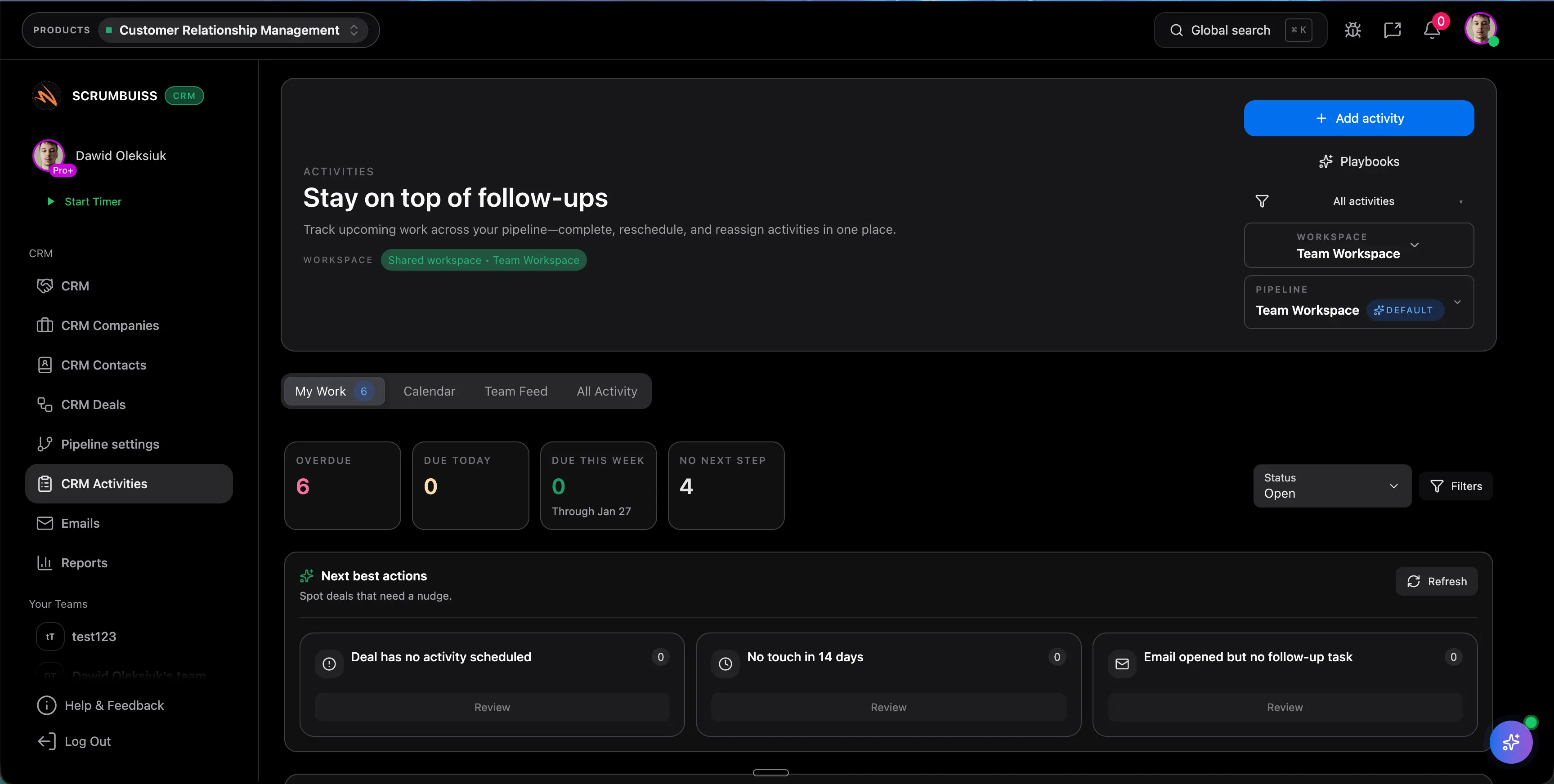
Use activities, playbooks, and automations so follow-up discipline survives beyond the individual rep

A CRM product only becomes operational when the next actions stay visible. The Scrumbuiss workflow should be evaluated on whether activities, playbooks, reminders, and the shared activity trail are strong enough to keep follow-up moving when the pipeline gets busy.

  • Use activities and playbooks to make next steps easier to repeat across the pipeline.
  • Support stage movement and reminders with automation instead of relying on memory.
  • Keep the follow-up story readable for the next owner, not only the person currently touching the record.
Scrumbuiss CRM activities and playbooks used to keep follow-up consistent

Turn a won deal into delivery context

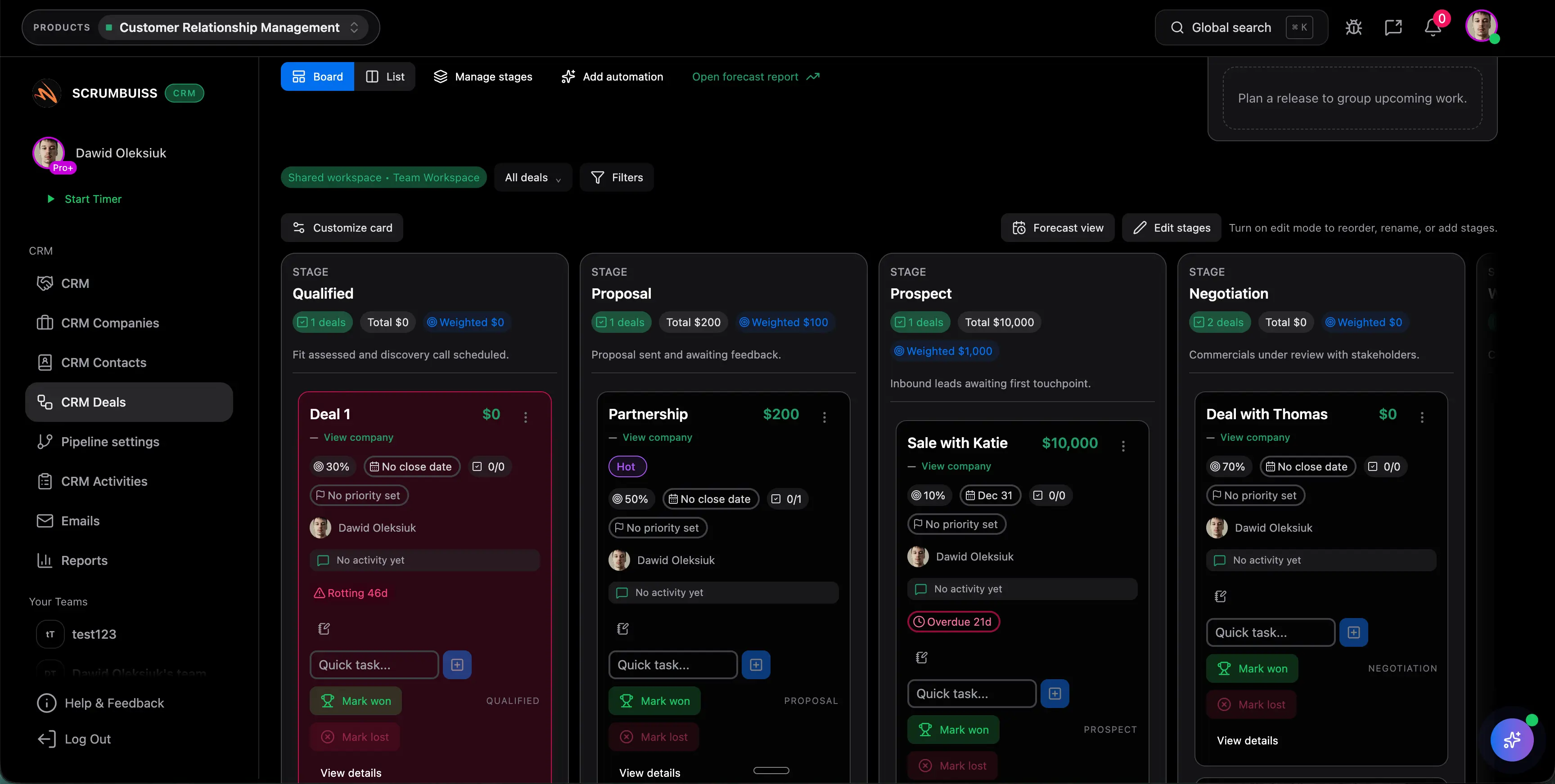
Move from closed-won to project brief without rebuilding the same customer context twice

The product-level handoff test is simple: can the next team start planning from the context that already exists? The stronger workflow turns the won deal into a brief, clear next owner, and a usable delivery starting point rather than another round of recap meetings.

  • Carry stakeholders, commitments, assets, and next actions into the first delivery layer.
  • Use the project brief workflow to turn sales context into execution context faster.
  • Judge the product by how much re-entry work disappears after the deal moves forward.
Scrumbuiss deals pipeline used to hand off won work into a project brief and delivery workflow

Competitor snapshot from official vendor pages

These products all connect CRM and project work differently. The useful comparison is whether the exact product keeps the handoff readable enough in practice or whether the workflow still depends on add-ons, integrations, or cross-product cleanup after the deal closes.

Criteria Scrumbuiss Pipedrive Insightly Zoho CRM
Best fit Teams that want a lighter CRM tied closely to follow-up discipline, project briefs, and sales-to-delivery continuity. Teams that want a CRM-centered workflow with project visibility via Pipedrive's Projects add-on. Teams that want CRM plus project management from an established CRM vendor in one platform. Teams already comfortable with the Zoho suite and willing to connect Zoho CRM with Zoho Projects.
Project handoff model Won deals can stay close to forms, automations, the activity trail, and project-brief setup without rebuilding the account story in a second operating layer. Pipedrive officially positions an all-in-one CRM project management workflow with tasks, timelines, and progress available through the Projects add-on, plus integrations with tools like Trello and Asana. Insightly officially emphasizes converting a closed-won opportunity right into a project so customer journey data flows through to the project team. Zoho officially emphasizes integrating Zoho CRM with Zoho Projects so sales and project teams stay aligned as soon as a deal closes.
Follow-up and activity discipline Activities, playbooks, automations, and the activity feed support the same sales-to-delivery workflow. Pipedrive officially emphasizes notifications, task automation, workflow automation, and centralized access to project and customer data. Insightly officially emphasizes workflow automation, dashboards, and productivity gains across CRM and project work. Zoho officially emphasizes customer feedback logged in CRM flowing into the projects feed so delivery teams can act on it.
Customer and project context Contacts, deals, files, brief context, and the next owned action stay close enough to support the first delivery phase. Pipedrive officially emphasizes a single searchable hub for customer and project information, with adjacent integrations when teams keep work in other tools. Insightly officially emphasizes one familiar interface where project data moves with the project after the handoff. Zoho officially emphasizes shared customer information, project updates, documents, and client participation through the integrated projects layer.
Operating weight Lighter product choice when the main problem is handoff clarity and weekly coordination overhead. CRM-first operating model with an optional projects layer or third-party integrations around it. Broader established CRM platform that still needs a live test for day-to-day handoff simplicity. Suite-based operating model across Zoho CRM and Zoho Projects rather than a single lightweight CRM-to-delivery product flow.

Review current packaging, plan limits, and workflow depth on vendor sites before you buy. Product names are trademarks of their respective owners.

Run a live CRM product pilot

The best product evaluation is one real pipeline sequence and one real handoff, not a clean demo account. Use the checklist below to test whether the exact Scrumbuiss CRM product reduces real weekly coordination work.

  1. Step 1

    Pick one live deal that should move from active pipeline work into onboarding, implementation, or client delivery during the pilot window.

  2. Step 2

    Define the minimum context that must survive the handoff: contacts, stakeholder roles, commitments, files, next owner, and the first delivery action.

  3. Step 3

    Set up activities, playbooks, and reminder logic so the pilot tests real follow-up discipline rather than passive record storage.

  4. Step 4

    Use one form or structured intake step where the team normally loses detail before the handoff is complete.

  5. Step 5

    Create one live project brief from the deal context and check whether the delivery owner can start from it without another recap meeting.

  6. Step 6

    Set go or no-go criteria before rollout: cleaner ownership, fewer duplicate updates, less handoff re-entry, and a more readable customer story after the deal moves forward.

FAQ

These are the product-level questions teams usually need answered before they decide whether the exact Scrumbuiss CRM workflow is strong enough to standardize across the handoff from pipeline to delivery.

What is the difference between this page and the CRM buyer guide?

The CRM buyer guide explains the broader CRM-with-project-management category and helps you decide whether that category fits your workflow. This page is narrower. It is for teams that already understand the category and now want to evaluate the exact Scrumbuiss CRM product.

Who is the Scrumbuiss CRM product best for?

It is strongest for teams where the deal record still matters after the sale. That usually includes agencies, onboarding and implementation teams, founders running a lighter sales process, and teams that need the handoff into delivery to stay readable without rebuilding the customer story.

What does the exact CRM product cover versus Forms, Automations, Activity Feed, and Project Brief?

The core CRM product covers contacts, companies, deals, stages, ownership, activities, and the working sales record itself. Forms help capture structured information before the handoff, Automations support routing and reminders, Activity Feed keeps the shared context visible, and Project Brief turns the most important deal context into a reusable delivery starting point.

Can a won deal turn into delivery work without manual re-entry?

That is the key product test. The workflow should let the next owner start from the existing deal context, move that context into a project brief or first delivery step, and avoid rebuilding the same customer story in a second tool or meeting.

When is Pipedrive, Insightly, or Zoho CRM a better fit?

Those products may fit better when you prefer a CRM-first operating model with broader suite depth, optional projects layers, or an existing vendor ecosystem you already want to standardize on. The right choice depends on whether your main problem is CRM administration or the exact handoff from sales into delivery.

Is this a full enterprise CRM replacement?

Not always. Scrumbuiss CRM is designed to be workflow-first and strong for connected sales-to-delivery coordination. Teams that need deeper enterprise CRM governance, broader revenue operations, or more extensive forecasting should validate those requirements directly in a live pilot.

What should the first pilot prove before wider rollout?

The first pilot should prove that one real deal can move from pipeline to delivery with clearer next ownership, less duplicate updating, and a handoff that the next team can use immediately. If the team still needs another recap meeting or another side tracker to get started, the workflow is not connected enough yet.