CRM workflow guide • reviewed March 17, 2026

CRM With Project Management Software

Compare CRM with project management software for teams that need contacts, deals, activities, and sales-to-delivery handoff in one workflow instead of splitting revenue context from execution.

Use this page to compare CRM with project management software before your team standardizes on another standalone sales system, another delivery tool, or another handoff process that still depends on copy-paste and memory.

Scrumbuiss CRM with project management overview

How we reviewed CRM with project management tools

Reviewed on March 17, 2026. This page compares one buying question: which tools help teams keep CRM context close enough to planning and delivery work that won deals, onboarding steps, client handoffs, and follow-up actions do not disappear into separate systems after the sale moves forward.

  • Scrumbuiss references come from the live pricing page plus the CRM product page, Project Delivery product page, Project Brief page, Forms page, Automations page, and project brief template in this site.
  • Competitor references come from the official monday CRM page, Insightly CRM project management page, and Zoho CRM project management page reviewed on March 17, 2026.
  • The goal is not to compare every enterprise CRM feature. It is to help teams decide whether sales context, structured follow-up, and downstream delivery work should stay in one operating workflow or be reconciled across separate tools.

When Scrumbuiss is a fit

The right decision depends less on whether the CRM looks complete on day one and more on whether the same workflow stays readable once the sale turns into real work.

Strong fit for Scrumbuiss

Best when the same team needs to manage contacts, deals, activities, and the first layer of delivery planning without losing context between the sale and the work that follows.

  • Won deals turn into onboarding, implementation, client delivery, or internal execution work that still depends on account context.
  • The recurring pain is not only pipeline visibility. It is handoff friction, duplicate briefing work, and missed follow-up once delivery starts.
  • You want CRM data close enough to project workflows that sales and delivery can work from one readable operating record.

Worth piloting carefully

A live pilot is useful when the team already has a CRM, but account context still gets copied manually into briefs, onboarding tasks, or project work after deals move forward.

  • Test one real deal that includes qualification notes, follow-up activities, and a genuine handoff into delivery or onboarding.
  • Measure whether reps and delivery leads can find the same customer context without rebuilding it in separate tools.
  • Validate that the workflow reduces admin work instead of creating one more place to update fields and reminders.

Probably not the best fit

A more sales-only or enterprise-heavy CRM may fit better when delivery work does not need to stay close to the pipeline or when your main requirement is deep CRM administration rather than connected execution.

  • You mainly need forecasting, complex revenue operations, or broad enterprise CRM controls with little downstream project handoff.
  • Sales and delivery already use separate tools with clean handoffs, shared ownership, and low re-entry overhead.
  • The main requirement is a standalone system of record for sales, not a CRM workflow tied to project planning and follow-through.

Generic CRM vs CRM with project management vs product detail

These categories overlap, but they solve different workflow problems. Choosing the wrong one is how teams end up with a polished pipeline and a messy handoff into the actual work.

Choose a generic CRM

Use a traditional CRM when the main requirement is sales pipeline management, revenue visibility, and customer records, and the downstream work lives comfortably elsewhere.

  • The core buying need is lead capture, pipeline stages, forecasting, and sales process control.
  • Delivery work does not need to stay tightly connected to the deal record after handoff.
  • Your team is optimizing for sales administration first, not a shared sales-to-delivery operating workflow.

Choose CRM with project management software

Use this category when customer context, deal notes, activities, and the first delivery steps should stay connected after the sale moves into execution.

  • Won deals become onboarding, implementation, agency work, or cross-functional delivery that still depends on the original context.
  • Sales, account, and delivery leads all need to see the same next actions without retyping data into separate systems.
  • The main pain is handoff quality, not only pipeline tracking.

Choose the Scrumbuiss product detail page

Use the product page when you have already decided the category makes sense and now want the Scrumbuiss-specific feature view, setup framing, and product-level FAQ.

  • You are evaluating the exact Scrumbuiss CRM workflow rather than the broader category fit.
  • You want the product overview, related feature set, and implementation framing in one place.
  • Your next step is product validation, not category research.
Review the CRM product page

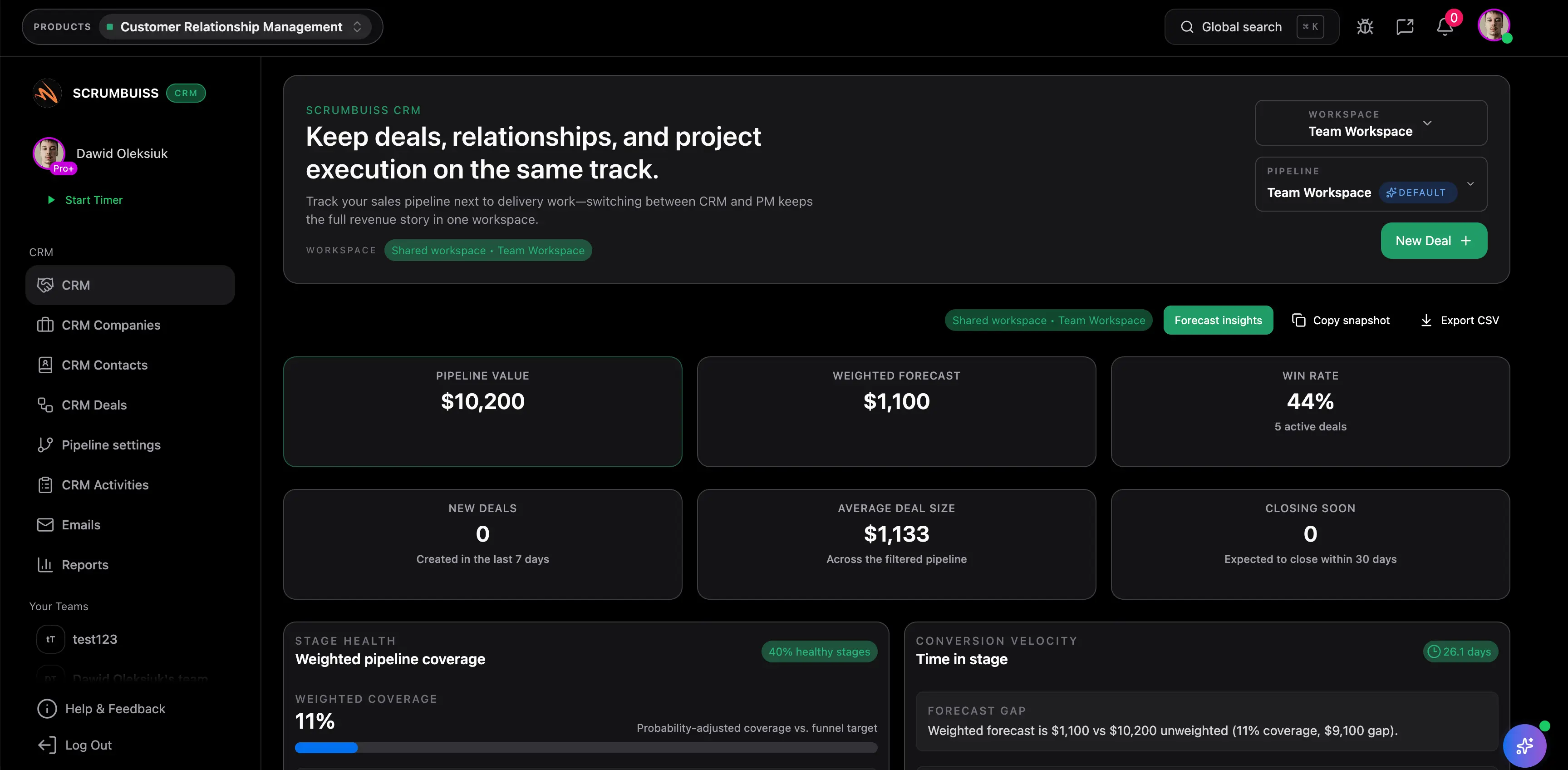
Keep account context visible

Track contacts, companies, deals, and next steps without separating customer context from execution

Teams usually feel the gap between CRM and project management after a deal starts moving. Contacts, account notes, and next steps may still influence the work, but the delivery team can only see fragments unless someone manually rebuilds the story. A connected workflow keeps account context visible before the handoff becomes another meeting.

  • Keep contacts, companies, deals, and the current next step readable in the same operating layer as the work that follows.
  • Reduce the copy-paste loop that starts when customer context lives in one tool and the delivery plan starts in another.
  • Use one connected workflow when pipeline visibility matters because it changes who needs to act next after the sale moves forward.
Scrumbuiss CRM overview with contacts, companies, and deals connected to delivery workflows

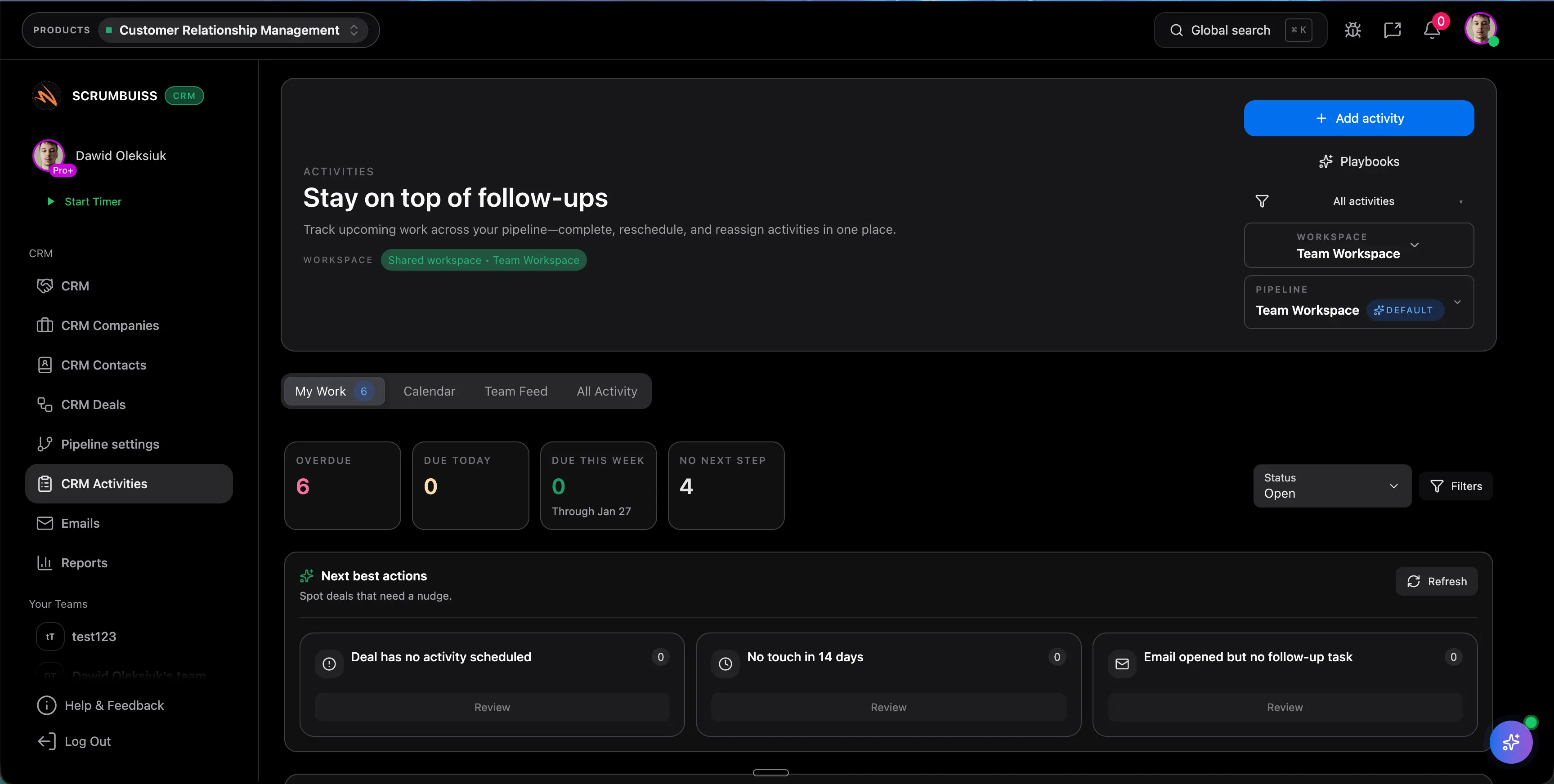
Standardize follow-through

Use activities, playbooks, forms, and automations so follow-up work does not depend on rep memory

A CRM workflow becomes operational when teams can standardize what happens next. That includes qualification follow-ups, reminders, intake details, and the tasks that prepare a handoff. The right system should make recurring steps visible enough that the team can repeat them without depending on individual heroics.

  • Use activities and repeatable playbooks to make next steps, due dates, and accountability easier to see across the pipeline.
  • Capture structured information with forms when inbound requests, qualification inputs, or post-sale details should arrive in a consistent format.
  • Add automations for reminders, stage updates, and handoff triggers so the workflow does not stall between the customer conversation and the work kickoff.
Scrumbuiss CRM activities and playbooks used to keep follow-up work consistent

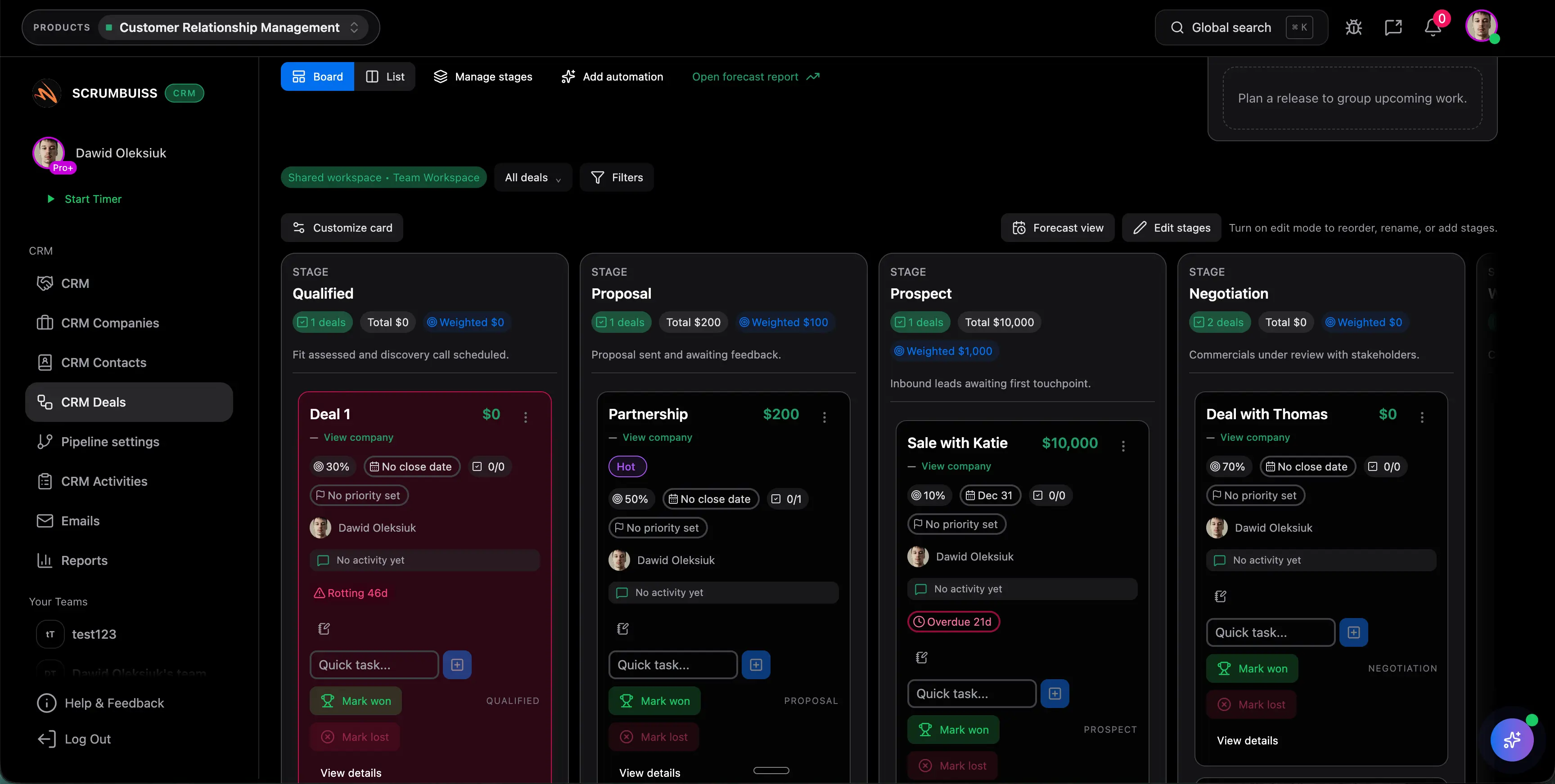
Handoff without losing the deal story

Turn a won deal into a project brief and delivery workflow without rebuilding the same context twice

The real difference between generic CRM and CRM with project management software shows up after the sale. If the team still has to recreate the account story in a kickoff doc, implementation board, or stakeholder update, the handoff is not actually connected. A better workflow lets the delivery owner start with the context that already exists and move straight into planning.

  • Convert the most important deal context into a brief or delivery setup instead of asking the next team to reconstruct it from notes and calls.
  • Keep stakeholders, expectations, assets, and early next actions visible during the first delivery phase so kickoff quality improves.
  • Use the CRM workflow to support onboarding, implementation, or client delivery, not only the sales stage before the contract is signed.
Scrumbuiss deals pipeline used to hand off won work into a project brief and delivery workflow

Competitor snapshot

These tools all cover CRM and workflow coordination differently. The useful comparison is whether sales context, follow-up discipline, and delivery handoff stay readable in one operating layer or still have to be stitched together after the deal moves on.

Tool Best for CRM workflow angle Main tradeoff Why teams choose Scrumbuiss instead
Scrumbuiss Teams that want contacts, deals, activities, project briefs, and delivery follow-through close together instead of spread across separate systems. Scrumbuiss positions the CRM workflow around sales-to-delivery continuity, where won deals can move into project planning and execution with the context still attached. It is a newer product than the largest CRM brands, so teams should validate the workflow with one real sales-to-delivery handoff before standardizing widely. The same operating layer can cover account context, next-step discipline, project brief creation, and downstream delivery work without rebuilding the story after the sale.
monday CRM Teams already evaluating monday for broader workflow management and wanting a CRM centered on pipeline visibility, automations, and sales process control. monday publicly positions the CRM around lead capture, sales funnel visibility, and automating repetitive work inside the wider monday product family. Buyers should validate how cleanly CRM context and downstream delivery execution stay connected once work moves beyond the sales pipeline into implementation or client delivery. Scrumbuiss is stronger when the shortlist centers on keeping the handoff from deal to delivery inside one practical workflow rather than optimizing the sales layer on its own.
Insightly Teams that want an established CRM vendor with project management functions presented as part of the broader commercial platform. Insightly publicly frames the offer around combining CRM and project management so relationship data and project execution can live closer together. The shortlist should still test whether day-to-day handoff clarity, activity discipline, and stakeholder readability stay simple enough once the workflow spans sales and delivery. Scrumbuiss is stronger when the buyer wants a lighter sales-to-delivery operating model tied tightly to briefs, delivery planning, and ongoing execution visibility.
Zoho CRM Teams already comfortable with the Zoho ecosystem and looking to connect project management to CRM records and sales ownership. Zoho publicly positions the page around integrating project management with CRM so sales and project teams stay aligned throughout the customer lifecycle. Buyers should verify whether activities, deal context, project kickoff, and stakeholder reporting stay readable without extra admin once the work moves across modules. Scrumbuiss is stronger when the main requirement is a simpler connected workflow for contacts, deals, project briefs, and delivery follow-through rather than a broader suite connection.

Review current packaging, permissions, and workflow depth on vendor pages before you buy. Product names are trademarks of their respective owners.

What to validate in a live pilot

The right trial is one real handoff, not a blank CRM demo. Use the checklist below to decide whether a connected CRM workflow actually reduces admin work and handoff confusion in practice.

  1. Step 1

    Pick one live deal that should move from active pipeline work into onboarding, implementation, or client delivery during the pilot window.

  2. Step 2

    Define which context must survive the handoff: contacts, company details, decision-makers, commitments, notes, files, and the next delivery action.

  3. Step 3

    Configure activities, reminders, and stage rules so the pilot tests real follow-up discipline instead of passive record storage.

  4. Step 4

    Use one brief or delivery handoff document during the pilot to verify that the next team does not have to recreate the account story from scratch.

  5. Step 5

    Run one stakeholder review after the handoff and check whether the CRM record, brief, and early delivery plan still tell the same story.

  6. Step 6

    Set go or no-go criteria: fewer duplicate updates, cleaner handoff, clearer ownership, and less time spent reconstructing context after the sale moves forward.

FAQ

These are the buying and rollout questions teams usually need answered before CRM and project work become dependable enough to standardize across the handoff from pipeline to delivery.

What is CRM with project management software?

CRM with project management software combines customer records, deals, activities, and follow-up workflows with the planning or delivery work that happens after a sale or approval moves forward. The useful version is not just a CRM plus a separate task list. It keeps enough account context attached to the work that the next team does not have to rebuild the story by hand.

How is CRM with project management software different from a generic CRM?

A generic CRM mainly optimizes sales records, pipeline management, and forecasting. CRM with project management software also focuses on what happens after the deal or request progresses into execution. That includes handoff clarity, repeatable next steps, linked briefs, and the ability to keep delivery context readable without copying it into another tool stack.

Which teams benefit most from CRM with project management software?

Teams benefit most when customer context still affects the work after the sale. That usually includes agencies, onboarding and implementation teams, service businesses, operations-led teams, and cross-functional groups where sales, account, and delivery all need to see the same context during handoff and follow-through.

When is a generic CRM still the better choice?

A generic CRM is often the better choice when the main requirement is sales administration, forecasting, or enterprise CRM governance and the downstream work already runs well in a different system. If delivery teams rarely need deal context after handoff, a broader CRM platform may fit better than a CRM workflow tied closely to project execution.

What should a live pilot prove before a team standardizes on this category?

A live pilot should prove that one real deal can move from pipeline to delivery with less duplicate data entry, clearer next ownership, and a more readable handoff. The best pilot shows that contacts, activities, brief context, and early execution work stay connected enough that the next team does not need another discovery meeting just to get started.

How should Scrumbuiss be compared with the CRM product page?

Use this solution page for category fit and evaluation questions. Use the CRM product page when you want the Scrumbuiss-specific feature overview, included capabilities, and product-level setup framing. The two pages should work together: one explains why the category matters, the other explains how the product works.