ITSM guide • reviewed March 16, 2026

ITSM Software for Incident and Change Management

Compare ITSM software for incidents, service requests, change scheduling, and operational follow-up. Use this guide to evaluate whether your team needs a heavier service-management stack or a tighter operating workflow that keeps delivery and IT operations connected.

Use this page to compare IT service-management workflows before your team standardizes on a separate ticket queue, another change calendar, or another operational reporting loop to maintain.

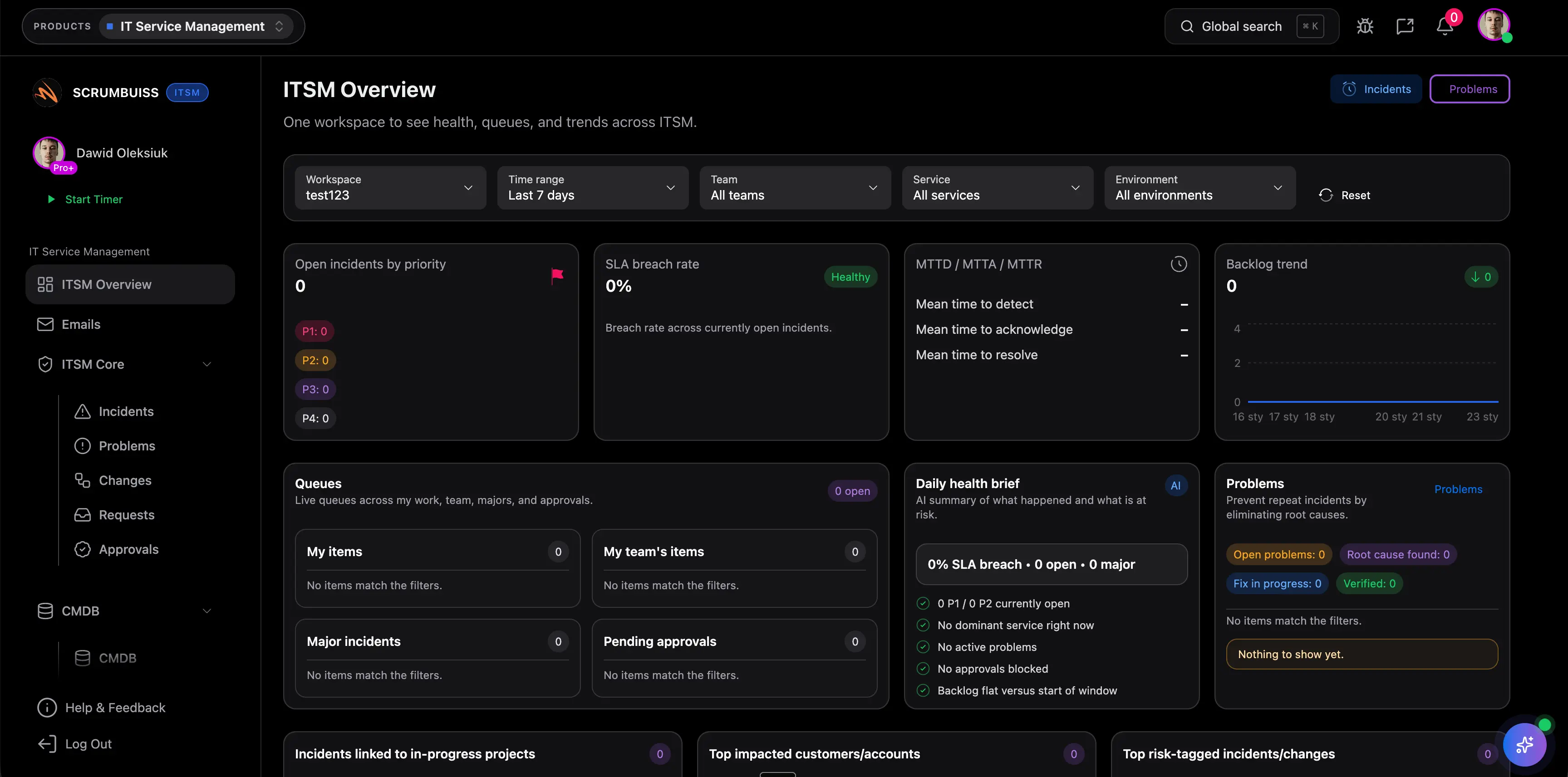
Scrumbuiss ITSM overview

How we reviewed IT service-management software

Reviewed on March 16, 2026. This page compares one buying question: which IT service management tools keep incident coordination, change management, and follow-up work readable enough for teams to operate from the same workflow instead of splitting the story across tickets, change calendars, and status updates.

  • Scrumbuiss references come from the live pricing page, the ITSM product page, the IT operations workflow page, the Calendar solution, and the Slack integration page in this site.
  • Competitor references come from the official Jira Service Management, ServiceNow ITSM, and Freshservice ITSM pages.
  • The goal is not to score every enterprise service-management feature. It is to help teams decide whether they need a broader ITSM platform first or a simpler operating layer that keeps incidents, changes, and delivery follow-up close together.

When Scrumbuiss is a fit

The right decision depends less on one service-desk feature and more on where incidents, changes, and operational follow-up should live after the immediate issue is resolved.

Strong fit for Scrumbuiss

Best when incidents, change windows, and operational follow-up should stay close to the rest of the work the team is already coordinating.

  • The team wants to triage incidents, track ownership, and keep next actions visible without rebuilding context in another layer.
  • Change scheduling matters because releases, maintenance windows, and operational dependencies have to stay readable across teams.
  • Leads want operational reporting, alerts, and follow-up work to stay understandable to both technical teams and stakeholders outside the queue.

Worth piloting carefully

A live pilot is useful when the team already has tickets somewhere, but incident updates, change coordination, or post-incident follow-up still happen in chat threads, spreadsheets, or status decks.

  • You can test the workflow with one active support stream, one change calendar, and one recurring operational review.
  • The useful question is whether Scrumbuiss reduces manual coordination rather than simply moving tickets into a new interface.
  • Validate that the same workflow helps with triage, scheduling, and follow-up before you standardize on it.

Probably not the best fit

A more enterprise-heavy ITSM suite may fit better when advanced service-desk governance, CMDB depth, or large-scale service operations matter more than keeping operational work close to delivery.

  • Your primary requirement is a deep service-management platform with extensive enterprise administration and service-catalog complexity.
  • Operational workflows already live comfortably in a dedicated ITSM stack and the real need is broader platform depth, not simpler coordination.
  • The organization has a separate service-management function whose core job is running a larger ITSM program beyond incidents and change visibility.

Run the queue in context

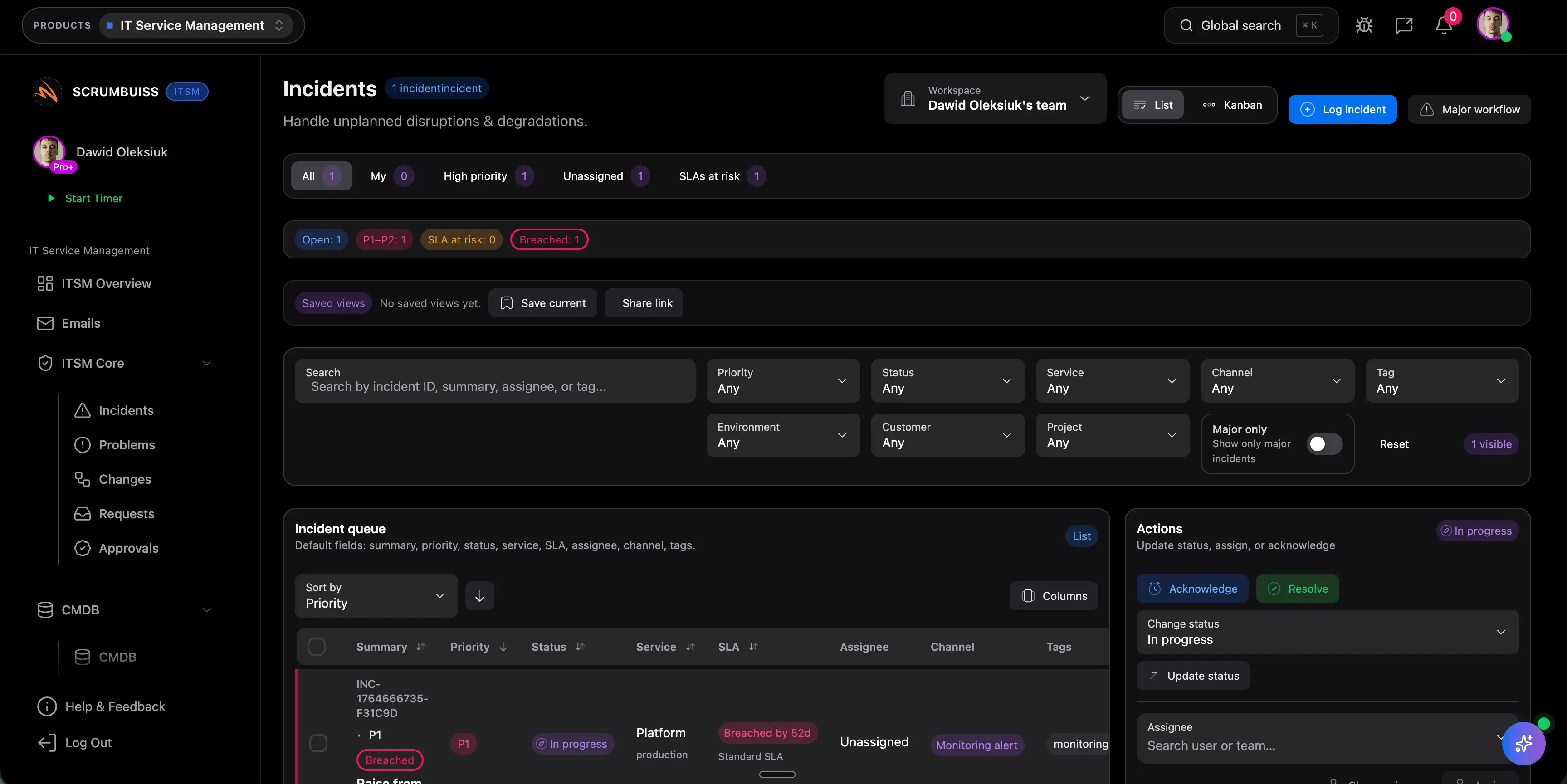
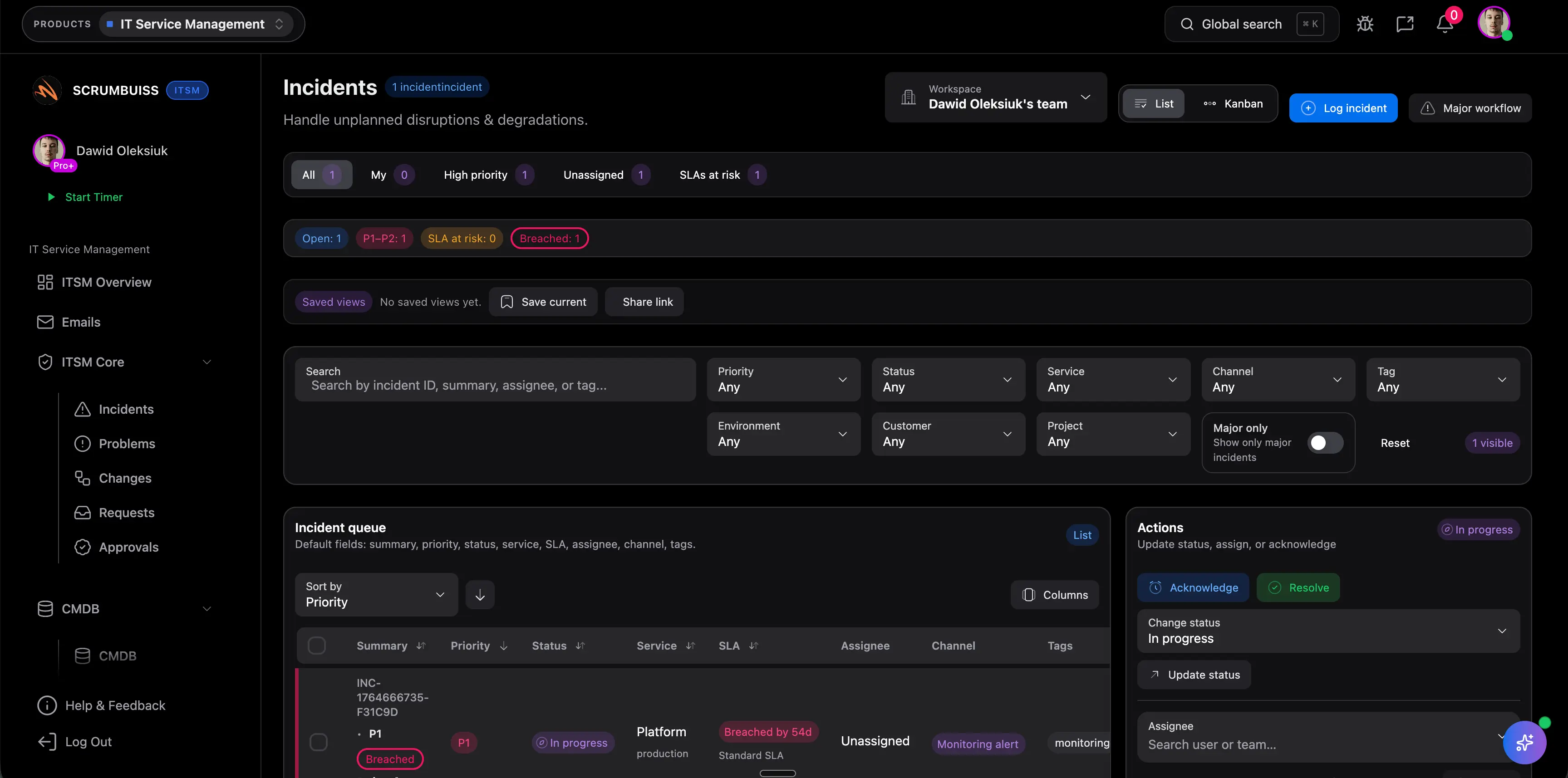
Triage incidents with ownership, urgency, and operational visibility

The practical value of ITSM software is not just a ticket list. It is the ability to keep impact, owners, blockers, and next actions readable enough that the team can respond quickly without losing the broader operational picture.

  • Capture incidents with clear ownership, priority, and status so the queue remains actionable during busy periods.
  • Keep incident follow-up close to the work itself instead of translating updates between tickets, chat, and side notes.
  • Use the same operating layer for recurring reviews so incidents become an input into future process improvements rather than isolated fire drills.
Scrumbuiss incident triage workflow for IT operations teams

Keep change windows readable

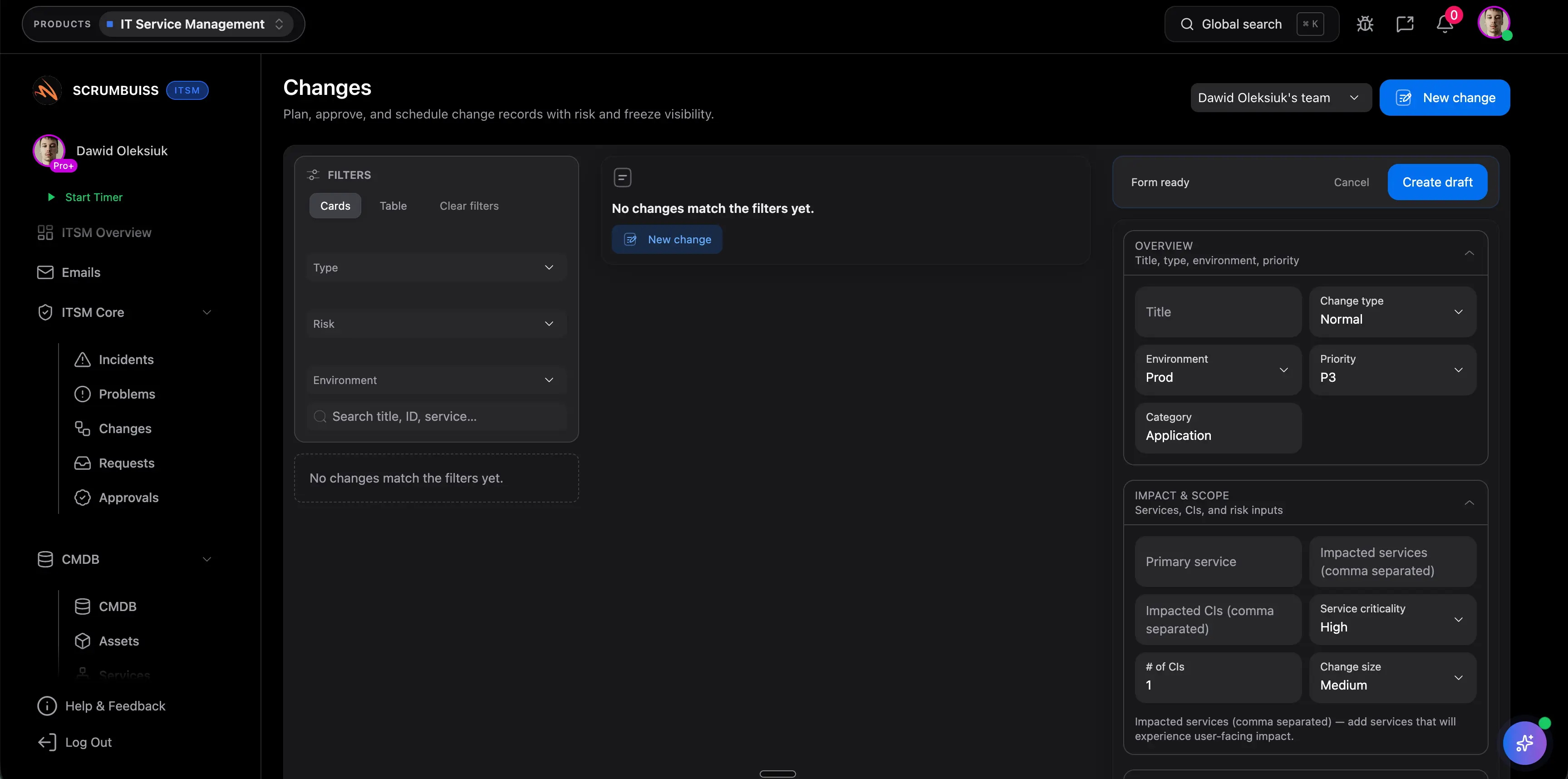
Schedule changes with a shared calendar before they collide

Change management becomes useful when the team can see which work is planned, what might conflict, and how that timing affects the rest of delivery. The real operating win is not another calendar view. It is a workflow that makes change coordination visible before risk shows up in production.

  • Use a shared calendar to plan changes, maintenance windows, and operational milestones with enough context for the people affected.
  • Review timing, risk, and dependencies before the change is committed instead of after communication already breaks down.
  • Keep operational scheduling tied to the same workflow that tracks follow-up tasks, approvals, and stakeholder updates.
Scrumbuiss change scheduling workflow with shared calendar visibility

Carry learning forward

Keep problem follow-up and delivery work connected after the incident ends

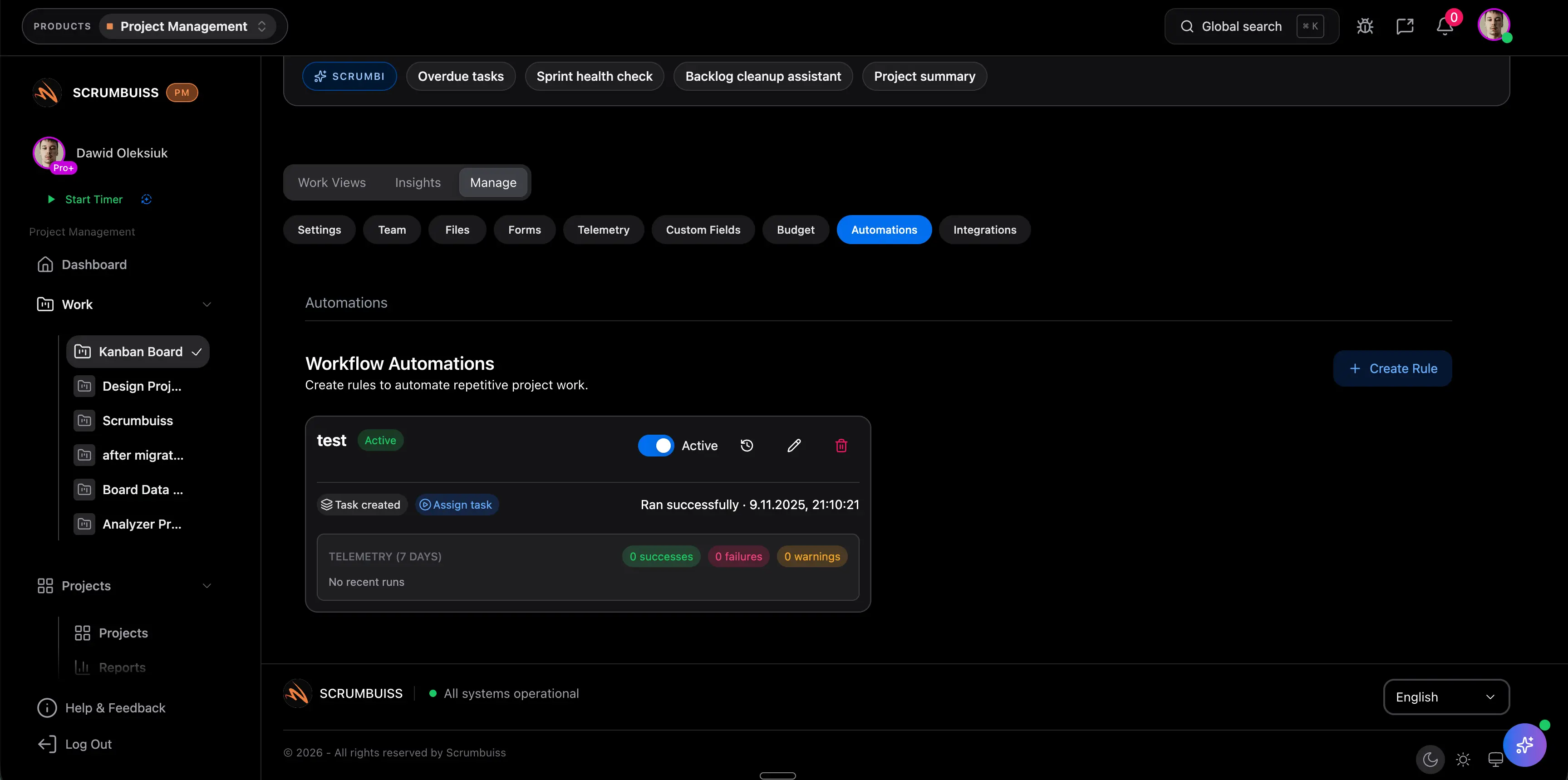
The better ITSM pages are not only about opening and closing tickets. They show whether the same workflow can keep root-cause follow-up, automations, and operational reporting close enough to ongoing delivery that the team actually changes the next plan.

  • Group recurring issues and document follow-up work so the team can see what changed after the immediate incident was resolved.
  • Use automations and Slack-connected updates to keep stakeholders informed without manually reconstructing the story every time.
  • Keep operational improvements connected to the delivery workflow so process changes, backlog items, and change controls stay aligned.
Scrumbuiss IT operations follow-up workflow with automations and alerts

Competitor snapshot

These vendors all cover IT service management, but they emphasize different operating models. The useful question is whether you need a larger enterprise ITSM suite or a workflow that keeps incidents, changes, and adjacent follow-up work easier to run day to day.

Tool Best for ITSM angle Main tradeoff Why teams choose Scrumbuiss instead
Jira Service Management Teams already operating in the Atlassian ecosystem and wanting service management close to engineering issue-tracking and developer workflows. Publicly positions itself around request, incident, problem, change, and asset-oriented service-management workflows with strong ties into the broader Atlassian stack. Buyers should validate how much administration, workflow design, and adjacent-tool coordination is required to keep operational reporting and delivery follow-up readable outside the service desk itself. Scrumbuiss is stronger when the shortlist prioritizes a simpler operating layer for incident visibility, change scheduling, and cross-team follow-up rather than a broader Atlassian-centered service-management program.
ServiceNow Enterprises standardizing on a broad service-management platform with larger governance, automation, and organizational complexity requirements. Publicly frames ITSM around enterprise service operations, AI-enabled workflows, productivity, and connected employee service experiences at scale. That depth can be heavier than teams need when the practical buying problem is keeping incidents, change windows, and follow-up work coordinated in one readable workflow. Scrumbuiss is stronger when teams want operational clarity and a tighter connection between service work and delivery work without taking on a larger platform rollout first.
Freshservice IT teams wanting a modern service-management product with incident, change, and service-desk coverage in a more dedicated ITSM environment. Publicly emphasizes unified service operations, AI-assisted service management, and structured workflows across common ITSM activities such as incidents and changes. Teams should validate how much delivery planning, stakeholder communication, and operational follow-up still live in separate systems once the core service-desk workflow is in place. Scrumbuiss is stronger when the team wants incidents, changes, automations, and adjacent operational work to stay close to the broader project and delivery workflow.

Review current plan limits, service-management modules, and enterprise requirements on the vendor pages before you buy. Product names are trademarks of their respective owners.

What to validate in a live pilot

The best trial is one real operational cycle, not a ticket demo. Use the checklist below to judge whether the workflow becomes usable inside the team’s weekly rhythm.

  1. Step 1

    Pilot one live incident stream or support queue plus one real change window instead of testing incident management in isolation.

  2. Step 2

    Define the minimum fields that make the queue readable: impact, priority, owner, status, change timing, and escalation path.

  3. Step 3

    Run triage in the live workflow for at least one full operational week so the view reflects real handoffs, not a sample dataset.

  4. Step 4

    Schedule at least one real change or maintenance window in the shared calendar and confirm the timing is visible to the people affected.

  5. Step 5

    Capture one recurring issue or post-incident follow-up and verify the resulting work stays attached to the operational context that created it.

  6. Step 6

    Push one alert or follow-up into Slack or the team’s reporting loop so you can judge whether communication becomes faster and clearer.

  7. Step 7

    Set go or no-go criteria: faster triage, clearer change visibility, less manual status translation, and more reliable follow-through after incidents.

FAQ

These are the buying and rollout questions teams usually need answered before ITSM becomes part of the real operating workflow.

What should teams look for in ITSM software first?

Start with the operating questions that create weekly friction: how incidents are triaged, how change windows are coordinated, how recurring issues are tracked after the initial fix, and how stakeholders stay informed. If the workflow still depends on chat threads, spreadsheets, or manual status translation, the tool is not solving the real problem yet.

What is the difference between incident management and change management software?

Incident management focuses on restoring service quickly when something breaks or degrades. Change management focuses on planning and communicating operational changes before they create new disruption. Strong ITSM software usually supports both because incidents and changes influence each other in the same operating rhythm.

Who usually needs ITSM software before they think they do?

Teams usually need it once incidents stop being isolated events and start affecting delivery plans, release timing, or cross-team communication. That often happens in growing software organizations, IT operations teams, and support-heavy environments where operational work is no longer manageable as a loose ticket queue.

How should a team evaluate an ITSM pilot?

Use one real incident stream and one real change schedule. Measure whether the tool makes triage faster, keeps ownership clearer, reduces manual reporting, and helps the team carry follow-up work into the next review instead of forgetting it once the immediate problem is closed.

Can ITSM live in the same tool as delivery and project work?

Yes, and that is often useful when the same organization coordinates releases, incidents, changes, and backlog follow-up together. The advantage is that the team can move from an operational issue to the next delivery action without rebuilding the context elsewhere.

When is a heavier enterprise ITSM platform a better fit than Scrumbuiss?

A larger platform can make more sense when the core requirement is enterprise-scale service management with deep administration, service catalogs, CMDB-heavy workflows, or broader organizational standardization. Scrumbuiss is stronger when the team wants a more readable operating workflow for incident coordination, change visibility, and follow-up work.

Why does change scheduling matter so much in IT operations software?

Because many teams do not fail on ticket capture. They fail when planned changes collide with releases, maintenance windows, staffing limits, or dependent systems. Shared change visibility reduces that risk by making timing and impact easier to review before the work starts.