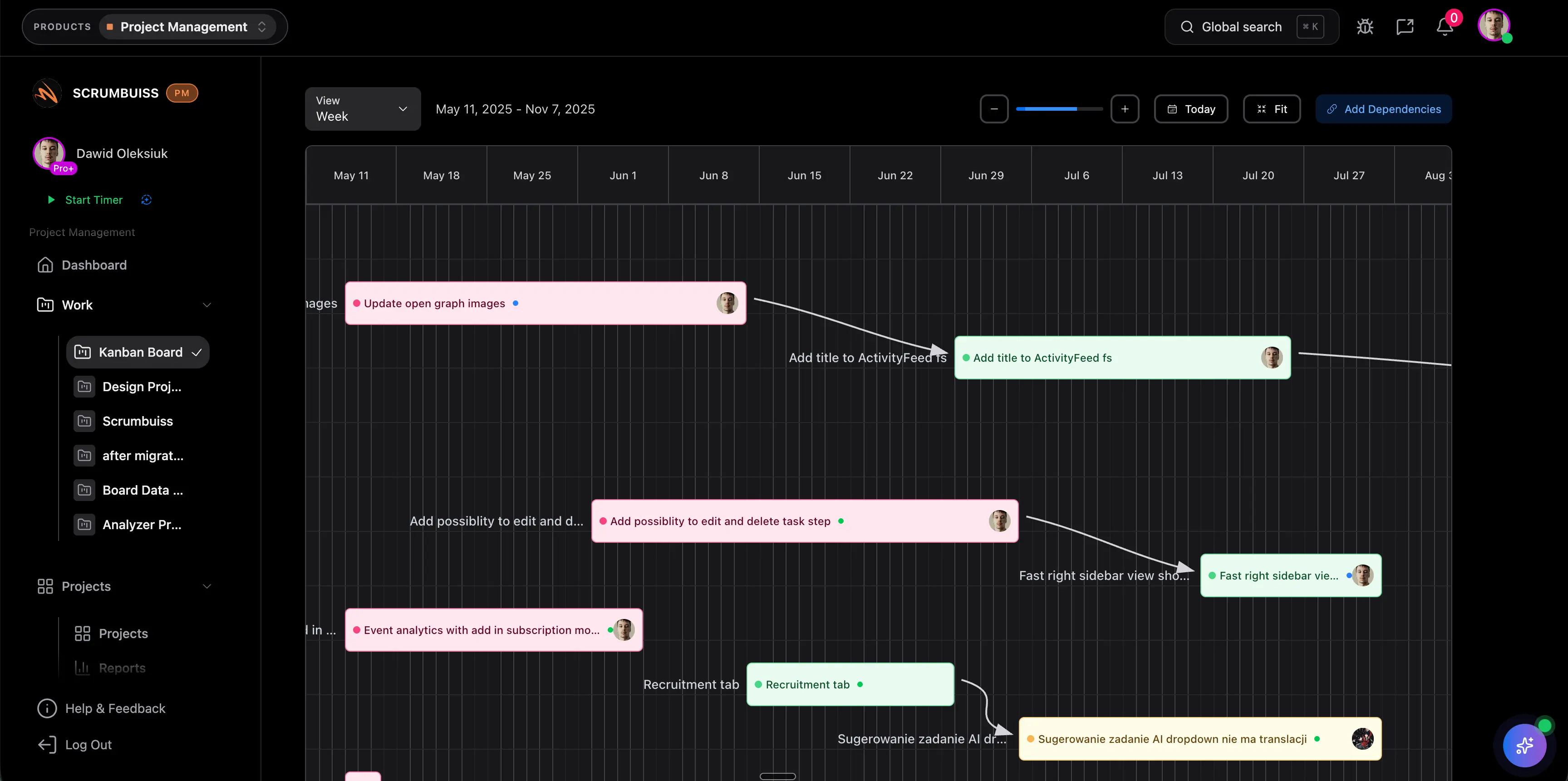
Project Scheduling Software Guide
Project scheduling software helps teams plan work across dates, dependencies, milestones, owners, and capacity before delivery pressure becomes invisible. It is different from a simple task board because the schedule has to show sequence, timing, constraints, and the effect of change.
This guide targets the commercial "project scheduling software" intent found in SEMrush keyword research. It supports, rather than duplicates, the Scrumbuiss Gantt Timeline solution page, the project schedule template, and the broader project timeline guide by focusing on buying and evaluation criteria.
Key Takeaways
- Project scheduling software should connect tasks, milestones, dependencies, capacity, and status in one planning view.
- A schedule is useful only when changes are visible and ownership is clear.
- Teams should evaluate scheduling tools with a real project, not a sample plan.
- The best fit depends on whether the team needs simple dates, Gantt planning, capacity-aware scheduling, or portfolio-level visibility.
What Project Scheduling Software Should Do
At minimum, project scheduling software should help a team answer:
- What work must happen before something else can start?
- Who owns each scheduled activity?
- Which milestones matter to stakeholders?
- What date is at risk if this task moves?
- Where is the critical dependency or approval?
- Is the plan realistic against available capacity?
- What changed since the last review?
The useful output is not a pretty chart. The useful output is a schedule the team trusts enough to use during decisions.
Project Scheduling Software vs. Task Management
| Area | Task management | Project scheduling software |
|---|---|---|
| Primary question | What needs to be done? | When should work happen and in what order? |
| Core view | Tasks, status, assignees | Dates, dependencies, milestones, timeline |
| Best for | Daily execution | Planning, coordination, forecast review |
| Risk if missing | Work gets lost | Dates slip without early warning |
Most delivery teams need both. The task board helps people execute. The schedule helps project managers, leads, and stakeholders understand timing, sequencing, and tradeoffs.
Features To Evaluate
| Feature | Why it matters |
|---|---|
| Gantt or timeline view | Shows sequence, dependencies, milestones, and deadline pressure |
| Dependency mapping | Makes handoffs and blockers visible before they delay the plan |
| Milestone tracking | Keeps stakeholder commitments separate from every task detail |
| Drag-and-drop replanning | Lets the team model changes without rebuilding the plan |
| Capacity signals | Prevents dates from looking possible when people are already overloaded |
| Baseline or change history | Shows what moved and why |
| Status reporting | Turns schedule data into stakeholder-ready updates |
| Permissions and sharing | Lets leaders or clients see the right level of detail |
Scrumbuiss connects scheduling with Project Delivery, Gantt Timeline, Workload & Capacity, Dashboard, and Risk Center.
When Scheduling Software Is Worth It
Scheduling software is usually worth evaluating when:
- deadlines depend on multiple teams or departments
- work has handoffs, reviews, approvals, or vendor dependencies
- projects have milestones that must be reported to leadership
- the team keeps promising dates before checking capacity
- a task board shows status but not date risk
- plans are rebuilt manually for every stakeholder update
It may be unnecessary when the team runs very small projects with flexible dates, few dependencies, and no stakeholder reporting requirement.
How To Shortlist Tools
Use one real project and test the workflow from planning to replanning.
| Test | What to check |
|---|---|
| Build the schedule | Can the team create tasks, dependencies, owners, and milestones quickly? |
| Review capacity | Does the tool reveal overload before dates are approved? |
| Move a dependency | Does the downstream impact become obvious? |
| Share status | Can stakeholders understand progress without opening every task? |
| Add a scope change | Is the effect on date, owner, and milestone visible? |
| Close the project | Can the team keep the final schedule, decisions, and lessons attached? |
If the tool looks good only when the project is clean, keep testing. Schedules become valuable when the plan changes.
Common Mistakes
Choosing a timeline-only tool
A visual timeline is helpful, but it is not enough if owners, dependencies, status, risks, and files live elsewhere.
Ignoring capacity
Dates can look perfect while the same person is assigned to five critical tasks in the same week. Use capacity review before approving the schedule.
Updating status twice
If the schedule and task board are maintained separately, one will drift. The schedule should be connected to live execution wherever possible.
Hiding changes in meetings
Every material schedule change should have a reason, owner, and decision record. Otherwise the team loses the ability to explain why the forecast moved.
FAQ
Frequently
asked
questions
Related features
Explore the Scrumbuiss features mentioned in this article.
- Gantt Timeline
Plan dependencies, milestones, and schedule changes with a Gantt chart view that stays close to execution.
- Workload & Capacity
Balance workload, plan capacity, and spot overload early.
- Dashboard
Track project progress, blockers, workload, KPIs, status reporting, and analytics context in one live dashboard.
Unlock Success &
Power Up Your Projects
Next to explore
Explore more pages to understand the product suite, common workflows, and evaluation guides.