Client Project Management Software for Agencies
Client project management software for agencies should carry one real client job from the first request through kickoff, delivery, approvals, tracked effort, workload decisions, and the status a client actually sees. If briefs, files, time, and updates split across separate systems, account leads spend more time reconstructing the story than moving the work.
Reviewed on March 21, 2026
A practical workflow guide, illustrated with real Scrumbuiss screenshots.
How we evaluated client project management software
Reviewed on March 21, 2026. This buyer guide evaluates one concrete agency workflow: a new client request lands, kickoff turns it into owned delivery work, files and approvals move through the project, tracked effort and workload shape staffing decisions, and the client sees current status without the team rebuilding the story in slides or chat recaps.
- We reviewed how Scrumbuiss supports that workflow across Client Portal, Project Intake, CRM, Project Brief, Files, Time Tracking, Workload Capacity, Dashboard, and the agencies and client-onboarding use cases.
- We compared that against the official agency and client-delivery positioning published by Teamwork, ClickUp, Productive, and Accelo.
- We prioritized the buyer questions agencies usually need answered before rollout: portal versus workflow, how approvals and time stay attached to the work, where change requests should enter the system, and when broader PSA or profitability requirements mean validating another layer as well.
At a glance
Scrumbuiss is built for agencies that want one client-delivery workflow, not a separate board for every handoff. The page is strongest when the request, brief, files, approvals, time, workload, and client-visible status stay tied together.
What Scrumbuiss is
Client project management software for agencies that keeps intake, briefs, files, approvals, time tracking, workload, and client-visible status in one operating flow.
Who it fits now
Agencies and client-service teams that already need to run live delivery, share current status, and keep context attached to one project record.
What to validate before rollout
Confirm whether you need deeper profitability reporting or a formal client change-request system before replacing a broader agency-ops stack.
What is shipped today
Strong fit now / Validate if you need
Strong fit now
- One workflow from intake to delivery status
- A client-facing view that keeps current work visible
- Teams that want briefs, files, approvals, and time close together
- Delivery leads who need a demo-first evaluation before rollout
Validate if you need
- Deep profitability reporting for agency finance teams
- A structured client change-request workflow
- A broader agency-operations platform before delivery workflow
Capability matrix
The matrix below keeps the claim boundaries explicit so the page does not overstate what is already live in the app.
| Capability | Status | Notes |
|---|---|---|
| Client intake | Shipped now | Structured intake is available today. |
| Project brief continuity | Shipped now | Brief context can stay attached to delivery work. |
| Files | Shipped now | Files are available in the delivery workflow. |
| Approvals | Shipped now | Approval steps are already part of the flow. |
| Forms | Shipped now | Structured forms are available for intake and follow-up. |
| Time tracking | Shipped now | Tracked effort is available in the product. |
| Workload review | Shipped now | Workload visibility is already part of the app. |
| Budget vs actual | Shipped now | Budget tracking is available today. |
| Client-visible status | Partial today | Status sharing exists, but the stable publication model still needs deeper client-hub work. |
| Profitability | Planned next | This needs the broader finance phase before the page can market it confidently. |
| Client change requests | Planned next | A first-class request flow is still to be built. |
Who it’s for
Teams that want a clear workflow, less manual coordination, and better visibility.
- Agencies running retainers, implementations, website builds, or recurring client delivery across several active accounts.
- Account managers, project managers, and delivery leads who own kickoff, approvals, staffing decisions, and weekly client updates.
- Teams outgrowing a portal-only or board-only setup because briefs, files, approvals, tracked effort, and status reporting keep splitting apart.
- Organizations deciding whether the immediate need is a cleaner delivery workflow first or a heavier PSA and agency-operations platform.
- Client-service teams that want clients to see current status without the internal team rebuilding the same narrative in separate decks, email threads, or spreadsheets.
Client project management software comparison
The practical decision is not which workspace can store client tasks. It is which workflow keeps request intake, kickoff context, files, approvals, tracked effort, workload review, and client-ready status connected enough that the agency does not rebuild the same story every week.
| Platform | Best fit | Main tradeoff | Where Scrumbuiss is stronger |
|---|---|---|---|
| Scrumbuiss | Agencies that want one operating path from intake and kickoff through delivery, files, approvals, tracked effort, workload review, and client-visible status. | It is newer than the largest agency and PSA platforms, so teams should validate the workflow with one live client account and confirm that the current partial client-visible status layer and planned profitability or change-request work cover their real rollout needs. | Keeps intake, briefs, files, approvals, tracked effort, and delivery status tighter in one operating flow instead of pushing the team into separate request, portal, and reporting layers. |
| Teamwork | Client-service teams that prioritize agency delivery, time, budgets, profitability, and broader account operations inside an agency-focused platform. | Buyers should still validate how much kickoff structure, file continuity, and client-facing workflow they want tied directly to the same operating record rather than spread across a broader agency stack. | Scrumbuiss is stronger when the shortlist prioritizes a tighter client-delivery workflow connecting requests, briefs, approvals, files, time, and status with less platform sprawl. |
| ClickUp | Teams that want a highly configurable all-in-one workspace for client projects, approvals, dashboards, and templated delivery flows. | The flexibility can shift more of the workflow-design burden onto the agency once client reporting, workload reviews, and file handoffs need a clearer default model. | Scrumbuiss is stronger when agencies want a more opinionated client-delivery path that stays readable from intake through weekly delivery reviews. |
| Productive | Agencies that prioritize PSA-style operations, including resourcing, financial control, and broader agency administration around client work. | Teams should validate whether they need a broader agency-operations platform today or a more focused client-delivery workflow first. | Scrumbuiss is stronger when the main buying need is delivery continuity across intake, briefs, approvals, files, time, workload, and client-facing progress instead of a finance-led agency stack. |
| Accelo | Agencies that want CRM, projects, client work, retainers, and operational administration connected inside a long-established service-business platform. | Buyers should validate how much implementation depth and operational breadth they need when the immediate pain is a fragmented delivery workflow rather than a full agency-ops replacement. | Scrumbuiss is stronger when the rollout starts with delivery clarity: getting requests, kickoff context, files, approvals, time, and client-visible status into one readable workflow before layering on broader PSA administration. |
This is a fit-and-tradeoff view based on public product positioning and visible workflow coverage, not a feature-parity procurement sheet.
Common challenges
- New client requests arrive by email, form, or chat, then kickoff notes, owners, and deadlines splinter into separate systems before delivery even starts.
- A portal or board can show motion while the real client context still lives in briefs, folders, approvals, and status recaps maintained somewhere else.
- Files and approval history drift away from the active work, which makes scope discussions and review rounds slower every week.
- Time gets captured after the fact instead of inside the delivery flow, so over-servicing shows up late and budget-versus-actual discussions start from incomplete context.
- Workload is reviewed in one place while pending approvals, handoffs, and real client deadlines sit in another, making staffing decisions less reliable.
- Change requests become ambiguous because the team cannot clearly separate a new ask from the work that was already scoped, approved, and in progress.
How it works
A practical workflow structure you can replicate in your own workspace.
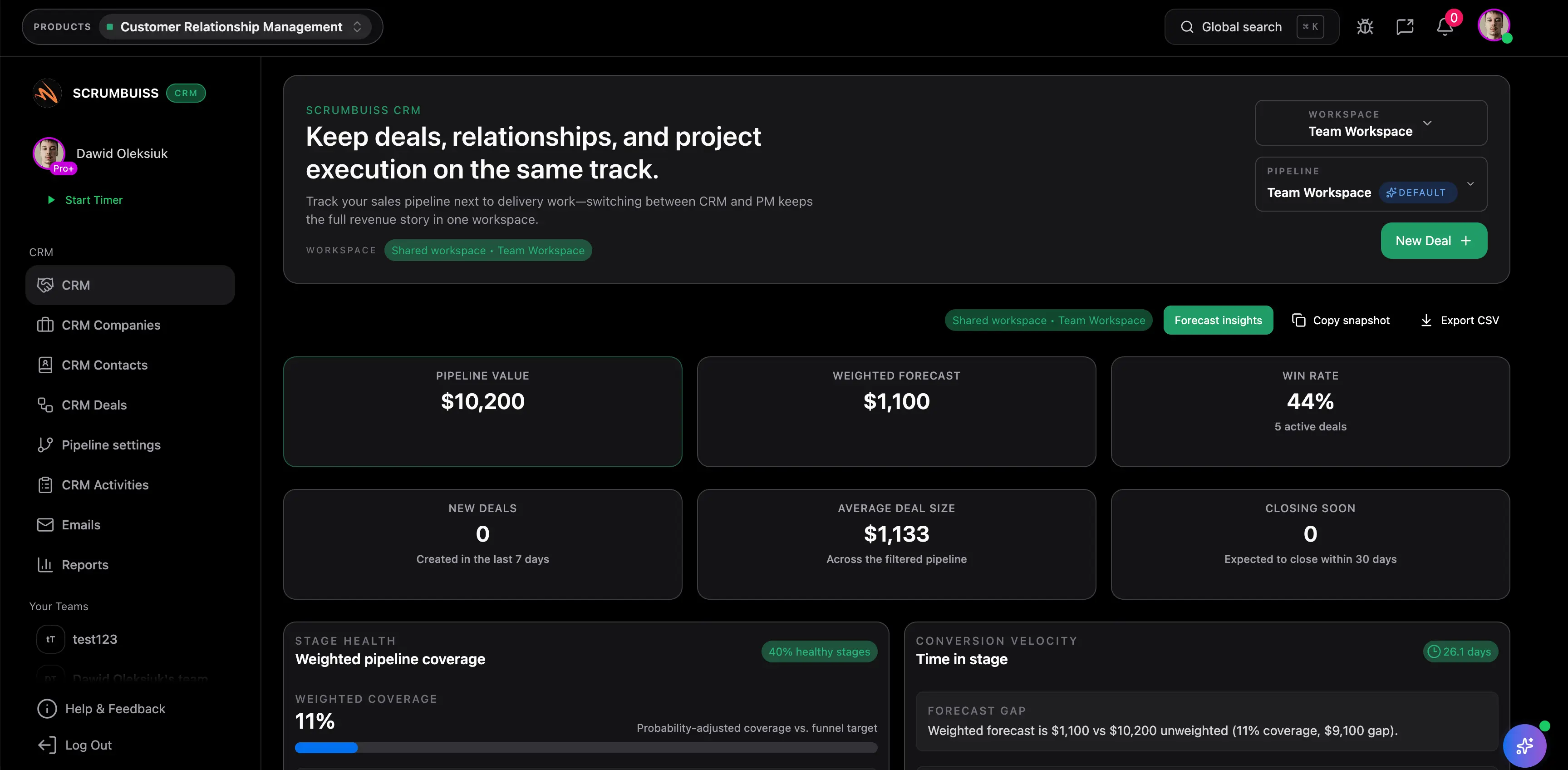
Turn a new client request into an owned kickoff record
A client asks for a landing-page refresh with new copy, design updates, and a launch deadline. Capture the requester, scope notes, stakeholders, starting files, and next owner before the work turns into email archaeology.
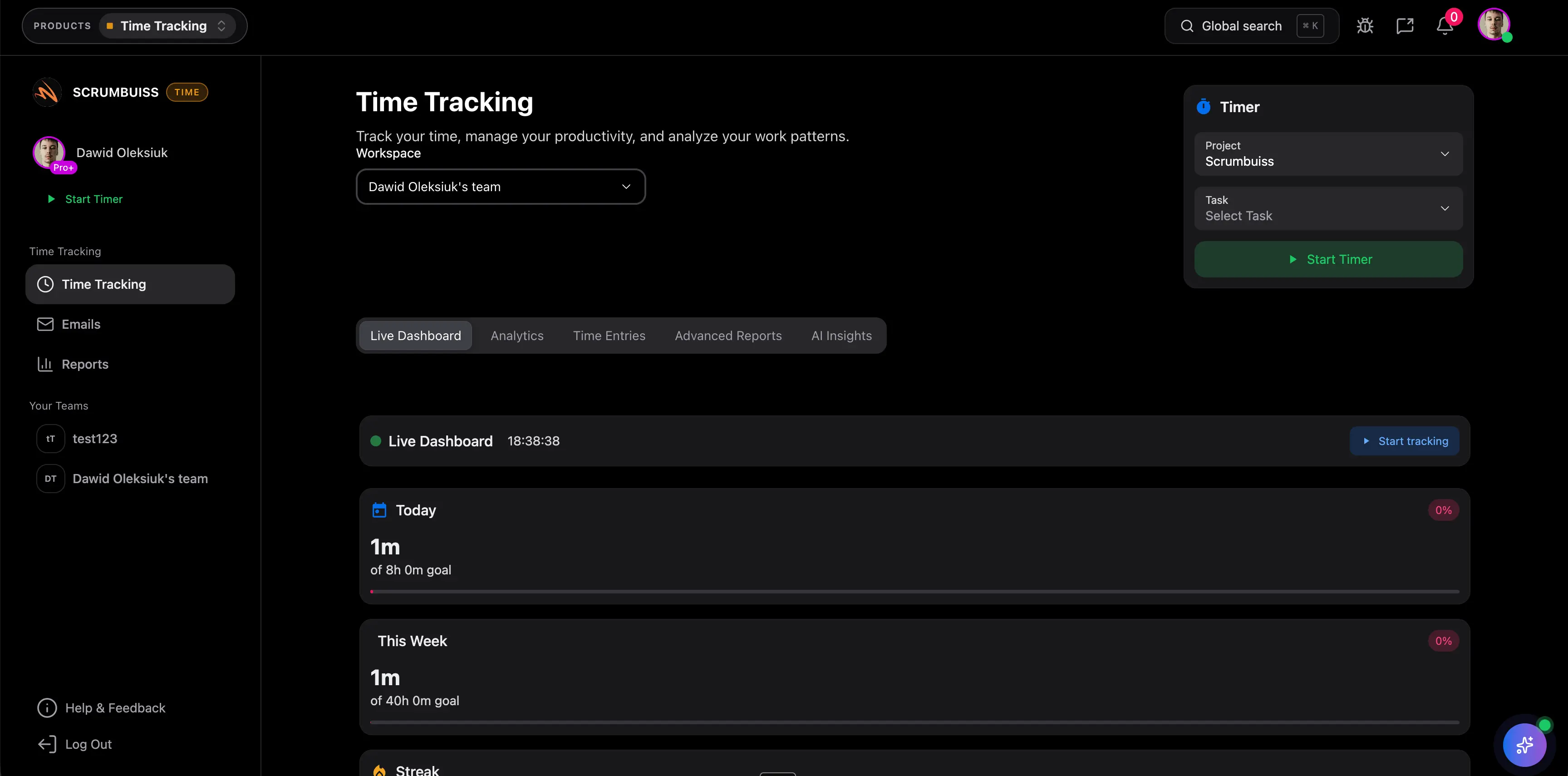
Run delivery with approvals, files, time, and workload visible together
Once design and implementation work starts, keep active tasks, file handoffs, client approvals, logged hours, and team load visible in the same operating layer so an overdue approval or overbooked specialist shows up before the Friday status call.
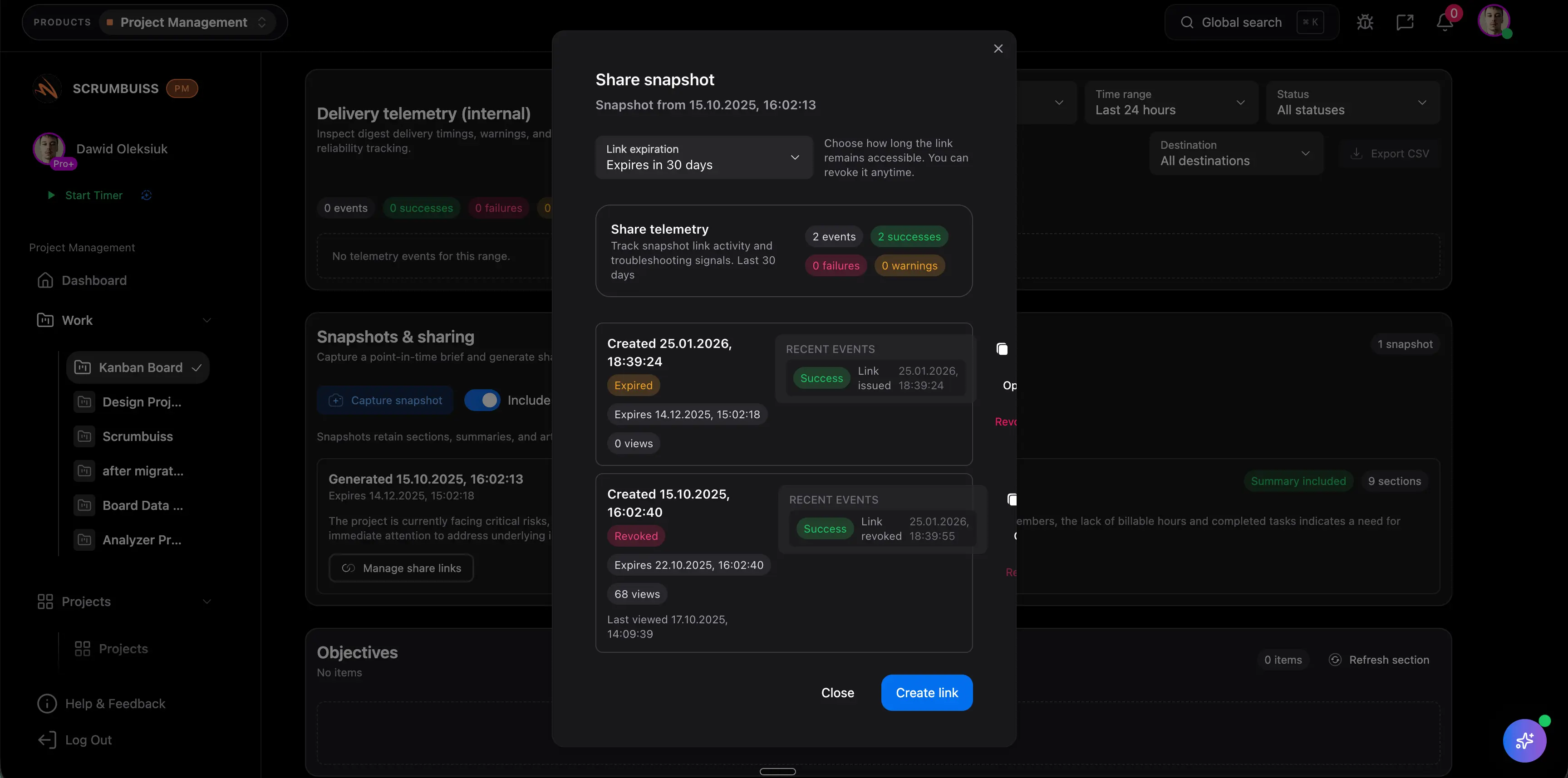
Share client-ready status without rebuilding the story in slides
When the client asks what changed this week, use the live brief, current files, pending approvals, and next milestone to share an update from the workflow instead of compiling a separate narrative from chats, decks, and folders.
Potential impact (examples)
The examples below are illustrative and depend on your team, process, and workload.
Reduce weekly status reconstruction
Keep the brief, files, approvals, tracked effort, workload signals, and next milestone close enough together that account leads stop rebuilding the same delivery story every week.
Example: Save 1 to 2 hours per account lead each week on a retainer book that currently requires pulling updates from boards, chats, and Drive folders.
Catch over-servicing earlier
Attach tracked effort and current approvals to the delivery workflow so extra revision cycles, unplanned tasks, and scope drift show up before month-end reporting.
Example: Recover 30 to 60 minutes per person each week by spotting approval loops and unscoped work before they become normal delivery behavior.
Make workload decisions with client context
Bring workload review into the same operating layer as the client work itself so managers can rebalance before a deadline slips, an approval stalls, or one specialist becomes the hidden bottleneck.
Example: Avoid one late monthly replan or missed client date by rebalancing work when approvals, active tasks, and team load are visible together.
Setup checklist
A practical checklist to implement this workflow inside Scrumbuiss.
- ✓ Pilot one live agency scenario, such as a retained website change, campaign rollout, or client implementation, with a real request and one real reporting cycle.
- ✓ Define the minimum kickoff context that must stay attached to the work: requester, scoped outcome, stakeholders, deadlines, starting files, approval owners, and next milestone.
- ✓ Decide what enters through structured intake, what should be treated as a change request, and what belongs inside the active delivery workflow after kickoff.
- ✓ Set up the pilot around the client-facing moments that usually break first: the current brief, file handoff, approval checkpoint, tracked effort, workload review, and shared status view.
- ✓ Keep time tracking inside the same pilot so the team can judge whether hours improve staffing, estimate, and scope decisions instead of only creating another report.
- ✓ Run one weekly account review and one client update from the live workflow, then measure how much manual recap, file chasing, or status reconstruction still remains.
- ✓ Validate whether the current shipped and partial capabilities are enough for the rollout or whether the team truly needs a deeper profitability layer or first-class change-request workflow before standardizing.
- ✓ Set go or no-go criteria up front: fewer handoff gaps, clearer client updates, stronger file continuity, earlier visibility into effort and overload, and less ambiguity around new asks versus approved work.
ROI example
A simple way to think about profitability is saved time value (or recovered billable time) minus software cost.
Illustrative calculation (USD)
- Team size: 8
- Hours saved per person per week: 0.6
- Blended hourly rate: $85 per hour
Estimated saved time: 4.8 hours/week
Estimated value: $408 per week (~$1,767 per month)
Illustrative example only. This is not a guarantee or customer result. Subtract your software costs to estimate net ROI.
FAQ
What is client project management software? +
Client project management software helps agencies run client delivery from the first request or kickoff through active execution, approvals, files, tracked effort, workload review, and current status updates. The useful version does more than organize tasks. It keeps the client-facing story connected to the internal workflow that actually moves the work.
How is client project management software different from agency management software? +
Client project management software is narrower and more delivery-focused. It centers on how client work is requested, planned, delivered, approved, and reported. Agency management software is usually broader and may include staffing, profitability, finance, and wider operational administration. Teams often need to decide which layer matters first.
Is client portal software enough for client project management? +
Sometimes, but only when the main buying need is the external client experience. A portal can help clients view updates or upload files, but it does not automatically solve the internal workflow problem. Agencies still need the brief, approvals, files, tracked effort, workload review, and next-step ownership tied to the work that is actually moving. Scrumbuiss is stronger when that internal continuity is the bigger gap.
Why keep time tracking inside the client delivery workflow? +
If billable visibility, scope control, staffing realism, or client reporting matter, keeping time close to delivery work is usually the cleaner setup. The key is not only logging hours. It is whether those hours improve the next staffing, estimate, or status decision while the work is still in motion.
How should approvals and change requests be handled? +
Approval history should stay attached to the files and deliverables the client is reviewing, not buried in separate inboxes or chat threads. Change requests should also be separated from already scoped work early enough that the team can decide whether the ask belongs in the current plan or a new request path. Scrumbuiss already supports approvals today, while a more formal first-class client change-request workflow is still a planned area that teams should validate directly during evaluation.
What should a live client project management pilot prove? +
A useful pilot should prove that one real client workflow can move from intake to kickoff, delivery, approvals, tracked effort, workload review, and status reporting with less reconstruction. If the team still needs a second spreadsheet, a second file system, or a second status tracker to run the week, the workflow is not connected enough yet.
When do agencies still need a PSA or profitability platform in addition to Scrumbuiss? +
Not every agency needs that extra layer immediately, but some do. Scrumbuiss is strongest when the immediate buying need is a cleaner client-delivery workflow. Teams that need deeper budget-versus-actual control, profitability management, broader finance reporting, or more formal client change-request administration should validate those broader requirements directly during evaluation.
Supporting links
Explore the supporting pages that back up this workflow and help explain the full delivery stack.
Related products
Project delivery
Plan, execute, and report project work with Kanban, sprints, timelines, workload planning, task management, workflow automation, and dashboards.
CRM
Manage contacts, companies, deals, and pipelines — with work connected to delivery.
Time Tracking
Track team and agency time inside delivery workflows, then report effort by project, client, or person.
Files
Store, organize, and share project files — with recents, shared items, and collections.
Related templates
Client handoff template
Download a free client handoff template for sales-to-delivery handoff, client onboarding, kickoff readiness, stakeholders, scope, files, risks, and next actions.
Project charter template
Download a free project charter template for project goals, scope, stakeholders, assumptions, risks, milestones, success criteria, and approval readiness.
Stakeholder matrix template
Download a free stakeholder matrix template for stakeholder mapping, influence, interest, decision rights, communication cadence, owners, and next actions.
Scope of work template
Download a free scope of work template with example deliverables, exclusions, acceptance criteria, milestones, assumptions, and approval checkpoints.
Project development plan template Excel
Download a free project development plan template for Excel with phases, milestones, owners, dependencies, risks, status fields, Gantt chart inputs, and deliverable tracking for project teams.
Project roadmap template
Download a free project roadmap template with objectives, initiatives, themes, milestones, dependencies, capacity notes, risks, success metrics, and review fields.
Project schedule template
Download a free project schedule template for weekly planning, milestones, owners, dependencies, blockers, schedule risk, and next steps.
Meeting agenda template
Download a free meeting agenda template for project meetings, kickoff reviews, decisions, action items, owners, risks, and follow-up summaries.
Timesheet template
Download a free timesheet template with date, person, project, task, client, billable status, estimated hours, actual hours, variance, notes, and approval status.
Kanban board template
Download a free Kanban board template with columns, Kanban card fields, WIP limit prompts, priorities, owners, due dates, blockers, and review notes.
Project brief template
Download a free project brief template with a filled example, one-page outline, and practical checklist for aligning scope, stakeholders, milestones, and handoffs.
Project KPI dashboard template
Download a free project KPI dashboard template with example delivery metrics, status rules, owner fields, and a weekly reporting structure for project teams.
Project status report template
Download a free project status report template with progress, milestones, blockers, risks, decisions, next steps, and stakeholder update fields.
Risk register template
Download a free risk register and risk matrix template in CSV format with sample risks, 1 to 5 scoring, owners, trigger signals, and weekly review steps.