Sales Pipeline Software for Lead Management and Handoff
Sales pipeline software should do more than list deals by stage. Scrumbuiss helps teams manage leads, activities, next steps, and closed-won handoff so the account story can move into onboarding or delivery without being rebuilt from spreadsheets, CRM notes, and recap meetings.
Reviewed on May 21, 2026
Reviewed by Scrumbuiss editorial team
A practical workflow guide, illustrated with real Scrumbuiss screenshots.
How we evaluated sales pipeline workflow fit
Reviewed on May 21, 2026 by the Scrumbuiss editorial team. This page evaluates one workflow question: can a team move from lead management and deal follow-up into a clean delivery handoff without rebuilding the customer story in another tool?
- We reviewed the public Scrumbuiss pages for CRM, Forms, Automations, Project Brief, Client Onboarding, Client Project Management, and Project Delivery.
- We kept the page focused on operational pipeline execution: stages, ownership, next steps, activities, and handoff readiness.
- We intentionally avoided broad best-CRM rankings, generic CRM definitions, contact-center CRM, and sales theory that does not connect to Scrumbuiss product fit.
At a glance
This page is the practical pipeline workflow page. Use it after you know CRM with project management is relevant and need to see how deals, activities, next steps, and handoff readiness should run day to day.
What Scrumbuiss is here
Sales pipeline software connected to CRM records, follow-up activities, project briefs, and delivery handoff.
Who it fits now
Teams that need a lighter pipeline workflow where won deals become onboarding, implementation, or delivery work.
What to validate
Confirm whether your team needs deeper revenue forecasting or enterprise CRM administration before replacing a larger CRM stack.
What is shipped today
Strong fit now / Validate if you need
Strong fit now
- Pipeline stages tied to next actions
- Lead and deal context close to project handoff
- Activities and reminders that support follow-up discipline
- Closed-won work that moves into onboarding or delivery
Validate if you need
- Deep revenue forecasting and sales governance
- Large-enterprise CRM administration
- Contact-center CRM or heavy customer-service operations
Capability matrix
The page keeps the claim boundaries clear: this is a pipeline and handoff workflow, not a broad CRM review or generic sales methodology page.
| Capability | Status | Notes |
|---|---|---|
| Lead and deal tracking | Shipped now | CRM records cover contacts, companies, deals, stages, ownership, and current next steps. |
| Activities and follow-up | Shipped now | Activities and playbooks support repeatable follow-up instead of relying on rep memory. |
| Forms for qualification or intake | Shipped now | Forms can capture structured information before a deal moves into handoff or delivery. |
| Sales-to-delivery handoff | Shipped now | Project brief and delivery workflows help turn closed-won context into execution context. |
| Pipeline reporting | Partial today | Teams can review stages and activity context, but deeper revenue forecasting should be validated directly. |
| Enterprise CRM governance | Planned next | Teams that need complex CRM administration should validate fit before standardizing. |
Who it’s for
Teams that want a clear workflow, less manual coordination, and better visibility.
- Sales teams that need clear pipeline stages, next steps, and follow-up ownership
- Founders and account leads managing a lightweight CRM process before delivery starts
- Teams that hand off won deals into onboarding, implementation, agency work, or client delivery
- Revenue and delivery leaders who want fewer missed steps and less duplicate handoff work
Sales pipeline workflow comparison
The important decision is not whether a tool can display a pipeline. It is whether deal context, follow-up activity, and the first delivery action stay connected once the opportunity moves forward.
| Platform | Best fit | Main tradeoff | Where Scrumbuiss is stronger |
|---|---|---|---|
| Scrumbuiss | Teams that want a lighter CRM pipeline tied to activities, forms, project briefs, and sales-to-delivery handoff. | It is narrower than large enterprise CRM suites, so teams should validate revenue-ops depth and reporting requirements before replacing a broader stack. | Keeps pipeline follow-up close to the delivery handoff so won deals can become onboarding or project work without another reconstruction step. |
| Standalone CRM | Sales teams whose main requirement is pipeline administration, forecasting, governance, and account records before the sale. | Delivery teams may still need to rebuild scope, stakeholders, files, and next actions in another project system after the deal is won. | Scrumbuiss is stronger when the operational pain starts at the handoff between pipeline and delivery. |
| Spreadsheet pipeline | Small teams that need a quick shared format for stage, owner, value, probability, and follow-up date. | Spreadsheets become stale when activities, reminders, history, and handoff ownership need to stay current across several people. | Scrumbuiss adds live ownership, activity context, forms, automations, and linked delivery workflows when the sheet starts creating manual review work. |
This is a fit-and-tradeoff view based on public positioning and visible Scrumbuiss workflow coverage, not a feature-parity CRM procurement sheet.
Common challenges
- Pipeline reviews focus on deal value while next actions and follow-up dates stay vague
- Lead details, proposal notes, and promised scope are copied manually into kickoff docs after the sale
- Closed-won deals stall because nobody owns the first onboarding or delivery action
- Activities and reminders depend on rep memory instead of a shared CRM workflow
- Spreadsheets can show the pipeline but rarely preserve enough context for the team that inherits the work
How it works
A practical workflow structure you can replicate in your own workspace.
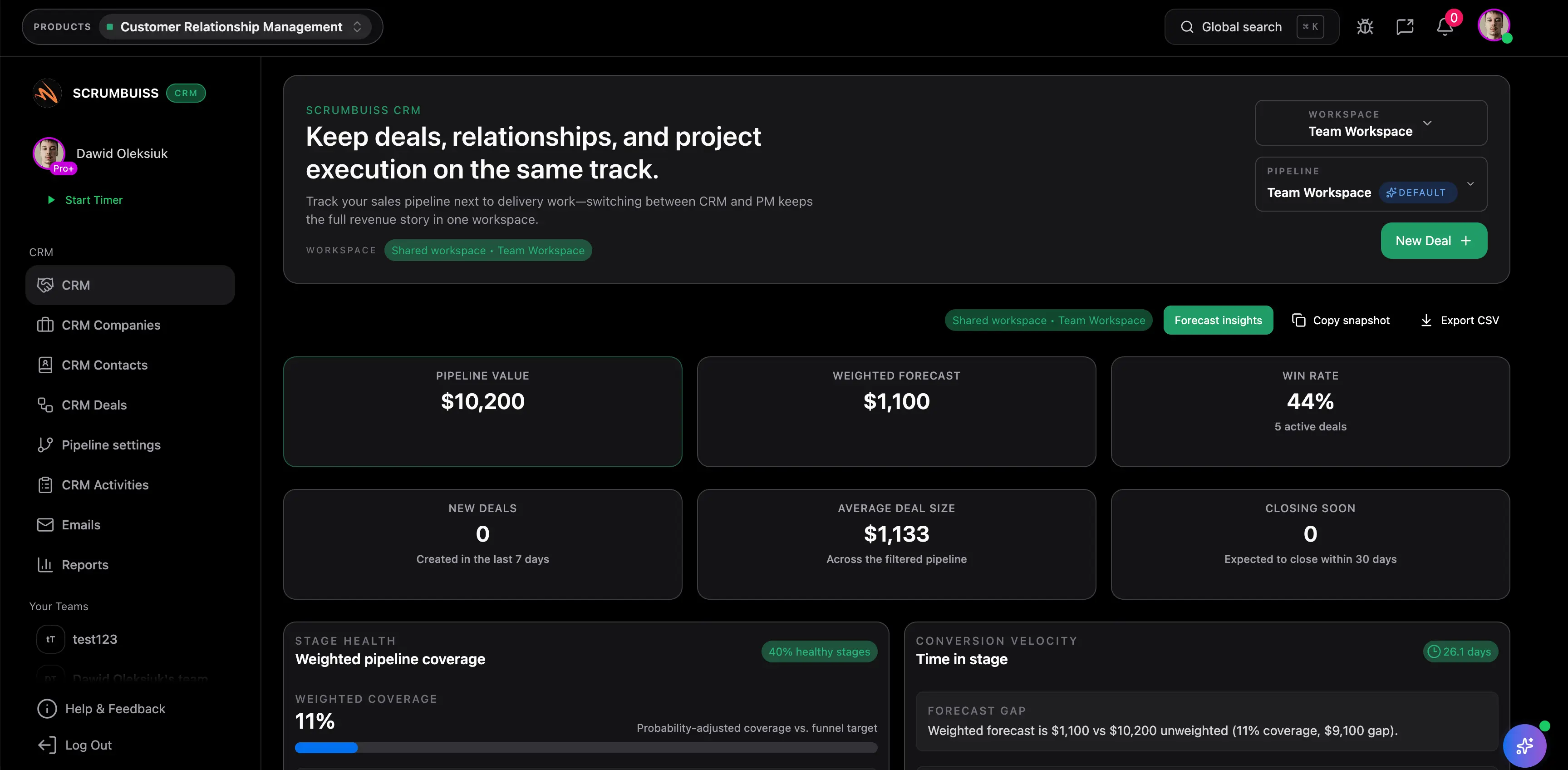
Qualify leads with ownership and next steps
Capture company, contact, source, need, decision maker, owner, and next action so early pipeline work does not become an unowned list.
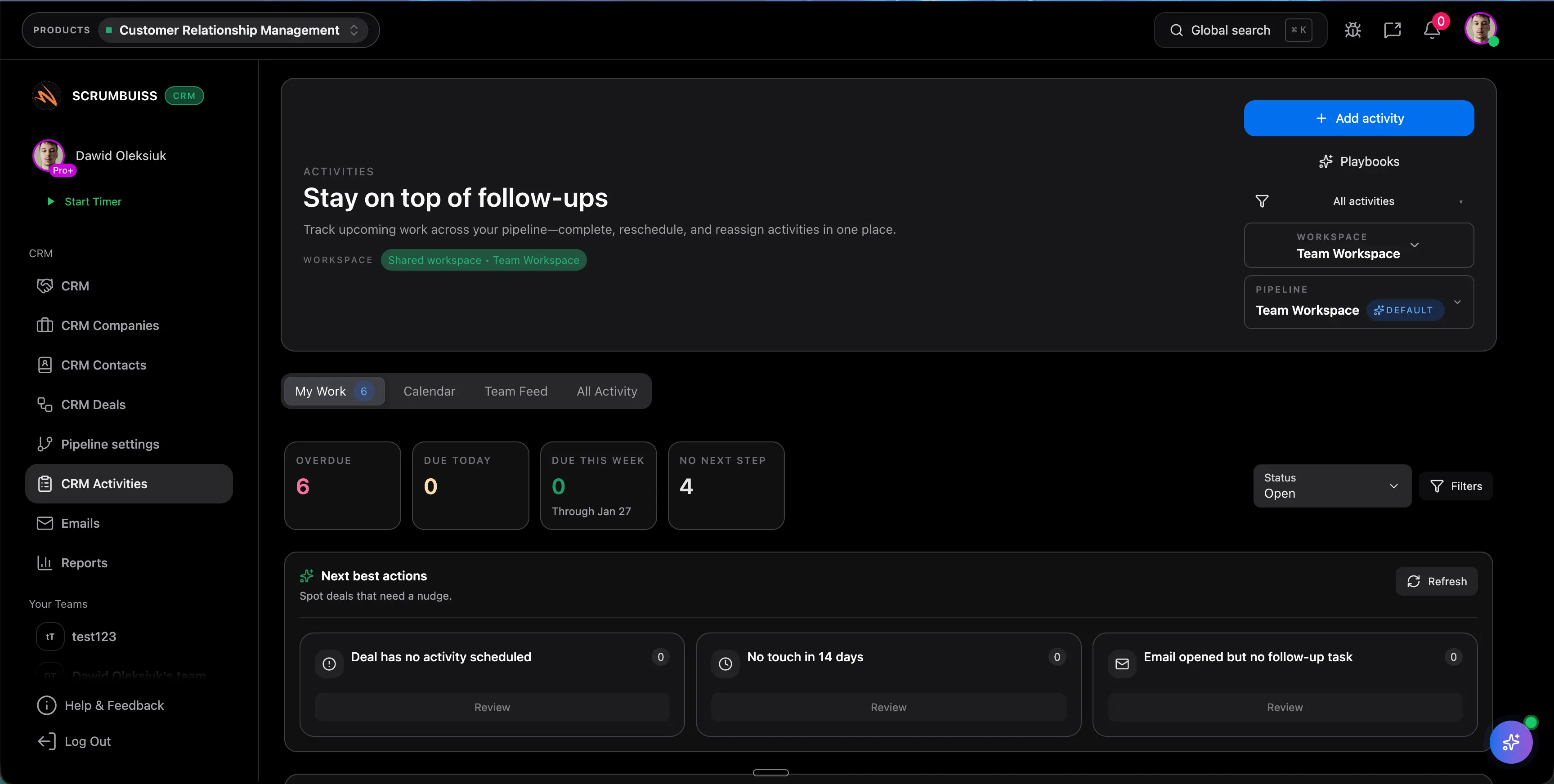
Run follow-up from activities, not memory
Use activities, playbooks, and reminders to keep calls, emails, proposal reviews, and stage movement visible across the team.
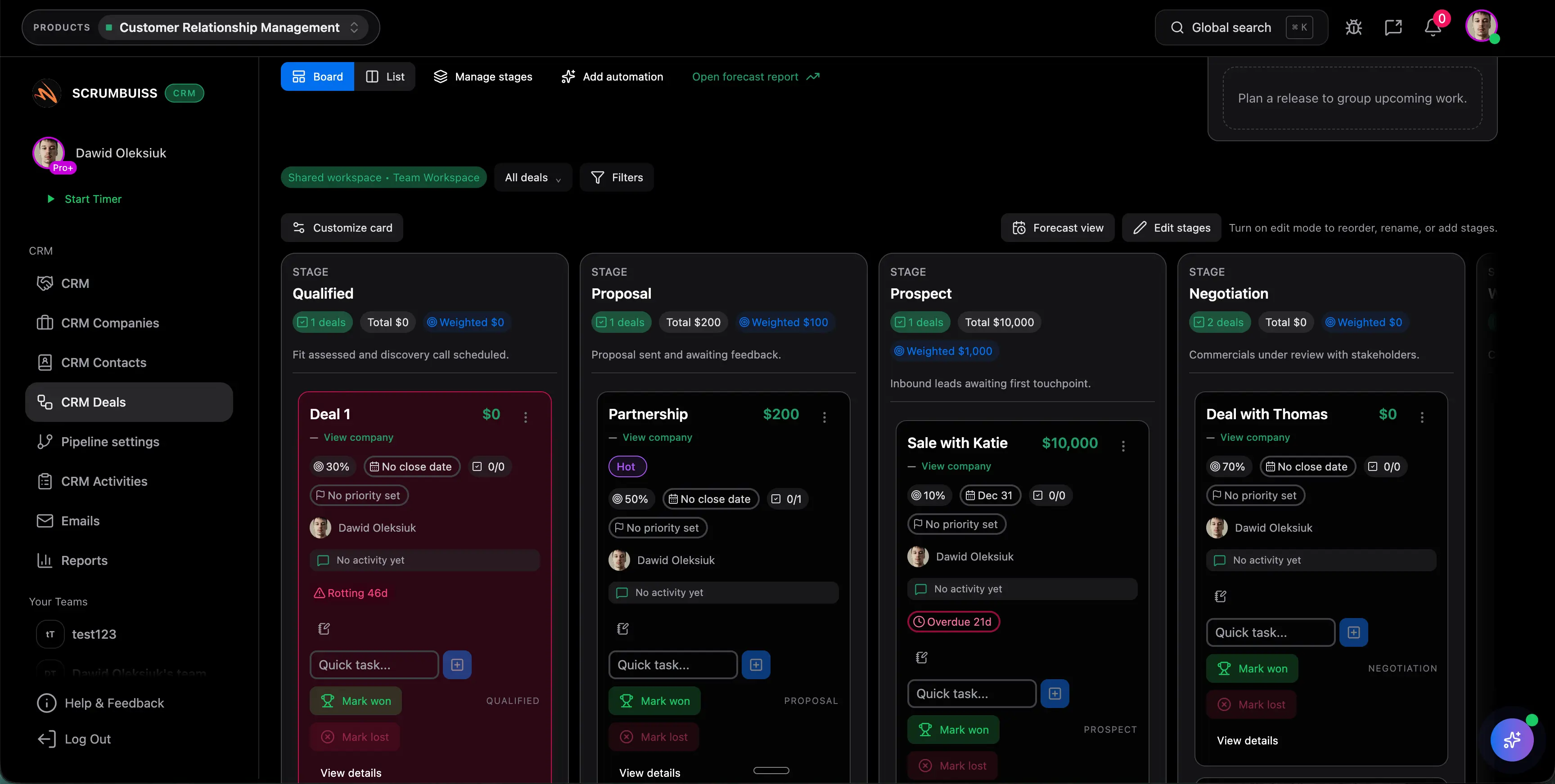
Move closed-won deals into handoff-ready delivery
Turn deal context into a client handoff, project brief, or onboarding workflow so the next owner starts from the customer story already captured.
Potential impact (examples)
The examples below are illustrative and depend on your team, process, and workload.
Reduce stale pipeline cleanup
Keep owners, stages, next steps, and follow-up dates visible so pipeline review starts from current action rather than cleanup.
Example: Save 30 to 60 minutes per rep per week by reducing manual pipeline reconciliation before sales review.
More consistent follow-ups
Use activities and playbooks to standardize calls, emails, proposal reviews, and handoff preparation.
Example: Prevent one or two missed follow-ups per week by tying each opportunity to a due date and owner.
Cleaner sales-to-delivery handoff
Turn won deals into a brief, handoff record, or first delivery workflow without rebuilding stakeholders, scope, files, and next actions.
Example: Save 1 to 2 hours per closed-won deal by reusing captured context instead of recreating the kickoff packet.
Setup checklist
A practical checklist to implement this workflow inside Scrumbuiss.
- ✓ Start with the free sales pipeline template and define the stages that match your real sales process.
- ✓ Set the required fields for each stage: account, decision maker, next step, follow-up date, value, probability, and blocker.
- ✓ Add activities and playbooks for calls, emails, proposal reviews, and handoff preparation.
- ✓ Use forms when qualification inputs, onboarding details, or client requests should enter the workflow in a consistent format.
- ✓ Add automations for reminders, stage updates, overdue follow-up, and closed-won handoff tasks.
- ✓ Use the client handoff template to define what must move from the deal record into kickoff or delivery.
- ✓ Run one live pipeline review and one closed-won handoff, then judge whether the next owner still needs another recap meeting.
ROI example
A simple way to think about profitability is saved time value (or recovered billable time) minus software cost.
Illustrative calculation (USD)
- Team size: 6
- Hours saved per person per week: 0.5
- Blended hourly rate: $55 per hour
Estimated saved time: 3 hours/week
Estimated value: $165 per week (~$714 per month)
Illustrative example only. This is not a guarantee or customer result. Subtract your software costs to estimate net ROI.
FAQ
What is sales pipeline software? +
Sales pipeline software helps teams manage leads and opportunities by stage, owner, next step, follow-up date, value, and probability. The useful version also keeps activities and handoff context close enough that won deals can move into onboarding or delivery without another manual rebuild.
How is this page different from the CRM buyer guide? +
The CRM buyer guide explains the category decision for CRM with project management. This page is narrower. It focuses on running the pipeline workflow itself: stages, next steps, follow-up, activities, and handoff readiness.
Can Scrumbuiss be used for lead management? +
Yes. Teams can use Scrumbuiss CRM to track contacts, companies, deals, owners, stages, activities, and next steps. If the lead process is very complex or requires deep enterprise CRM governance, validate those requirements in a live pilot.
How do we avoid losing context after a deal is won? +
Use a client handoff template, project brief, and delivery workflow so contacts, stakeholders, commitments, files, risks, and first actions move forward with the deal instead of being reconstructed from notes.
When is a spreadsheet pipeline still enough? +
A spreadsheet is enough when the team only needs a lightweight shared list of deals, stages, owners, and follow-up dates. Move into software when activities, reminders, account history, stage updates, and delivery handoff need to stay current across the team.
Is this meant to replace every CRM? +
Not always. Scrumbuiss is strongest when the pipeline should stay close to delivery follow-through. Teams that need heavy forecasting, revenue operations, contact-center CRM, or deep enterprise administration should validate those requirements before replacing an existing CRM.
Supporting links
Explore the supporting pages that back up this workflow and help explain the full delivery stack.
Related products
Related templates
Sales pipeline template
Download a free sales pipeline template for lead management, deal stages, follow-up dates, probability, next steps, and sales-to-delivery handoff readiness.
Client handoff template
Download a free client handoff template for sales-to-delivery handoff, client onboarding, kickoff readiness, stakeholders, scope, files, risks, and next actions.
Scope of work template
Download a free scope of work template with example deliverables, exclusions, acceptance criteria, milestones, assumptions, and approval checkpoints.
Project development plan template Excel
Download a free project development plan template for Excel with phases, milestones, owners, dependencies, risks, status fields, Gantt chart inputs, and deliverable tracking for project teams.
Meeting agenda template
Download a free meeting agenda template for project meetings, kickoff reviews, decisions, action items, owners, risks, and follow-up summaries.
Project status report template
Download a free project status report template with progress, milestones, blockers, risks, decisions, next steps, and stakeholder update fields.
Project brief template
Download a free project brief template with a filled example, one-page outline, and practical checklist for aligning scope, stakeholders, milestones, and handoffs.